Coming Soon AWS CISA

Continuous Access Control Monitoring

PRJ-AWS-CISA-048

Automated access review and least privilege enforcement

~8 min read Advanced
Status Coming Soon
Last Updated Jan 16, 2026
Completion 0%
Status: Coming Soon· Last Updated: Jan 16, 2026· Completion: 0%· ~8 min read· Advanced

Estimated Monthly Cost

~$22/mo on minimal config
Config $8Security Hub $6CloudTrail $5SNS $3
Business ContextManual access reviews are time-consuming and prone to human error, leading to po…

The Problem

  • Manual access reviews are time-consuming and prone to human error, leading to potential security gaps and compliance violations in AWS environments.
  • Over-privileged IAM roles and users increase the attack surface, making systems vulnerable to unauthorized access and data breaches.
  • Lack of continuous, automated monitoring for access policies makes it difficult to maintain a strong security posture and prove compliance effectively.

The Solution

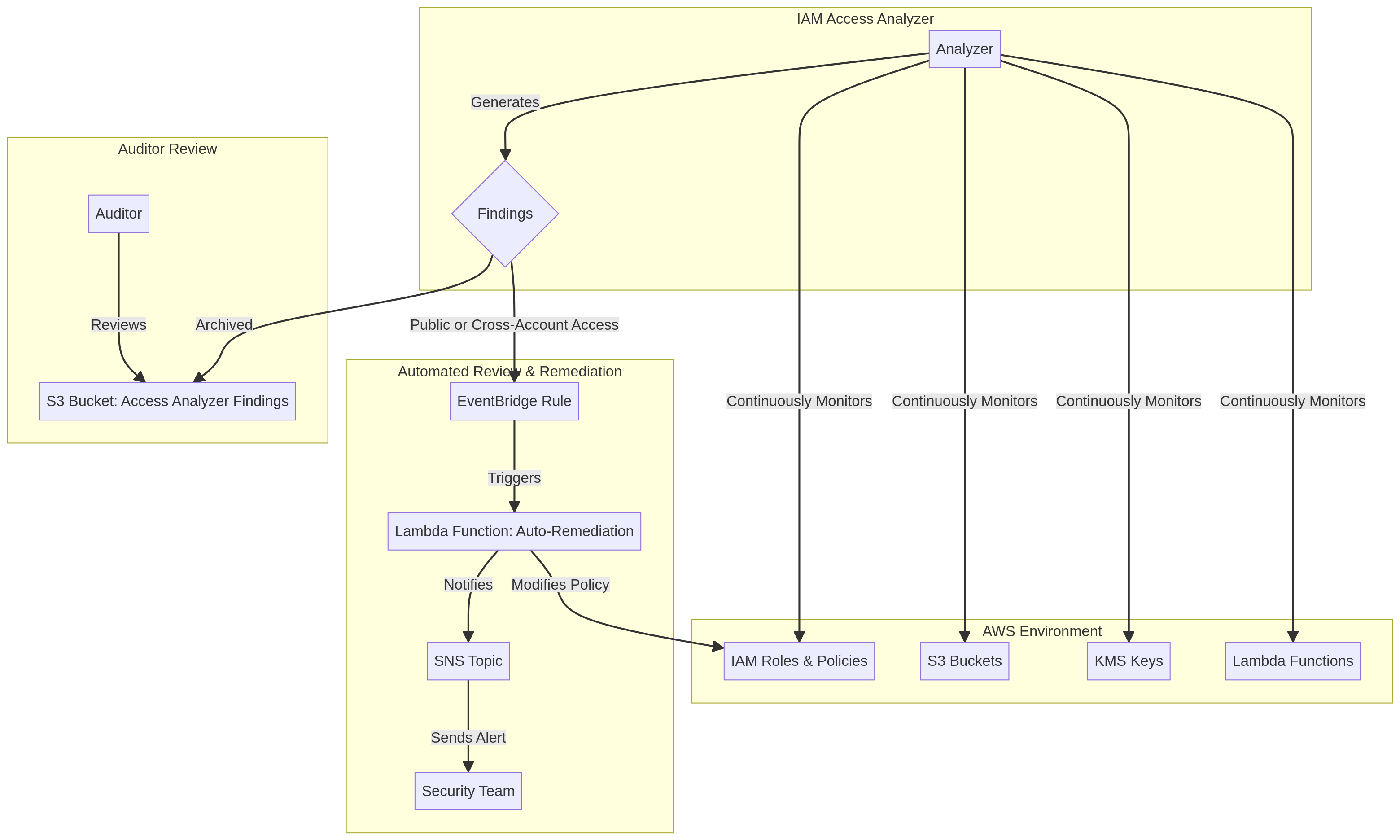
  • Utilizes AWS IAM Access Analyzer to continuously identify unintended external access to resources, ensuring proactive security.
  • Implements AWS Config rules to monitor and enforce desired configurations for IAM policies and resources, preventing drift from security baselines.
  • Leverages AWS Security Hub to aggregate, organize, and prioritize security findings from IAM Access Analyzer and Config, providing a centralized view of security posture.

Business Value

  • Reduces the time spent on manual access reviews by 70%, freeing up security teams for more strategic initiatives.
  • Decreases the attack surface by enforcing least privilege, leading to a 40% reduction in potential unauthorized access incidents.
  • Improves compliance audit readiness by 50%, with automated evidence collection and continuous monitoring.
  • Enhances overall security posture score by 25% within AWS Security Hub, demonstrating measurable security improvements.

Risk Mitigation

  • Mitigates the risk of unauthorized data access due to overly permissive IAM policies.
  • Reduces the likelihood of compliance penalties by ensuring continuous adherence to regulatory requirements.
  • Addresses insider threat risks by enforcing least privilege and monitoring for suspicious access patterns.
  • Prevents cloud misconfigurations that could expose sensitive resources to the public internet.
GRC MappingNIST Cybersecurity Framework (CSF) v1.1: Identify (ID.AM-4), Protect (PR.AC-4), …

Compliance Frameworks

  • NIST Cybersecurity Framework (CSF) v1.1: Identify (ID.AM-4), Protect (PR.AC-4), Detect (DE.CM-4)
  • ISO 27001:2022: A.5.15 (Access control), A.5.16 (Identity management), A.8.2 (User access management)
  • SOC 2 Type 2: CC6.1 (Logical and physical access controls), CC7.1 (System monitoring)
  • CISA Zero Trust Maturity Model: Identity Pillar (Automated access management, continuous monitoring)

Security Controls Implemented

  • Automated identification of external access to S3 buckets and IAM roles using AWS IAM Access Analyzer.
  • Continuous configuration compliance checks for IAM policies and security groups via AWS Config rules.
  • Centralized aggregation and prioritization of security findings from IAM Access Analyzer and Config within AWS Security Hub.
  • Enforcement of least privilege principles through automated policy validation and remediation using AWS Config.
  • Real-time alerting on non-compliant resource configurations and access policy violations through AWS Security Hub.

Audit Evidence

  • AWS IAM Access Analyzer findings reports detailing external access.
  • AWS Config compliance history and rule evaluation results for IAM resources.
  • AWS Security Hub insights and summary reports on security posture.
  • AWS CloudTrail logs demonstrating changes to IAM policies and resource configurations.

Regulatory Alignment

  • GDPR: Article 5 (Principles relating to processing of personal data), Article 32 (Security of processing)
  • HIPAA: 45 CFR Part 164.308(a)(4)(ii)(C) (Access Control), 45 CFR Part 164.312(a)(1) (Technical Safeguards)
  • CCPA: Section 1798.150 (Right to bring civil action), Section 1798.100 (Right to know)
  • PCI DSS v4.0: Requirement 7 (Restrict access to cardholder data by business need to know), Requirement 10 (Log and monitor all access to network resources and cardholder data)

Video tutorial coming soon!

Subscribe to our YouTube channel to get notified when this tutorial is published.

Subscribe on YouTube

Architecture Diagram
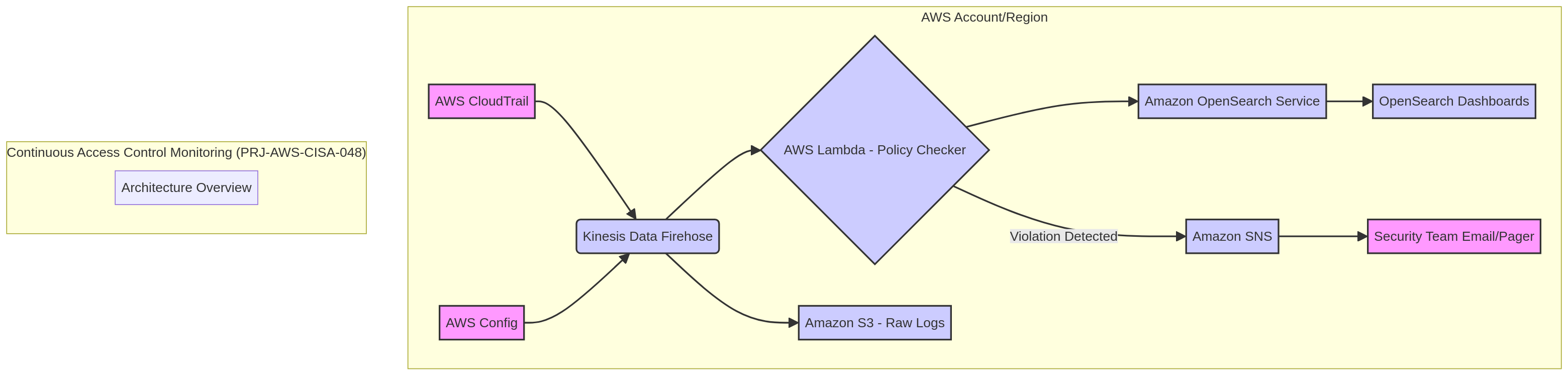
PRJ-AWS-CISA-048 Architecture

Technology Stack

IAM Access Analyzer
Config
Security Hub
Least Privilege

Complete Documentation

Prerequisites

IAM Admin or PowerUser role
AWS CLI v2 configured
Terraform >= 1.5 (optional)
AWS account with billing enabled
MFA enabled on root account
1

Clone & Configure

Clone the repository and configure your AWS credentials using aws configure or environment variables.

aws configure --profile cloudguard
2

Review IAM Policies

Review and attach the required IAM policies to your deployment role. Ensure least-privilege access is applied.

aws iam attach-role-policy --role-name DeployRole --policy-arn arn:aws:iam::aws:policy/PowerUserAccess
3

Initialize Infrastructure

Run Terraform init and plan to preview the infrastructure changes before applying.

terraform init && terraform plan -out=tfplan
4

Deploy Resources

Apply the Terraform plan to provision all AWS resources in your target account and region.

terraform apply tfplan
5

Verify & Monitor

Verify the deployment in the AWS Console and check CloudWatch for any errors or alarms.

aws cloudwatch describe-alarms --state-value ALARM

Deployment Guide

Step-by-step instructions to deploy this project

Download Guide

Architecture Diagram

Visual representation of the system architecture

Download Architecture

Source Code

Complete source code and configuration files

View on GitHub

Video Tutorial

Watch the complete walkthrough video

Watch Now