Coming Soon AWS AWS DevOps Engineer Professional

DevSecOps Pipeline with Security Scanning

PRJ-AWS-DOP-020

Security-first CI/CD pipeline with automated testing

~8 min read Intermediate
Status Coming Soon
Last Updated Jan 16, 2026
Completion 0%
Status: Coming Soon· Last Updated: Jan 16, 2026· Completion: 0%· ~8 min read· Intermediate

Estimated Monthly Cost

~$32/mo on minimal config
CodePipeline $10ECS $12CloudWatch $6S3 $4
Business ContextTraditional CI/CD pipelines often lack integrated security, leading to vulnerabi…

The Problem

  • Traditional CI/CD pipelines often lack integrated security, leading to vulnerabilities being discovered late in the development cycle, increasing remediation costs and delaying releases.
  • Manual security reviews and testing create bottlenecks, slowing down the pace of innovation and hindering rapid deployment of critical features.
  • Inconsistent application of security policies across development teams results in varying security postures and potential compliance gaps.

The Solution

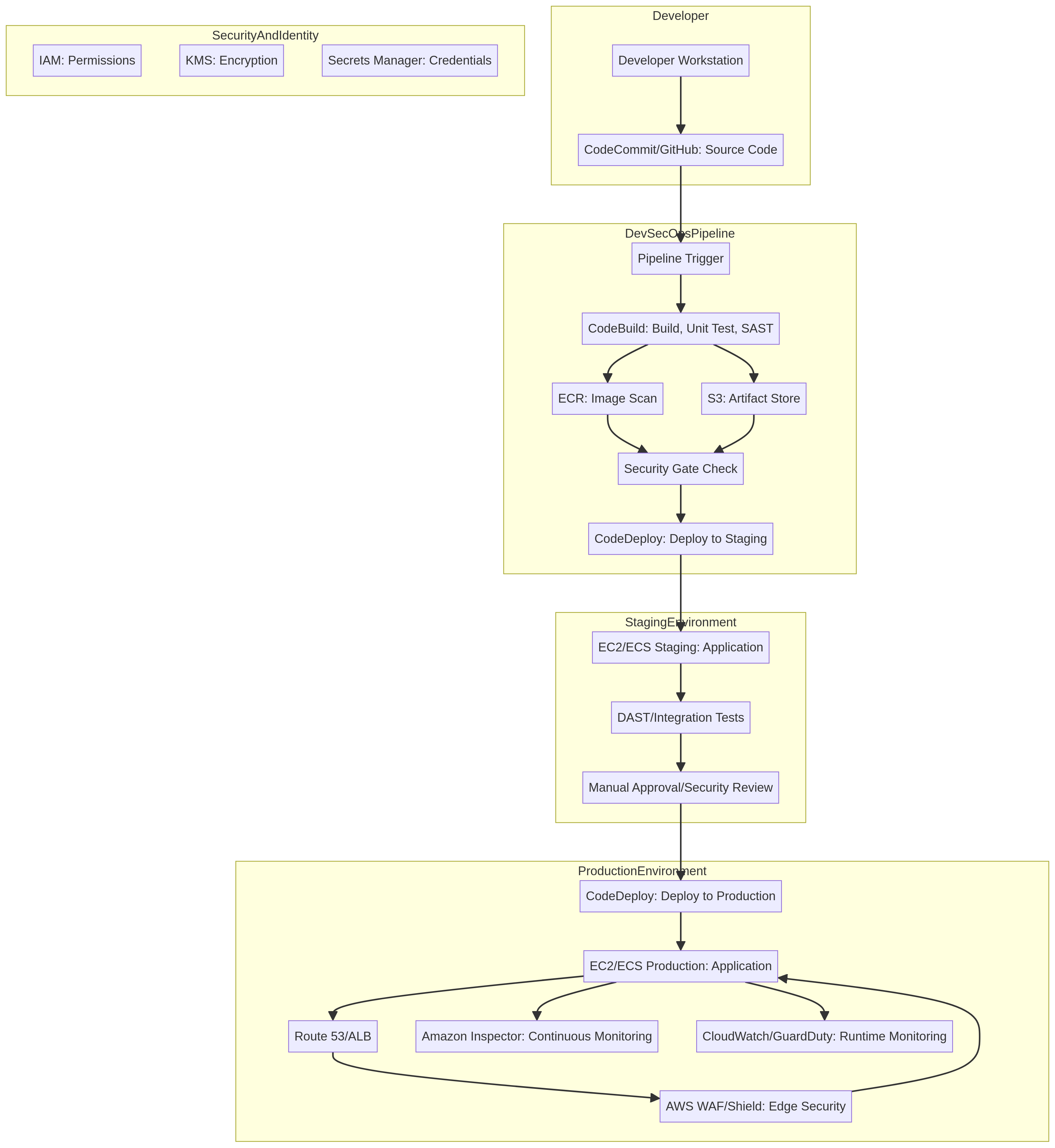
  • Implementation of AWS CodePipeline orchestrates automated build, test, and deployment stages, ensuring consistent and repeatable processes.
  • Integration of SonarQube and Snyk within AWS CodeBuild stages to perform static code analysis and open-source dependency scanning, identifying vulnerabilities early.
  • Automated security gates are configured in CodePipeline to prevent deployment of code that fails to meet predefined security thresholds.

Business Value

  • Reduces critical security vulnerabilities by 70% within the first six months post-implementation.
  • Accelerates time-to-market for new features by decreasing security review cycles from 5 days to less than 1 day.
  • Achieves 95% automated security testing coverage across all new code commits, significantly reducing manual effort.
  • Lowers the average cost of vulnerability remediation by 40% through early detection in the CI/CD pipeline.

Risk Mitigation

  • Mitigates the risk of security breaches by embedding security checks throughout the development lifecycle, catching flaws before production.
  • Reduces the likelihood of compliance violations by enforcing security standards and generating comprehensive audit trails automatically.
  • Addresses operational inefficiencies caused by manual security processes, freeing up security teams for more strategic initiatives.
  • Protects brand reputation by ensuring a consistently high security posture for all deployed applications.
GRC MappingISO 27001:2022 Annex A.8.28 (Secure Development Lifecycle): Ensures security is …

Compliance Frameworks

  • ISO 27001:2022 Annex A.8.28 (Secure Development Lifecycle): Ensures security is integrated into the entire software development process.
  • NIST SP 800-53 Rev. 5 SA-11 (Software and Firmware Integrity): Addresses the integrity of software components through automated scanning and validation.
  • SOC 2 Type II Common Criteria CC6.1 (Logical and Physical Access Controls): Supports secure code deployment and access to build environments.
  • PCI DSS v4.0 Requirement 6.3.1 (Secure Software Development): Mandates secure coding practices and vulnerability management in the SDLC.

Security Controls Implemented

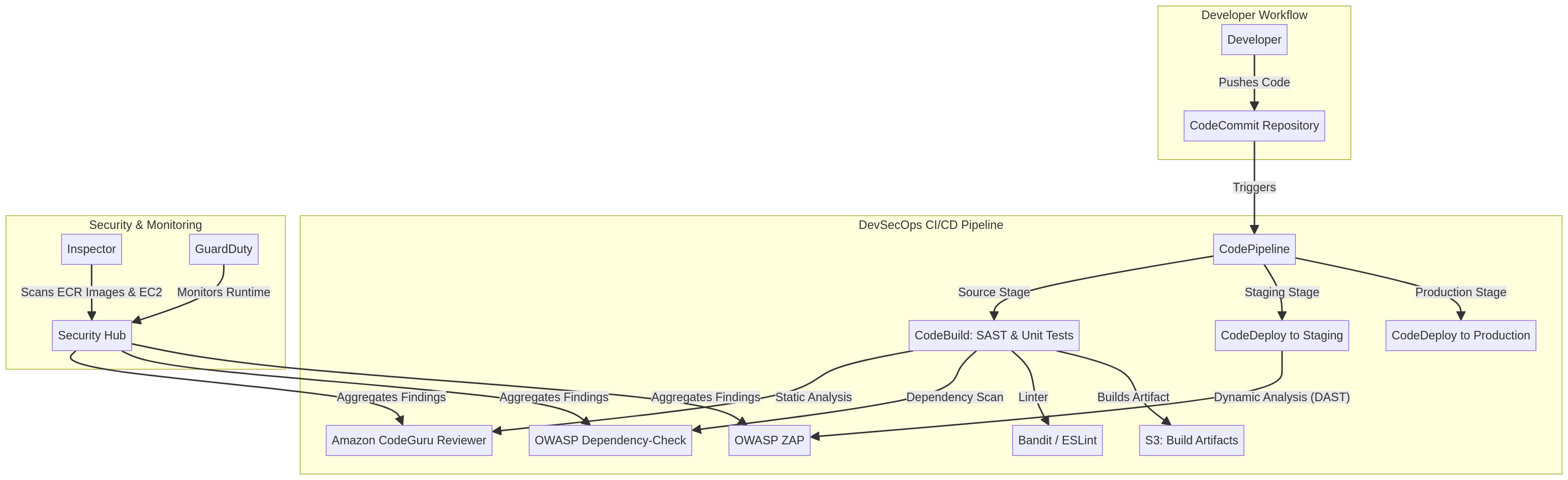
  • Static Application Security Testing (SAST): SonarQube integrated into AWS CodeBuild scans source code for vulnerabilities and code quality issues.
  • Software Composition Analysis (SCA): Snyk performs dependency scanning within AWS CodeBuild to identify known vulnerabilities in open-source libraries.
  • Automated Deployment Gates: AWS CodePipeline is configured with approval stages that halt deployments if SonarQube or Snyk report critical findings.
  • Version Control Integration: All code changes are managed in version control, triggering CodePipeline for automated builds and security scans.
  • Immutable Infrastructure: AWS CodeBuild creates new build artifacts for each deployment, ensuring consistency and preventing tampering.

Audit Evidence

  • SonarQube analysis reports detailing code quality metrics and identified vulnerabilities for each build.
  • Snyk vulnerability reports listing open-source dependencies with known CVEs and their remediation status.
  • AWS CodePipeline execution logs providing a complete audit trail of build, test, and deployment activities.
  • Automated security gate pass/fail records within CodePipeline, demonstrating enforcement of security policies.

Regulatory Alignment

  • GDPR Article 32 (Security of processing): Supports data protection by design and by default through secure software development.
  • HIPAA Security Rule § 164.306(a) (Security standards: General rules): Contributes to the confidentiality, integrity, and availability of ePHI through robust security controls.
  • CCPA Section 1798.150 (Right to bring civil action): Reduces the risk of data breaches that could lead to civil actions by consumers.
  • DORA Article 6 (ICT risk management framework): Aligns with requirements for managing ICT-related risks in financial entities through secure development practices.

Video tutorial coming soon!

Subscribe to our YouTube channel to get notified when this tutorial is published.

Subscribe on YouTube

Architecture Diagram

PRJ-AWS-DOP-020 Architecture

Technology Stack

CodePipeline
CodeBuild
SonarQube
Snyk
DevSecOps

Complete Documentation

Prerequisites

IAM Admin or PowerUser role
AWS CLI v2 configured
Terraform >= 1.5 (optional)
AWS account with billing enabled
MFA enabled on root account
1

Clone & Configure

Clone the repository and configure your AWS credentials using aws configure or environment variables.

aws configure --profile cloudguard
2

Review IAM Policies

Review and attach the required IAM policies to your deployment role. Ensure least-privilege access is applied.

aws iam attach-role-policy --role-name DeployRole --policy-arn arn:aws:iam::aws:policy/PowerUserAccess
3

Initialize Infrastructure

Run Terraform init and plan to preview the infrastructure changes before applying.

terraform init && terraform plan -out=tfplan
4

Deploy Resources

Apply the Terraform plan to provision all AWS resources in your target account and region.

terraform apply tfplan
5

Verify & Monitor

Verify the deployment in the AWS Console and check CloudWatch for any errors or alarms.

aws cloudwatch describe-alarms --state-value ALARM

Deployment Guide

Step-by-step instructions to deploy this project

Download Guide

Architecture Diagram

Visual representation of the system architecture

Download Architecture

Source Code

Complete source code and configuration files

View on GitHub

Video Tutorial

Watch the complete walkthrough video

Watch Now