Coming Soon AWS AWS DevOps Engineer Professional

Canary Deployment Strategy

PRJ-AWS-DOP-021

Progressive deployment with automatic rollback

~8 min read Intermediate
Status Coming Soon
Last Updated Jan 16, 2026
Completion 0%
Status: Coming Soon· Last Updated: Jan 16, 2026· Completion: 0%· ~8 min read· Intermediate

Estimated Monthly Cost

~$32/mo on minimal config
CodePipeline $10ECS $12CloudWatch $6S3 $4
Business ContextTraditional deployment methods often lead to significant downtime and service di…

The Problem

  • Traditional deployment methods often lead to significant downtime and service disruptions during software updates, impacting user experience and revenue.
  • Inability to quickly detect and automatically roll back faulty deployments results in prolonged outages and increased operational costs.
  • Lack of granular control over new feature rollouts makes it difficult to test in production with a small user segment before full release.

The Solution

  • Implements a Canary Deployment Strategy using AWS CodeDeploy to automate progressive traffic shifting to new application versions.
  • Leverages AWS CloudWatch for real-time monitoring of key application metrics and logs to detect anomalies during the canary phase.
  • Utilizes AWS Lambda functions for custom deployment hooks and automated rollback mechanisms, ensuring rapid recovery from issues.

Business Value

  • Reduces deployment-related downtime by 90%, ensuring continuous service availability and improved customer satisfaction.
  • Decreases the mean time to recovery (MTTR) from deployment failures by 85%, minimizing business impact.
  • Increases deployment frequency by 50% while maintaining high stability, accelerating time-to-market for new features.
  • Achieves a 99.99% uptime SLA for critical applications by mitigating risks associated with new software releases.

Risk Mitigation

  • Minimizes blast radius of faulty deployments by initially exposing new versions to a small, controlled user group.
  • Automates rollback to the last stable version upon detection of predefined error thresholds, preventing widespread service degradation.
  • Provides comprehensive observability through CloudWatch, enabling proactive identification and resolution of performance issues.
  • Ensures high availability and fault tolerance by leveraging Blue-Green deployment principles with ALB traffic management.
GRC MappingNIST SP 800-53 Rev. 5: Control Family CM-3 (Configuration Change Control) and AU…

Compliance Frameworks

  • NIST SP 800-53 Rev. 5: Control Family CM-3 (Configuration Change Control) and AU-6 (Audit Review, Analysis, and Reporting).
  • ISO 27001:2022: Annex A.8.28 (Configuration Management) and A.8.15 (Logging and Monitoring).
  • SOC 2 Type 2: Common Criteria CC6.1 (Logical and Physical Access Controls) and CC7.1 (System Operations).
  • DevSecOps Best Practices: Integration of security checks throughout the CI/CD pipeline.

Security Controls Implemented

  • Automated Rollback: AWS CodeDeploy automatically reverts to a stable version if CloudWatch alarms are triggered by deployment issues.
  • Access Control: IAM policies restrict access to CodeDeploy, Lambda, and CloudWatch resources, enforcing least privilege.
  • Monitoring & Alerting: AWS CloudWatch monitors application health, performance metrics, and logs for suspicious activities, triggering alerts.
  • Immutable Infrastructure: Blue-Green deployments ensure new environments are provisioned from secure, tested images, reducing configuration drift.
  • Traffic Shifting: AWS ALB manages traffic distribution, allowing controlled exposure of new versions and immediate isolation of problematic ones.

Audit Evidence

  • CodeDeploy Deployment Reports: Detailed logs of deployment events, including success/failure status and rollback actions.
  • CloudWatch Logs and Metrics: Historical data on application performance, error rates, and resource utilization during deployments.
  • AWS Config Rules: Records of configuration changes to CodeDeploy, Lambda, and ALB resources, demonstrating adherence to policies.
  • IAM Access Logs: Audit trails of who accessed and modified deployment-related services and resources.

Regulatory Alignment

  • GDPR Article 32: Security of processing, by ensuring system resilience and the ability to restore availability.
  • HIPAA Security Rule § 164.308(a)(1)(ii)(D): Information system activity review, through comprehensive logging and monitoring.
  • PCI DSS Requirement 6.4: Ensuring all system components and software are protected from known vulnerabilities.
  • SOX Section 302: Corporate responsibility for financial reports, by maintaining reliable and auditable deployment processes.

Video tutorial coming soon!

Subscribe to our YouTube channel to get notified when this tutorial is published.

Subscribe on YouTube

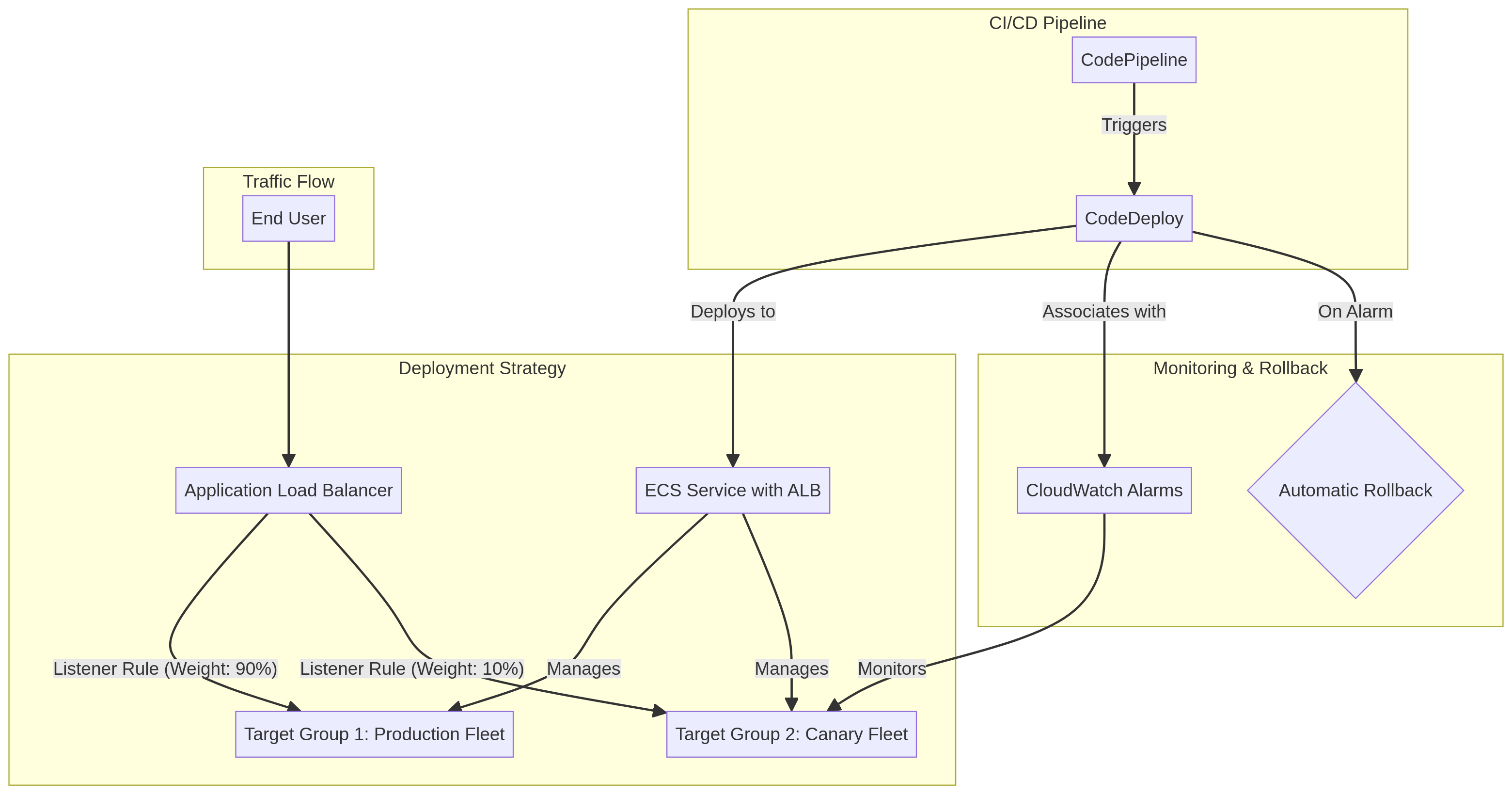
Architecture Diagram

PRJ-AWS-DOP-021 Architecture

Technology Stack

CodeDeploy
Lambda
CloudWatch
ALB
Blue-Green

Complete Documentation

Prerequisites

IAM Admin or PowerUser role
AWS CLI v2 configured
Terraform >= 1.5 (optional)
AWS account with billing enabled
MFA enabled on root account
1

Clone & Configure

Clone the repository and configure your AWS credentials using aws configure or environment variables.

aws configure --profile cloudguard
2

Review IAM Policies

Review and attach the required IAM policies to your deployment role. Ensure least-privilege access is applied.

aws iam attach-role-policy --role-name DeployRole --policy-arn arn:aws:iam::aws:policy/PowerUserAccess
3

Initialize Infrastructure

Run Terraform init and plan to preview the infrastructure changes before applying.

terraform init && terraform plan -out=tfplan
4

Deploy Resources

Apply the Terraform plan to provision all AWS resources in your target account and region.

terraform apply tfplan
5

Verify & Monitor

Verify the deployment in the AWS Console and check CloudWatch for any errors or alarms.

aws cloudwatch describe-alarms --state-value ALARM

Deployment Guide

Step-by-step instructions to deploy this project

Download Guide

Architecture Diagram

Visual representation of the system architecture

Download Architecture

Source Code

Complete source code and configuration files

View on GitHub

Video Tutorial

Watch the complete walkthrough video

Watch Now