Coming Soon AWS AWS DevOps Engineer Professional

High-Performance Computing Cluster

PRJ-AWS-DOP-026

Scalable HPC infrastructure for scientific workloads

~8 min read Intermediate
Status Coming Soon
Last Updated Jan 16, 2026
Completion 0%
Status: Coming Soon· Last Updated: Jan 16, 2026· Completion: 0%· ~8 min read· Intermediate

Estimated Monthly Cost

~$32/mo on minimal config
CodePipeline $10ECS $12CloudWatch $6S3 $4
Business ContextTraditional on-premises HPC clusters often suffer from rigid capacity constraint…

The Problem

  • Traditional on-premises HPC clusters often suffer from rigid capacity constraints, leading to significant delays in scientific simulations and data processing due to long queue times and underutilized resources during off-peak periods.
  • Managing and scaling complex HPC environments, including job schedulers, file systems, and interconnects, requires specialized expertise and substantial operational overhead, diverting valuable research time.
  • Data-intensive scientific workloads frequently encounter I/O bottlenecks with conventional storage solutions, hindering the performance of applications that rely on rapid access to large datasets.

The Solution

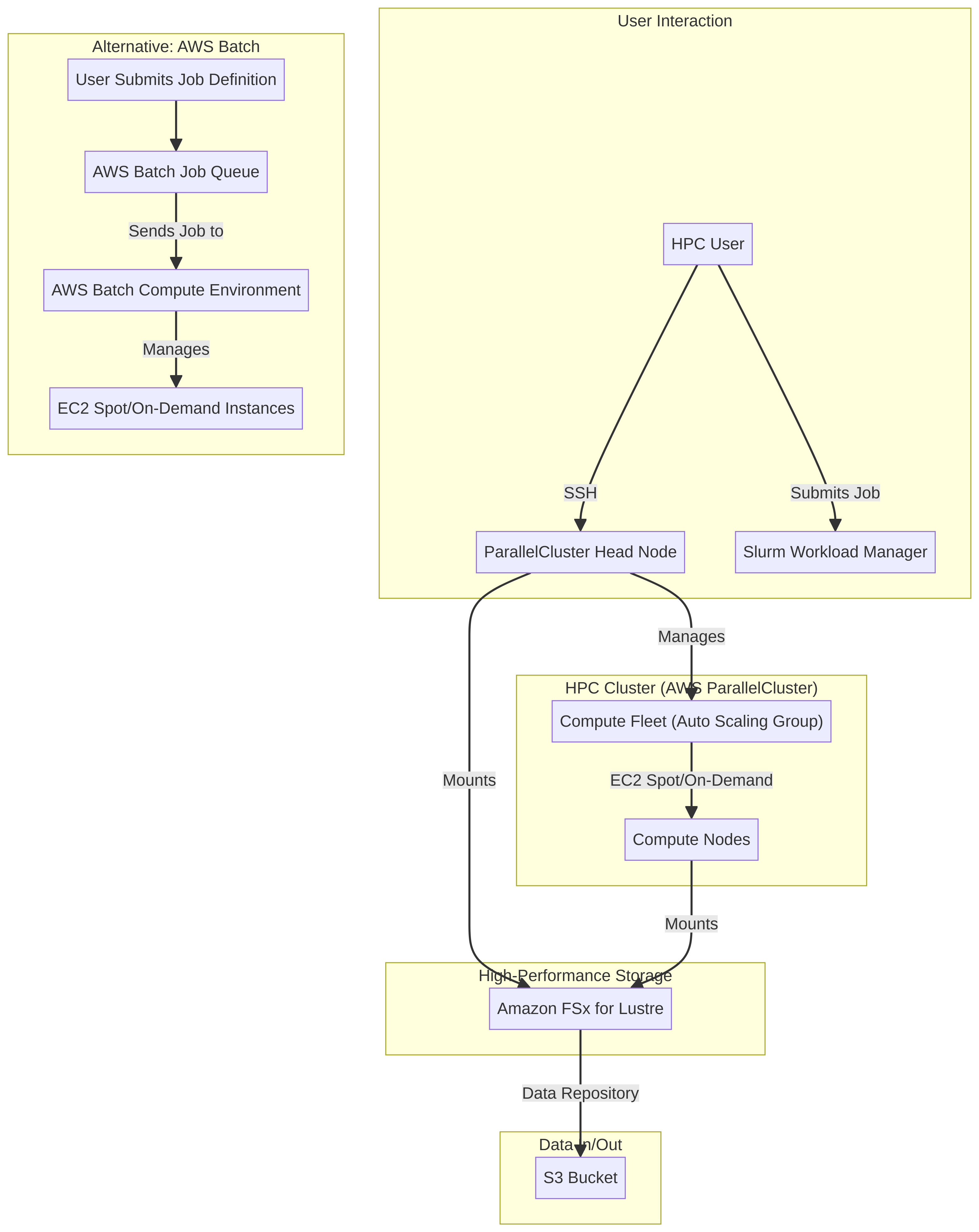
  • Implements a scalable HPC infrastructure using AWS ParallelCluster to automate the deployment and management of compute environments tailored for scientific workloads.
  • Leverages AWS Batch for efficient, dynamic job scheduling and execution, ensuring optimal resource utilization and reduced wait times for computational tasks.
  • Integrates Amazon FSx for Lustre to provide high-performance, POSIX-compliant file storage, eliminating I/O bottlenecks for data-intensive applications.

Business Value

  • Accelerates research cycles by 40% through on-demand access to HPC resources, reducing simulation run times from days to hours.
  • Decreases infrastructure operational costs by 30% by transitioning from fixed capital expenditure to a pay-as-you-go cloud model.
  • Increases computational throughput by 50% during peak demand periods, enabling more concurrent scientific experiments and analyses.
  • Achieves 99.9% availability for HPC workloads, minimizing disruptions to critical research and development initiatives.

Risk Mitigation

  • Mitigates the risk of resource starvation and project delays by providing elastic scaling of compute resources to match fluctuating demand.
  • Reduces the risk of data loss and corruption through automated backups and highly durable storage solutions offered by AWS.
  • Addresses the risk of security vulnerabilities by implementing AWS best practices for network isolation, access control, and data encryption.
  • Minimizes operational complexity and human error through infrastructure as code (IaC) and automated management provided by AWS ParallelCluster.
GRC MappingNIST SP 800-171: Protecting Controlled Unclassified Information in Nonfederal Sy…

Compliance Frameworks

  • NIST SP 800-171: Protecting Controlled Unclassified Information in Nonfederal Systems and Organizations, relevant for research data integrity and confidentiality.
  • ISO/IEC 27001: Information Security Management, providing a systematic approach to managing sensitive company and customer information.
  • HIPAA (Health Insurance Portability and Accountability Act): If processing protected health information (PHI) in scientific research, ensuring data privacy and security.
  • GDPR (General Data Protection Regulation): For research involving personal data of EU citizens, mandating strict data protection and privacy rules.

Security Controls Implemented

  • Access Control: Implemented via AWS Identity and Access Management (IAM) policies to restrict access to ParallelCluster resources and FSx for Lustre volumes based on least privilege.
  • Data Encryption: Data at rest on Amazon FSx for Lustre is encrypted using AWS Key Management Service (KMS) and data in transit is secured via TLS/SSL.
  • Network Segmentation: AWS Virtual Private Cloud (VPC) is used to isolate the HPC cluster, with security groups and network ACLs controlling traffic flow.
  • Logging and Monitoring: AWS CloudTrail and Amazon CloudWatch are configured to log all API calls and monitor resource activity within the ParallelCluster environment.
  • Vulnerability Management: Regular security patching and updates are managed for the underlying Amazon Machine Images (AMIs) used by ParallelCluster.

Audit Evidence

  • AWS CloudTrail logs detailing all management and data events within the HPC environment.
  • AWS Config rules compliance reports for resource configurations and security best practices.
  • IAM access reports and policy documents demonstrating adherence to least privilege principles.
  • Network flow logs (VPC Flow Logs) providing detailed records of IP traffic going to and from network interfaces in the VPC.

Regulatory Alignment

  • HIPAA: 45 CFR Part 164, Subpart C (Security Standards for the Protection of Electronic Protected Health Information) for PHI handling.
  • GDPR: Article 32 (Security of processing) and Article 25 (Data protection by design and by default) for personal data.
  • NIST SP 800-171: Section 3.1 (Access Control) and 3.4 (Configuration Management) for protecting controlled unclassified information.
  • Federal Information Security Modernization Act (FISMA): If operating for a federal agency, ensuring information security programs are in place.

Video tutorial coming soon!

Subscribe to our YouTube channel to get notified when this tutorial is published.

Subscribe on YouTube

Architecture Diagram

PRJ-AWS-DOP-026 Architecture

Technology Stack

ParallelCluster
Batch
FSx Lustre
EFA
HPC

Complete Documentation

Prerequisites

IAM Admin or PowerUser role
AWS CLI v2 configured
Terraform >= 1.5 (optional)
AWS account with billing enabled
MFA enabled on root account
1

Clone & Configure

Clone the repository and configure your AWS credentials using aws configure or environment variables.

aws configure --profile cloudguard
2

Review IAM Policies

Review and attach the required IAM policies to your deployment role. Ensure least-privilege access is applied.

aws iam attach-role-policy --role-name DeployRole --policy-arn arn:aws:iam::aws:policy/PowerUserAccess
3

Initialize Infrastructure

Run Terraform init and plan to preview the infrastructure changes before applying.

terraform init && terraform plan -out=tfplan
4

Deploy Resources

Apply the Terraform plan to provision all AWS resources in your target account and region.

terraform apply tfplan
5

Verify & Monitor

Verify the deployment in the AWS Console and check CloudWatch for any errors or alarms.

aws cloudwatch describe-alarms --state-value ALARM

Deployment Guide

Step-by-step instructions to deploy this project

Download Guide

Architecture Diagram

Visual representation of the system architecture

Download Architecture

Source Code

Complete source code and configuration files

View on GitHub

Video Tutorial

Watch the complete walkthrough video

Watch Now