Coming Soon AWS AWS GenAI Developer Professional

AI-Powered Code Review Assistant

PRJ-AWS-GAI-030

Automated code review with AI suggestions

~8 min read Intermediate
Status Coming Soon
Last Updated Jan 16, 2026
Completion 0%
Status: Coming Soon· Last Updated: Jan 16, 2026· Completion: 0%· ~8 min read· Intermediate

Estimated Monthly Cost

~$60/mo on minimal config
Bedrock $35Lambda $8S3 $10CloudWatch $7
Business ContextManual code reviews are time-consuming and prone to human error, leading to slow…

The Problem

  • Manual code reviews are time-consuming and prone to human error, leading to slower development cycles and increased technical debt.
  • Maintaining consistent code quality, security standards, and adherence to best practices across large, distributed development teams is challenging.
  • Identifying complex bugs, security vulnerabilities, and performance bottlenecks early in the development lifecycle requires specialized expertise and significant effort.

The Solution

  • Integrates AWS CodeWhisperer to provide real-time, AI-powered code suggestions and automated code generation directly within the IDE, accelerating developer productivity.
  • Leverages AWS CodeGuru Reviewer for intelligent recommendations to improve code quality, identify performance issues, and detect security vulnerabilities in Java and Python code.
  • Utilizes AWS Lambda functions to orchestrate the automated code review workflow within a CI/CD pipeline, triggered by code commits to ensure continuous feedback and quality gates.

Business Value

  • Reduces code review cycle time by 40%, accelerating time-to-market for new features and product enhancements.
  • Improves overall code quality metrics by 25%, leading to a significant decrease in post-deployment defects and operational incidents.
  • Decreases developer effort spent on identifying and fixing common issues by 30%, allowing engineers to focus on higher-value tasks.
  • Enhances security posture by proactively identifying and mitigating critical vulnerabilities before production deployment, reducing potential breach costs by 15%.

Risk Mitigation

  • Mitigates the risk of human error and oversight in code reviews through consistent, AI-driven analysis.
  • Reduces the risk of introducing security vulnerabilities and compliance issues by integrating automated security and best practice checks.
  • Addresses the risk of inconsistent code quality and style across different development teams and projects.
  • Minimizes the risk of performance degradation and operational instability by identifying inefficient code patterns early in development.
GRC MappingNIST AI Risk Management Framework (AI RMF): Addresses responsible development an…

Compliance Frameworks

  • NIST AI Risk Management Framework (AI RMF): Addresses responsible development and deployment of AI systems, particularly relevant for the AI-powered suggestions.
  • ISO 42001:2023 (AI Management System): Provides a framework for managing AI systems, including ethical considerations and data governance for the AI models.
  • ISO 27001 (Information Security Management): Ensures systematic management of information security risks related to code, data, and the CI/CD pipeline.
  • SOC 2 Type 2: Demonstrates robust controls over security, availability, processing integrity, confidentiality, and privacy of the code review process and data.

Security Controls Implemented

  • Access Control: IAM policies restrict access to AWS Bedrock models, CodeWhisperer configurations, and CodeGuru reports based on least privilege.
  • Input Validation: AWS Lambda functions validate code inputs before processing by AI services to prevent injection attacks.
  • Data Encryption: Code repositories and review data are encrypted at rest using KMS and in transit using TLS within AWS.
  • Logging and Monitoring: AWS CloudWatch and AWS CloudTrail provide comprehensive logging and monitoring of all interactions with Bedrock, CodeWhisperer, CodeGuru, and Lambda.
  • Secure CI/CD Pipeline: The CI/CD pipeline is secured with secrets management (AWS Secrets Manager) and secure build environments to prevent tampering.

Audit Evidence

  • CodeGuru Reviewer Reports: Detailed findings and recommendations from automated code analysis.
  • CloudTrail Logs: Records of API calls and actions taken within the AWS environment, including access to AI services.
  • CI/CD Pipeline Audit Trails: Logs demonstrating successful execution of automated code review steps and quality gates.
  • IAM Policy Documents: Documentation of access controls and permissions for all project resources.

Regulatory Alignment

  • GDPR (Article 25 - Data Protection by Design and by Default): Ensures privacy considerations are built into the code review process, especially concerning personal data in code.
  • CCPA (Section 1798.100 - Consumer Rights): Supports data privacy for any personal information processed or stored within the code review system.
  • HIPAA (Security Rule - 45 CFR Part 164): Relevant if the code being reviewed handles Protected Health Information (PHI), ensuring confidentiality and integrity.
  • DORA (Digital Operational Resilience Act - Article 27 - ICT Third-Party Risk): Addresses risks associated with using third-party AI services like Bedrock and CodeWhisperer in financial sector applications.

Video tutorial coming soon!

Subscribe to our YouTube channel to get notified when this tutorial is published.

Subscribe on YouTube

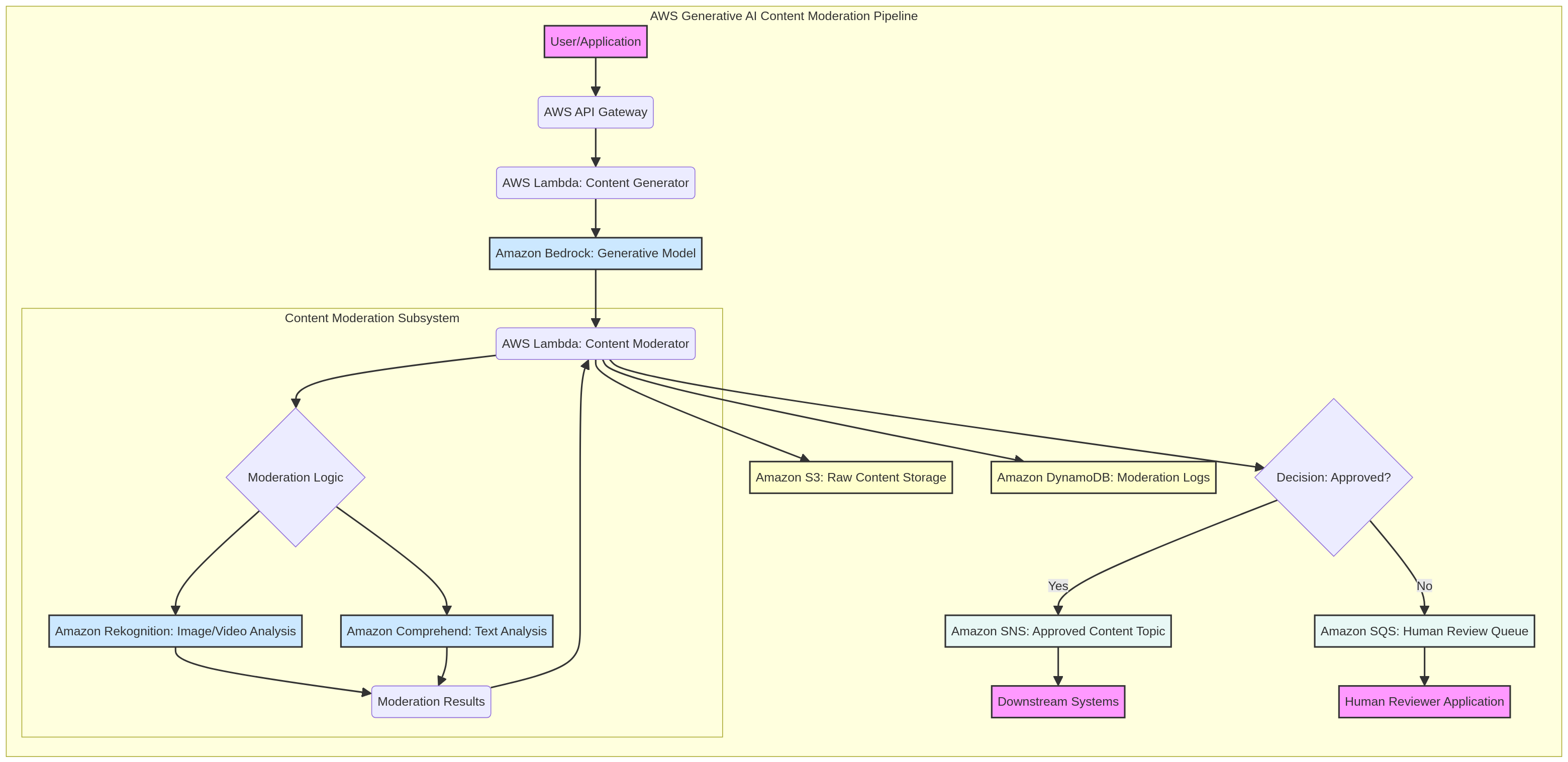
Architecture Diagram

PRJ-AWS-GAI-030 Architecture

Technology Stack

Bedrock
CodeWhisperer
CodeGuru
Lambda
CI/CD

Complete Documentation

Prerequisites

IAM Admin or PowerUser role
AWS CLI v2 configured
Terraform >= 1.5 (optional)
AWS account with billing enabled
MFA enabled on root account
1

Clone & Configure

Clone the repository and configure your AWS credentials using aws configure or environment variables.

aws configure --profile cloudguard
2

Review IAM Policies

Review and attach the required IAM policies to your deployment role. Ensure least-privilege access is applied.

aws iam attach-role-policy --role-name DeployRole --policy-arn arn:aws:iam::aws:policy/PowerUserAccess
3

Initialize Infrastructure

Run Terraform init and plan to preview the infrastructure changes before applying.

terraform init && terraform plan -out=tfplan
4

Deploy Resources

Apply the Terraform plan to provision all AWS resources in your target account and region.

terraform apply tfplan
5

Verify & Monitor

Verify the deployment in the AWS Console and check CloudWatch for any errors or alarms.

aws cloudwatch describe-alarms --state-value ALARM

Deployment Guide

Step-by-step instructions to deploy this project

Download Guide

Architecture Diagram

Visual representation of the system architecture

Download Architecture

Source Code

Complete source code and configuration files

View on GitHub

Video Tutorial

Watch the complete walkthrough video

Watch Now