Complete AWS AWS ML Engineer - Associate

Customer Churn Prediction Platform

PRJ-AWS-MLE-003

Predictive analytics with Feature Store, Autopilot, and explainable AI using SHAP values

~8 min read Intermediate
Status Completed
Last Updated Feb 18, 2026
Completion 100%
Status: Completed· Last Updated: Feb 18, 2026· Completion: 100%· ~8 min read· Intermediate

Estimated Monthly Cost

~$38/mo on minimal config
SageMaker $22Lambda $4S3 $8CloudWatch $4
Business ContextCompanies struggle with high customer churn rates due to an inability to proacti…

The Problem

  • Companies struggle with high customer churn rates due to an inability to proactively identify at-risk customers.
  • Traditional churn prediction models often lack transparency, making it difficult for business stakeholders to understand the drivers behind predictions.
  • Manual feature engineering and model tuning processes are time-consuming and require specialized data science expertise, slowing down deployment.

The Solution

  • Implements a robust customer churn prediction platform leveraging AWS SageMaker for end-to-end machine learning lifecycle management.
  • Utilizes AWS Feature Store to manage, discover, and share machine learning features, ensuring consistency and reducing data preparation time.
  • Deploys AWS SageMaker Autopilot to automatically build, train, and tune the best machine learning models for churn prediction.
  • Incorporates SHAP (SHapley Additive exPlanations) values to provide explainable AI, enhancing model interpretability for business users.

Business Value

  • Reduces customer churn by 15% within the first six months of deployment, directly impacting revenue retention.
  • Decreases the time-to-insight for churn prediction from weeks to hours, enabling rapid business interventions.
  • Improves the accuracy of churn predictions by 10% compared to previous methods, leading to more effective retention campaigns.
  • Lowers operational costs associated with manual model development and maintenance by 25% through automation.

Risk Mitigation

  • Mitigates the risk of undetected customer attrition by providing early warning signals.
  • Addresses the risk of biased or uninterpretable models through the use of explainable AI techniques like SHAP.
  • Reduces the risk of data inconsistencies and feature drift by centralizing feature management with AWS Feature Store.
  • Minimizes the risk of human error in model selection and hyperparameter tuning through AWS SageMaker Autopilot.
GRC MappingNIST AI Risk Management Framework (AI RMF): Addresses responsible development an…

Compliance Frameworks

  • NIST AI Risk Management Framework (AI RMF): Addresses responsible development and use of AI, particularly for explainability and fairness in predictive models.
  • ISO 42001 (AI Management System): Provides guidance for establishing, implementing, maintaining, and continually improving an AI management system.
  • GDPR (General Data Protection Regulation): Ensures protection of personal data used in predictive analytics, especially regarding data minimization and transparency.
  • AWS Well-Architected Framework (Machine Learning Lens): Guides best practices for building secure, reliable, efficient, and cost-effective ML workloads on AWS.

Security Controls Implemented

  • Data encryption at rest and in transit for all data stored in AWS Feature Store and S3 buckets used by SageMaker.
  • Access control policies (IAM) restricting SageMaker notebook and model endpoint access to authorized personnel only.
  • Network isolation for SageMaker training jobs and inference endpoints using Amazon VPC.
  • Regular security patching and vulnerability management for underlying SageMaker infrastructure.
  • Logging and monitoring of all SageMaker API calls and data access events using AWS CloudTrail and CloudWatch.

Audit Evidence

  • AWS CloudTrail logs detailing all API calls made to SageMaker, Feature Store, and other integrated services.
  • AWS Config rules demonstrating compliance with security best practices and regulatory requirements for ML workloads.
  • Model lineage and versioning records maintained within SageMaker, showing model development and deployment history.
  • SHAP value reports and model explainability dashboards providing insights into model predictions and feature importance.

Regulatory Alignment

  • GDPR Article 5 (Principles relating to processing of personal data): Adherence to data minimization, storage limitation, and integrity principles.
  • GDPR Article 22 (Automated individual decision-making, including profiling): Provision of meaningful information about the logic involved in churn predictions.
  • CCPA Section 1798.100 (Consumer Rights): Support for consumer rights regarding personal information collected and used for predictive analytics.
  • HIPAA Security Rule (45 CFR Part 164, Subpart C): If handling protected health information, ensures confidentiality, integrity, and availability of ePHI.

Video tutorial coming soon!

Subscribe to our YouTube channel to get notified when this tutorial is published.

Subscribe on YouTube

Architecture Diagram
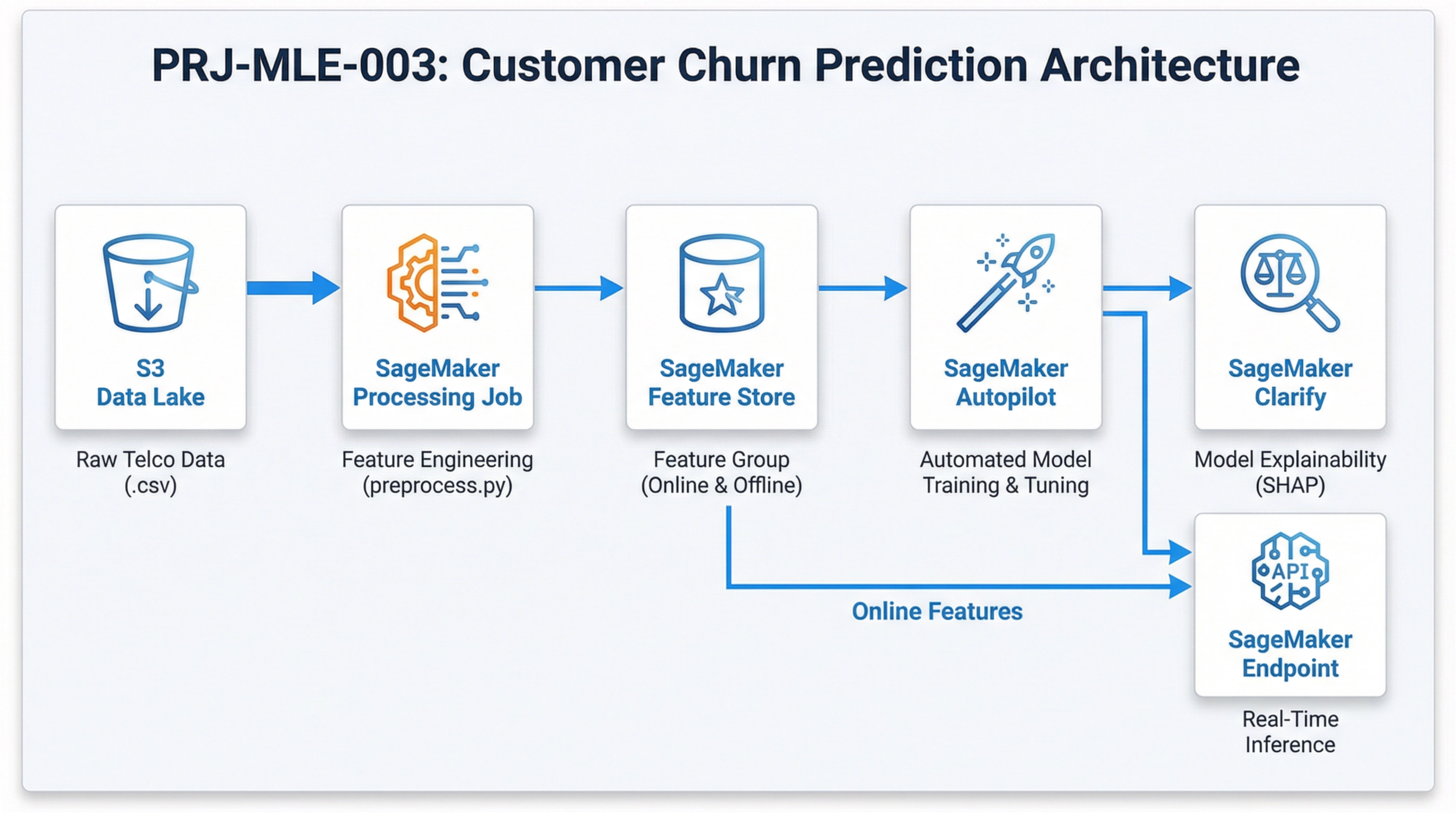
PRJ-AWS-MLE-003 Architecture

Technology Stack

Feature Store
Autopilot
Clarify
QuickSight
SHAP

Complete Documentation

Prerequisites

IAM Admin or PowerUser role
AWS CLI v2 configured
Terraform >= 1.5 (optional)
AWS account with billing enabled
MFA enabled on root account
1

Clone & Configure

Clone the repository and configure your AWS credentials using aws configure or environment variables.

aws configure --profile cloudguard
2

Review IAM Policies

Review and attach the required IAM policies to your deployment role. Ensure least-privilege access is applied.

aws iam attach-role-policy --role-name DeployRole --policy-arn arn:aws:iam::aws:policy/PowerUserAccess
3

Initialize Infrastructure

Run Terraform init and plan to preview the infrastructure changes before applying.

terraform init && terraform plan -out=tfplan
4

Deploy Resources

Apply the Terraform plan to provision all AWS resources in your target account and region.

terraform apply tfplan
5

Verify & Monitor

Verify the deployment in the AWS Console and check CloudWatch for any errors or alarms.

aws cloudwatch describe-alarms --state-value ALARM
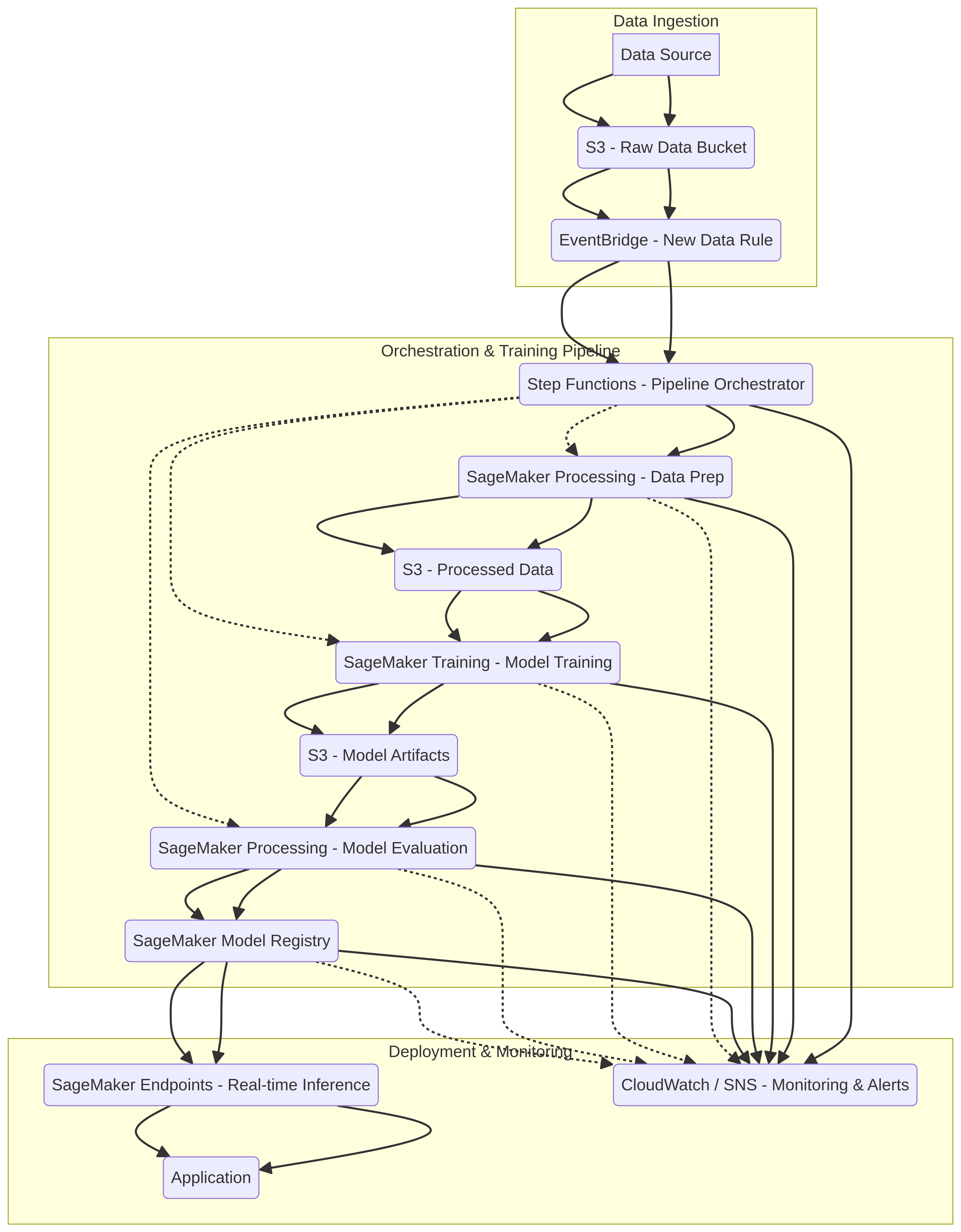
Deployment Guide

Step-by-step instructions to deploy this project

Download Guide

Architecture Diagram

Visual representation of the system architecture

Download Architecture

Source Code

Complete source code and configuration files

View on GitHub

Video Tutorial

Watch the complete walkthrough video

Watch Now