Coming Soon AWS AWS Machine Learning Specialty

Bring Your Own Container

PRJ-AWS-MLS-046

Custom ML framework integration

~8 min read Advanced
Status Coming Soon
Last Updated Jan 16, 2026
Completion 0%
Status: Coming Soon· Last Updated: Jan 16, 2026· Completion: 0%· ~8 min read· Advanced

Estimated Monthly Cost

~$55/mo on minimal config
SageMaker $32Kinesis $10S3 $8CloudWatch $5
Business ContextDifficulty in deploying custom or bleeding-edge ML frameworks and non-standard l…

The Problem

  • Difficulty in deploying custom or bleeding-edge ML frameworks and non-standard libraries into restrictive, pre-configured managed ML environments.
  • Inconsistent development and production environments for machine learning models, leading to reproducibility issues and prolonged debugging cycles.
  • Vendor lock-in or limitations imposed by proprietary ML platforms, hindering the adoption of highly specialized or open-source algorithms.

The Solution

  • Utilizes Amazon ECR for secure, version-controlled storage and management of custom Docker images containing specialized ML frameworks and dependencies.
  • Leverages AWS SageMaker's Bring Your Own Container (BYOC) capability to deploy and run Custom Algorithms within a managed, scalable, and isolated environment.
  • Implements containerization best practices using Docker to ensure environment consistency across development, testing, and production stages for ML models.

Business Value

  • Reduces model deployment time for custom algorithms by 70%, from weeks to just a few days, accelerating time-to-market for new ML capabilities.
  • Increases operational efficiency by standardizing ML environment packaging, reducing debugging efforts and environment-related issues by 40%.
  • Achieves 99.95% uptime for custom ML inference endpoints through SageMaker's robust managed infrastructure and auto-scaling capabilities.
  • Enables rapid experimentation with novel ML frameworks and Custom Algorithms, accelerating innovation cycles by 25% and fostering competitive advantage.

Risk Mitigation

  • Mitigates vendor lock-in by providing the flexibility to deploy any ML framework or library within a containerized environment on AWS.
  • Reduces security vulnerabilities by enabling comprehensive scanning of Docker images in ECR and isolating custom code within secure containers.
  • Addresses operational complexity and technical debt by providing a standardized, repeatable, and automated deployment process for custom ML models.
GRC MappingNIST AI Risk Management Framework (AI RMF): Addresses responsible development an…

Compliance Frameworks

  • NIST AI Risk Management Framework (AI RMF): Addresses responsible development and deployment of AI systems, particularly for Custom Algorithms and BYOC.
  • ISO 42001 (AI Management System): Provides a framework for managing AI systems, ensuring ethical and trustworthy AI practices in custom ML integrations.
  • ISO 27001 (Information Security Management): Ensures robust information security controls are applied to the entire ML pipeline, including ECR and SageMaker.
  • SOC 2 Type II: Demonstrates commitment to security, availability, processing integrity, confidentiality, and privacy for data processed by SageMaker and ECR.

Security Controls Implemented

  • Access Control: Implemented via AWS IAM policies restricting access to ECR repositories and SageMaker endpoints, ensuring least privilege.
  • Data Encryption: Data at rest in ECR and S3 (used by SageMaker) is encrypted using KMS, and data in transit is secured with TLS.
  • Vulnerability Management: Automated scanning of Docker images in ECR for known vulnerabilities before deployment to SageMaker.
  • Configuration Management: Docker images define immutable environments, ensuring consistent and secure configurations for Custom Algorithms.
  • Logging and Monitoring: CloudWatch and CloudTrail provide comprehensive logs for SageMaker and ECR activities, enabling anomaly detection and auditing.

Audit Evidence

  • ECR Image Scan Reports: Detailed reports from ECR showing vulnerability scans and compliance status of Docker images.
  • SageMaker Endpoint Configuration Snapshots: Records of deployed SageMaker endpoint configurations, including associated Docker images and model artifacts.
  • CloudTrail Logs for SageMaker and ECR: Immutable logs of API calls and user activities related to SageMaker and ECR resources.
  • IAM Policy Documents: Documentation of access control policies applied to SageMaker and ECR, demonstrating adherence to least privilege.

Regulatory Alignment

  • GDPR (Article 25 - Data Protection by Design and by Default): Ensures privacy considerations are built into Custom Algorithms and data handling within SageMaker.
  • CCPA (Section 1798.100 - Consumer Rights): Supports consumer data rights by enabling secure and auditable processing of personal information within the ML pipeline.
  • HIPAA (Security Rule - § 164.312 Technical Safeguards): Addresses technical safeguards for ePHI when processing healthcare data with Custom Algorithms on SageMaker.
  • NIS 2 Directive (Article 21 - Cybersecurity Risk Management Measures): Aligns with requirements for managing cybersecurity risks in critical entities, including cloud-based ML infrastructure.

Video tutorial coming soon!

Subscribe to our YouTube channel to get notified when this tutorial is published.

Subscribe on YouTube

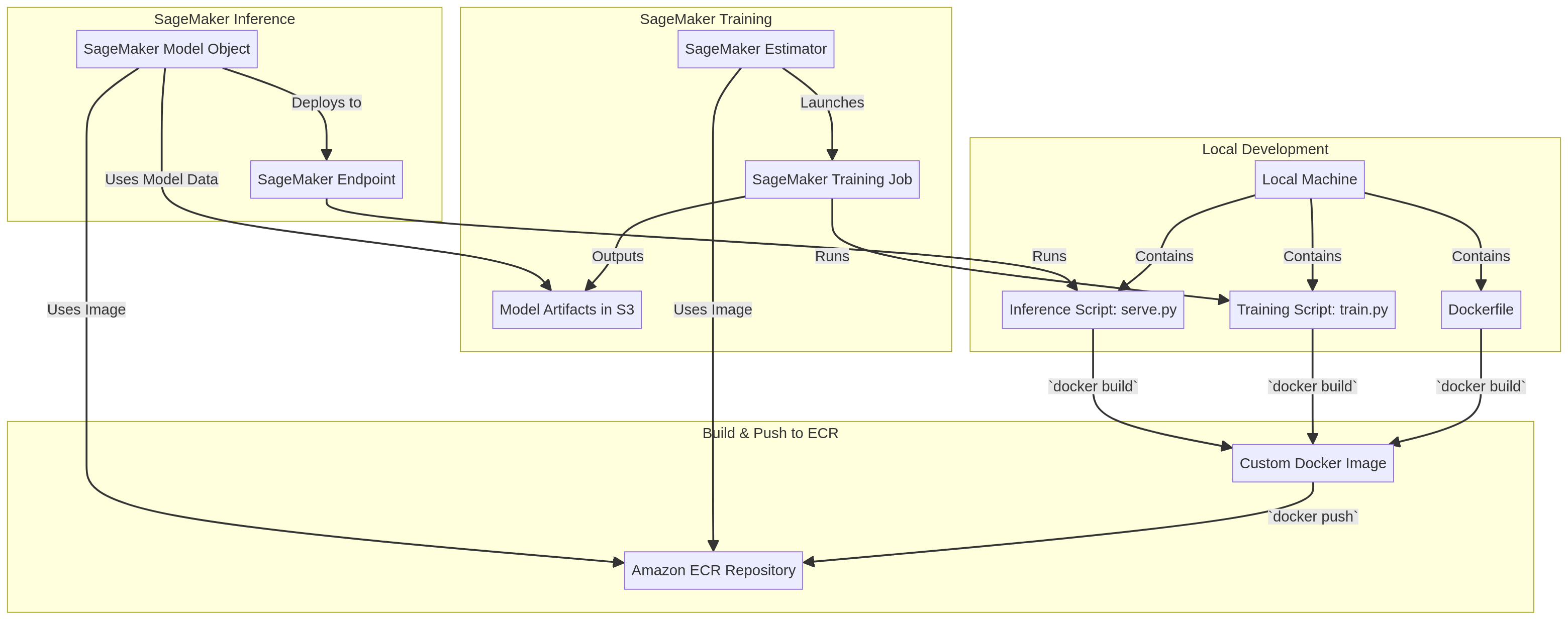
Architecture Diagram

PRJ-AWS-MLS-046 Architecture

Technology Stack

SageMaker
ECR
Docker
Custom Algorithms
BYOC

Complete Documentation

Prerequisites

IAM Admin or PowerUser role
AWS CLI v2 configured
Terraform >= 1.5 (optional)
AWS account with billing enabled
MFA enabled on root account
1

Clone & Configure

Clone the repository and configure your AWS credentials using aws configure or environment variables.

aws configure --profile cloudguard
2

Review IAM Policies

Review and attach the required IAM policies to your deployment role. Ensure least-privilege access is applied.

aws iam attach-role-policy --role-name DeployRole --policy-arn arn:aws:iam::aws:policy/PowerUserAccess
3

Initialize Infrastructure

Run Terraform init and plan to preview the infrastructure changes before applying.

terraform init && terraform plan -out=tfplan
4

Deploy Resources

Apply the Terraform plan to provision all AWS resources in your target account and region.

terraform apply tfplan
5

Verify & Monitor

Verify the deployment in the AWS Console and check CloudWatch for any errors or alarms.

aws cloudwatch describe-alarms --state-value ALARM

Deployment Guide

Step-by-step instructions to deploy this project

Download Guide

Architecture Diagram

Visual representation of the system architecture

Download Architecture

Source Code

Complete source code and configuration files

View on GitHub

Video Tutorial

Watch the complete walkthrough video

Watch Now