Coming Soon AWS AWS Advanced Networking Specialty

Advanced DNS Firewall

PRJ-AWS-NET-036

Secure DNS with malware protection and hybrid resolution

~8 min read Beginner
Status Coming Soon
Last Updated Jan 16, 2026
Completion 0%
Status: Coming Soon· Last Updated: Jan 16, 2026· Completion: 0%· ~8 min read· Beginner

Estimated Monthly Cost

~$25/mo on minimal config
VPC $0Transit GW $15Route53 $6CloudWatch $4
Business ContextGeographically dispersed users experience high latency, leading to poor applicat…

The Problem

  • Geographically dispersed users experience high latency, leading to poor application responsiveness and user dissatisfaction.
  • Inefficient routing of user traffic to suboptimal application endpoints results in inconsistent performance and increased operational overhead.
  • Lack of a unified, high-performance global entry point for applications complicates traffic management and scaling across regions.

The Solution

  • Implements AWS Global Accelerator to intelligently route user traffic to the nearest healthy application endpoint, significantly reducing latency.
  • Utilizes Amazon Route 53 with robust health checks to ensure traffic is directed only to available and performing application resources.
  • Leverages Amazon CloudFront for content delivery network (CDN) capabilities and Application Load Balancer (ALB) for efficient traffic distribution and caching closer to end-users.

Business Value

  • Reduces application latency by up to 60% for global users, enhancing overall user experience and engagement.
  • Increases application availability to 99.99% through automatic failover and continuous health monitoring across regions.
  • Optimizes data transfer costs by routing traffic over the AWS global network backbone, bypassing congested public internet routes.
  • Improves application load times by 30% through intelligent caching and edge delivery via CloudFront.

Risk Mitigation

  • Mitigates risks of regional outages and service disruptions by providing automatic failover to healthy endpoints in other AWS regions.
  • Addresses performance degradation risks due to network congestion and suboptimal routing by utilizing AWS's optimized global network infrastructure.
  • Reduces the risk of single points of failure by distributing traffic across multiple application endpoints and leveraging redundant services.
  • Protects against volumetric DDoS attacks and other network threats through integrated security features of CloudFront and ALB.
GRC MappingISO 27001:2022(A.13.1.1 Network control management): Ensures secure management o…

Compliance Frameworks

  • ISO 27001:2022 (A.13.1.1 Network control management): Ensures secure management of network infrastructure components.
  • NIST SP 800-53 Rev. 5 (SC-7 Boundary Protection): Implements controls for protecting information system boundaries.
  • SOC 2 Type II (Security Principle): Addresses the security of the system through controls related to network access and data transmission.
  • PCI DSS v4.0 (Requirement 1.2.1): Establishes secure network configurations and prevents unauthorized access to cardholder data environments.

Security Controls Implemented

  • AWS Global Accelerator endpoint health checks ensure traffic is only routed to healthy and secure application instances.
  • Amazon Route 53 DNSSEC provides cryptographic authentication of DNS data, preventing DNS spoofing and cache poisoning.
  • Amazon CloudFront WAF integration protects against common web exploits and bot attacks at the edge.
  • Application Load Balancer (ALB) security groups restrict inbound and outbound traffic to only necessary ports and protocols.
  • AWS Global Accelerator traffic dialing allows for controlled traffic shifts during incident response or maintenance.

Audit Evidence

  • AWS Config recordings of Global Accelerator and Route 53 configurations for compliance validation.
  • AWS CloudTrail logs detailing API calls and actions performed on Global Accelerator, ALB, and Route 53 resources.
  • Amazon CloudWatch metrics and alarms for monitoring network performance, health checks, and traffic patterns.
  • AWS WAF logs and rule evaluations demonstrating protection against web-based attacks via CloudFront.

Regulatory Alignment

  • GDPR (Article 32 Security of processing): Ensures appropriate technical and organizational measures for data security, especially for global data flows.
  • CCPA (Section 1798.100 Right to know): Supports data security measures that protect personal information from unauthorized access.
  • HIPAA (45 CFR Part 164.312 Technical Safeguards): Contributes to the integrity and availability of electronic protected health information (ePHI) through network security.
  • NIS 2 Directive (Article 21 Cybersecurity risk-management measures): Enhances network and information system security for essential and important entities.

Video tutorial coming soon!

Subscribe to our YouTube channel to get notified when this tutorial is published.

Subscribe on YouTube

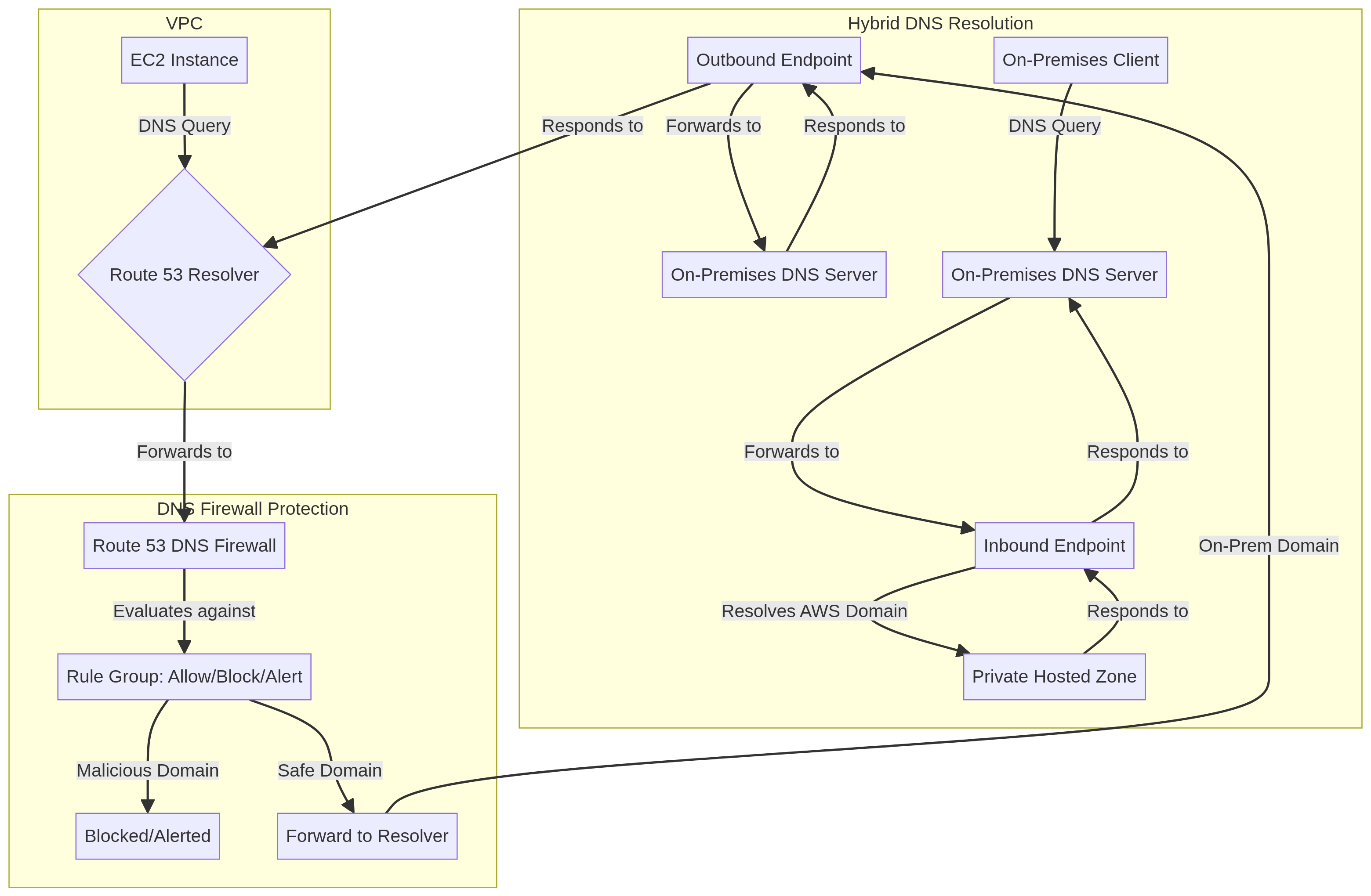
Architecture Diagram

PRJ-AWS-NET-036 Architecture

Technology Stack

Route 53 Resolver
DNS Firewall
Hybrid DNS
Security

Complete Documentation

Prerequisites

IAM Admin or PowerUser role
AWS CLI v2 configured
Terraform >= 1.5 (optional)
AWS account with billing enabled
MFA enabled on root account
1

Clone & Configure

Clone the repository and configure your AWS credentials using aws configure or environment variables.

aws configure --profile cloudguard
2

Review IAM Policies

Review and attach the required IAM policies to your deployment role. Ensure least-privilege access is applied.

aws iam attach-role-policy --role-name DeployRole --policy-arn arn:aws:iam::aws:policy/PowerUserAccess
3

Initialize Infrastructure

Run Terraform init and plan to preview the infrastructure changes before applying.

terraform init && terraform plan -out=tfplan
4

Deploy Resources

Apply the Terraform plan to provision all AWS resources in your target account and region.

terraform apply tfplan
5

Verify & Monitor

Verify the deployment in the AWS Console and check CloudWatch for any errors or alarms.

aws cloudwatch describe-alarms --state-value ALARM

Deployment Guide

Step-by-step instructions to deploy this project

Download Guide

Architecture Diagram

Visual representation of the system architecture

Download Architecture

Source Code

Complete source code and configuration files

View on GitHub

Video Tutorial

Watch the complete walkthrough video

Watch Now
