Coming Soon AWS AWS Advanced Networking Specialty

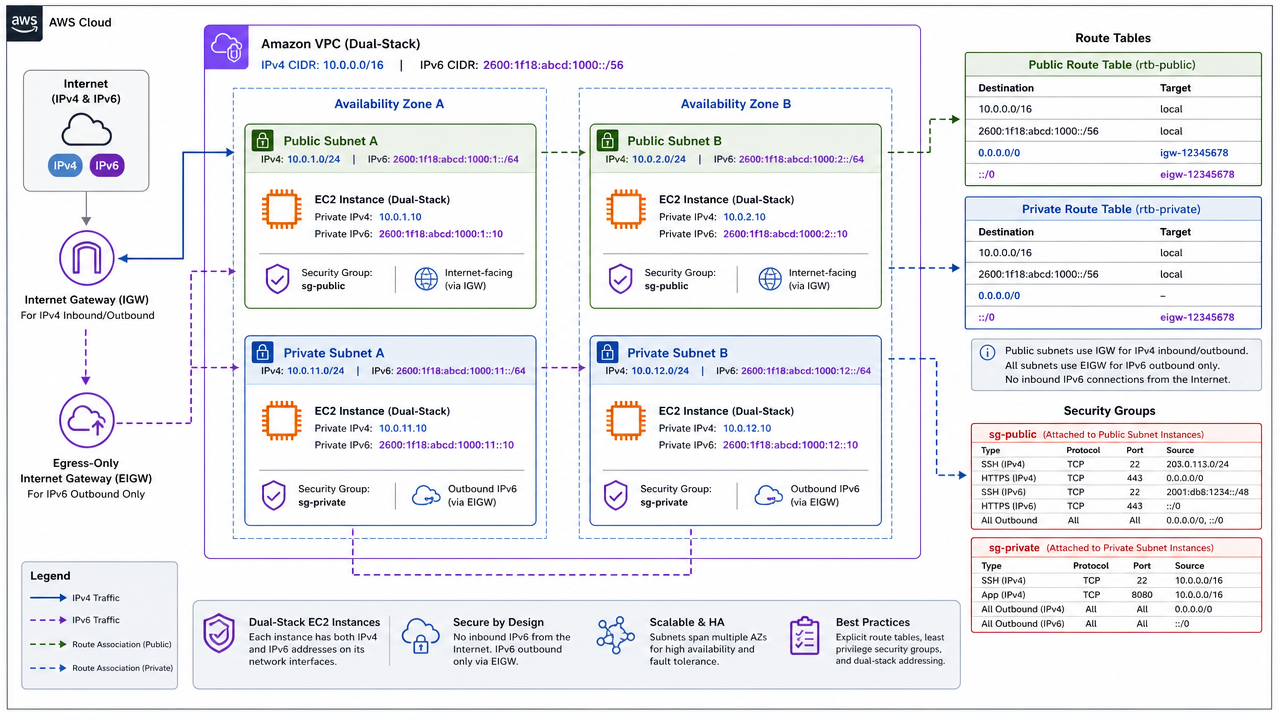
IPv6-Enabled Dual-Stack Architecture

PRJ-AWS-NET-039

Modern IPv6 implementation with IPv4 compatibility

~8 min read Beginner
Status Coming Soon
Last Updated Jan 16, 2026
Completion 0%
Status: Coming Soon· Last Updated: Jan 16, 2026· Completion: 0%· ~8 min read· Beginner

Estimated Monthly Cost

~$25/mo on minimal config
VPC $0Transit GW $15Route53 $6CloudWatch $4
Business ContextTraditional WAN architectures struggle with dynamic routing and traffic optimiza…

The Problem

  • Traditional WAN architectures struggle with dynamic routing and traffic optimization for hybrid cloud environments, leading to inefficient resource utilization and increased operational costs.
  • Lack of centralized management and visibility across on-premises and AWS cloud networks complicates troubleshooting and policy enforcement, impacting network agility.
  • Inconsistent network performance and reliability for critical applications spanning hybrid infrastructure, resulting in poor user experience and potential business disruption.

The Solution

  • Implement AWS Direct Connect to establish a dedicated network connection from on-premises to AWS, ensuring consistent high-bandwidth and low-latency connectivity.
  • Utilize AWS Transit Gateway to centralize routing between on-premises networks (via Direct Connect or VPN) and multiple Amazon Virtual Private Clouds (VPCs), simplifying network architecture.
  • Integrate SD-WAN overlay technology to intelligently route traffic based on application requirements and network conditions, optimizing performance and cost across the hybrid WAN.

Business Value

  • Reduces network operational costs by 20% through automated traffic steering and optimized bandwidth utilization.
  • Improves application performance by 30% for hybrid workloads by prioritizing critical traffic and ensuring consistent latency.
  • Accelerates network provisioning time by 50% for new cloud resources and branch offices due to software-defined policies and centralized management.
  • Enhances network resilience with 99.99% uptime for critical hybrid connections, minimizing downtime and ensuring business continuity.

Risk Mitigation

  • Mitigates the risk of network outages and performance degradation by providing redundant connectivity options (Direct Connect + VPN) and intelligent failover mechanisms.
  • Addresses security vulnerabilities in hybrid network traffic by enforcing granular access controls and encryption policies at the SD-WAN edge and within AWS.
  • Reduces the complexity of network management and configuration errors through centralized SD-WAN orchestration and automated policy deployment.
  • Minimizes compliance risks by ensuring network traffic adheres to regulatory requirements through policy-driven routing and logging.
GRC MappingNIST SP 800-53 Rev. 5(Control Family AC: Access Control, SC: System and Communic…

Compliance Frameworks

  • NIST SP 800-53 Rev. 5 (Control Family AC: Access Control, SC: System and Communications Protection)
  • ISO 27001:2022 (A.5 Information security policies, A.8 Asset management, A.13 Communications security)
  • PCI DSS v4.0 (Requirement 1: Install and maintain network security controls)
  • SOC 2 Type 2 (Security, Availability, Confidentiality principles)

Security Controls Implemented

  • Network segmentation and isolation using AWS Transit Gateway route tables and attachment policies.
  • Encrypted communication channels for hybrid connectivity via AWS VPN and IPsec tunnels.
  • Centralized network access control lists (ACLs) and security groups managed within AWS VPC.
  • Traffic inspection and filtering at the SD-WAN edge to prevent unauthorized access and malicious activity.
  • Logging and monitoring of all network flow data using AWS VPC Flow Logs integrated with security information and event management (SIEM) systems.

Audit Evidence

  • AWS Direct Connect connection details and configuration reports.
  • AWS Transit Gateway route tables, attachment configurations, and network topology diagrams.
  • AWS VPN connection logs, tunnel status, and security configuration.
  • SD-WAN controller policy configurations, traffic logs, and performance reports.

Regulatory Alignment

  • GDPR (Article 32: Security of processing, Article 25: Data protection by design and by default)
  • HIPAA (45 CFR Part 164, Subpart C: Security Standards for the Protection of Electronic Protected Health Information)
  • CCPA (Section 1798.150: Data breaches and security incidents)
  • NIST Cybersecurity Framework (ID.AM-1: Physical devices and systems within the organization are inventoried)

Video tutorial coming soon!

Subscribe to our YouTube channel to get notified when this tutorial is published.

Subscribe on YouTube

Architecture Diagram

PRJ-AWS-NET-039 Architecture

Technology Stack

VPC IPv6
ELB
CloudFront
Route 53
Dual-Stack

Complete Documentation

Prerequisites

IAM Admin or PowerUser role
AWS CLI v2 configured
Terraform >= 1.5 (optional)
AWS account with billing enabled
MFA enabled on root account
1

Clone & Configure

Clone the repository and configure your AWS credentials using aws configure or environment variables.

aws configure --profile cloudguard
2

Review IAM Policies

Review and attach the required IAM policies to your deployment role. Ensure least-privilege access is applied.

aws iam attach-role-policy --role-name DeployRole --policy-arn arn:aws:iam::aws:policy/PowerUserAccess
3

Initialize Infrastructure

Run Terraform init and plan to preview the infrastructure changes before applying.

terraform init && terraform plan -out=tfplan
4

Deploy Resources

Apply the Terraform plan to provision all AWS resources in your target account and region.

terraform apply tfplan
5

Verify & Monitor

Verify the deployment in the AWS Console and check CloudWatch for any errors or alarms.

aws cloudwatch describe-alarms --state-value ALARM

Deployment Guide

Step-by-step instructions to deploy this project

Download Guide

Architecture Diagram

Visual representation of the system architecture

Download Architecture

Source Code

Complete source code and configuration files

View on GitHub

Video Tutorial

Watch the complete walkthrough video

Watch Now
