Complete AWS AWS Solutions Architect Professional

Hybrid Cloud Connectivity

PRJ-AWS-SAP-014

Secure hybrid cloud integration with on-premises infrastructure

~8 min read Intermediate
Status Complete
Last Updated May 11, 2026
Completion 100%
Status: Complete· Last Updated: May 11, 2026· Completion: 100%· ~8 min read· Intermediate

Estimated Monthly Cost

~$35/mo on minimal config
ComputeStorageMonitoring
Business ContextUncontrolled cloud spending leading to budget overruns and unpredictable operati…

The Problem

  • Uncontrolled cloud spending leading to budget overruns and unpredictable operational costs.
  • Lack of granular visibility into cloud resource consumption and cost attribution across departments.
  • Manual and inefficient processes for identifying and optimizing underutilized or oversized cloud resources.

The Solution

  • Implementation of FinOps principles and practices to foster financial accountability and collaboration.
  • Automated rightsizing recommendations and actions using AWS Compute Optimizer for EC2, EBS, and Lambda.
  • Enhanced cost visibility and analysis through interactive dashboards and reports generated by AWS Cost Explorer.
  • Strategic utilization of AWS Savings Plans to achieve significant discounts on compute usage.

Business Value

  • Reduces overall cloud spend by an estimated 15-25% within the first year of implementation.
  • Improves cloud resource utilization efficiency by 20-30% through automated rightsizing.
  • Accelerates monthly cost reporting and analysis from 5 days to less than 1 day.
  • Enhances financial forecasting accuracy for cloud expenditures by 10-15%.

Risk Mitigation

  • Mitigates the risk of cloud budget overruns by providing real-time cost visibility and automated optimization.
  • Addresses the risk of inefficient resource provisioning by ensuring resources are appropriately sized for workloads.
  • Reduces the risk of financial unaccountability by attributing costs to specific teams and projects.
  • Minimizes the risk of unexpected cost spikes through proactive monitoring and alert mechanisms.
GRC MappingISO/IEC 27001:2022(Information Security Management): Annex A.8.1.1 (Inventory of…

Compliance Frameworks

  • ISO/IEC 27001:2022 (Information Security Management): Annex A.8.1.1 (Inventory of assets) and A.8.1.2 (Ownership of assets) for managing cloud resources and their associated costs.
  • NIST Cybersecurity Framework (CSF): Govern (ID.GV) function for establishing and monitoring cloud cost management policies.
  • ITIL 4 (IT Service Management): Value Stream and Process (VS&P) for optimizing the value delivered by cloud services through cost efficiency.
  • COBIT 2019 (Governance and Management of Enterprise IT): APO06 (Managed Budget and Costs) for optimizing IT costs and demonstrating value.

Security Controls Implemented

  • Automated Rightsizing: AWS Compute Optimizer automatically analyzes resource usage and recommends optimal configurations.
  • Cost Visibility & Reporting: AWS Cost Explorer provides centralized dashboards and reports for transparent cost allocation.
  • Budget Enforcement: AWS Budgets configured with alerts for forecasted and actual spend exceeding predefined thresholds.
  • Access Control: AWS IAM policies restrict access to cost management tools and data based on job roles and responsibilities.
  • Resource Tagging Enforcement: AWS Config rules ensure mandatory tagging for cost allocation and resource identification.

Audit Evidence

  • AWS Cost and Usage Reports (CUR) detailing granular resource consumption and costs.
  • AWS Compute Optimizer recommendation history and applied optimization actions.
  • FinOps dashboards and custom reports demonstrating cost savings and efficiency gains.
  • AWS Budgets alert history and associated actions taken to address cost anomalies.

Regulatory Alignment

  • GDPR (General Data Protection Regulation): Article 5 (Principles relating to processing of personal data) by ensuring efficient resource use, indirectly supporting data minimization and storage limitation.
  • HIPAA (Health Insurance Portability and Accountability Act): Security Rule (45 CFR Part 164, Subpart C) by optimizing infrastructure that processes ePHI, contributing to efficient and secure data handling.
  • SOX (Sarbanes-Oxley Act): Section 302 & 404 by providing accurate financial reporting and internal controls over IT expenditures.
  • PCI DSS (Payment Card Industry Data Security Standard): Requirement 1.2 (Build and maintain a secure network and systems) by optimizing infrastructure components that handle cardholder data.

Video tutorial coming soon!

Subscribe to our YouTube channel to get notified when this tutorial is published.

Subscribe on YouTube

Architecture Diagram
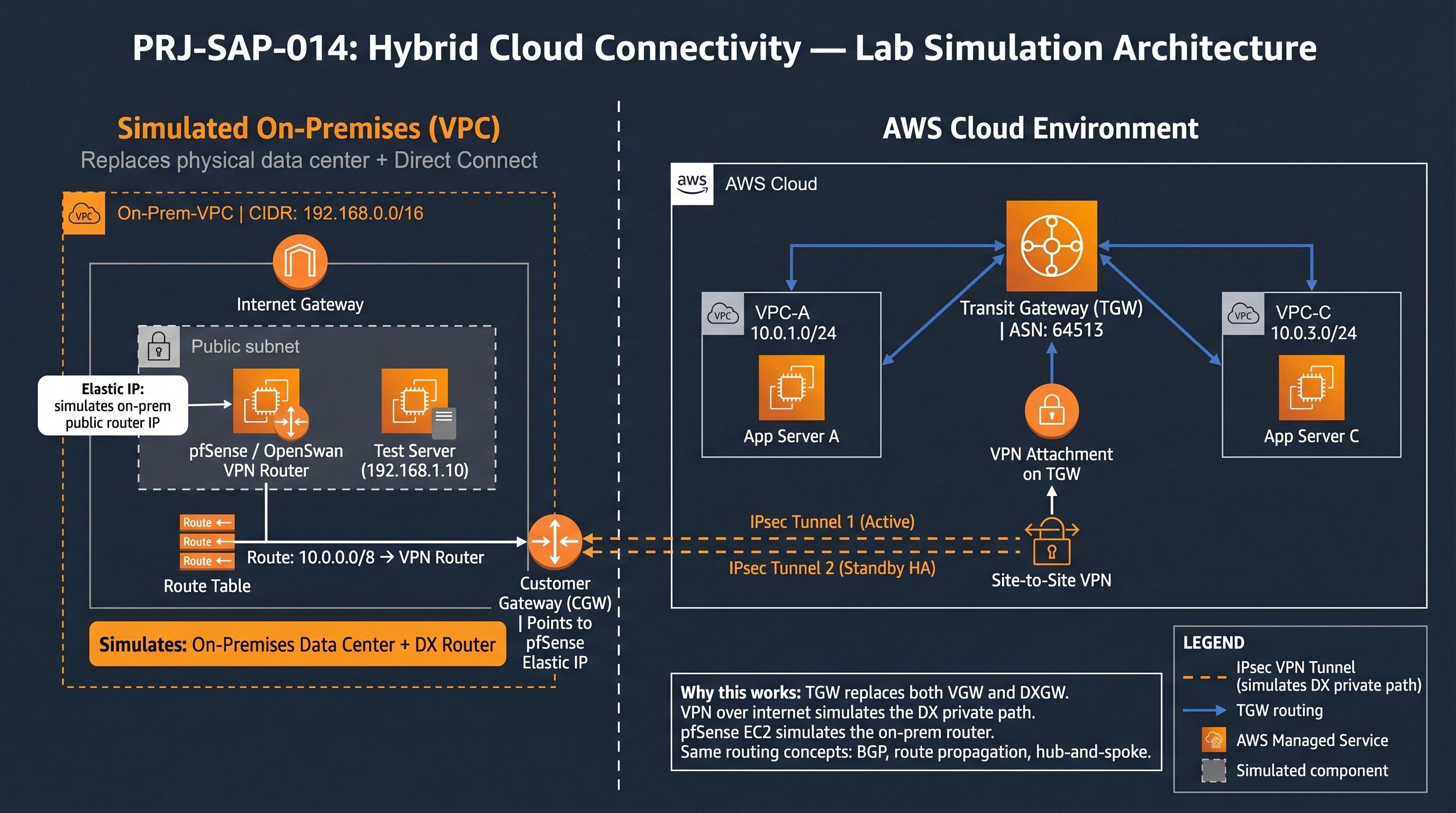
PRJ-AWS-SAP-014 Architecture

Technology Stack

Direct Connect
VPN
Transit Gateway
Route 53 Resolver

Complete Documentation

Prerequisites

IAM Admin or PowerUser role
AWS CLI v2 configured
Terraform >= 1.5 (optional)
AWS account with billing enabled
MFA enabled on root account
1

Clone & Configure

Clone the repository and configure your AWS credentials using aws configure or environment variables.

aws configure --profile cloudguard
2

Review IAM Policies

Review and attach the required IAM policies to your deployment role. Ensure least-privilege access is applied.

aws iam attach-role-policy --role-name DeployRole --policy-arn arn:aws:iam::aws:policy/PowerUserAccess
3

Initialize Infrastructure

Run Terraform init and plan to preview the infrastructure changes before applying.

terraform init && terraform plan -out=tfplan
4

Deploy Resources

Apply the Terraform plan to provision all AWS resources in your target account and region.

terraform apply tfplan
5

Verify & Monitor

Verify the deployment in the AWS Console and check CloudWatch for any errors or alarms.

aws cloudwatch describe-alarms --state-value ALARM
Deployment Guide

Step-by-step instructions to deploy this project

Download Guide

Architecture Diagram

Visual representation of the system architecture

Download Architecture

Source Code

Complete source code and configuration files

View on GitHub

Video Tutorial

Watch the complete walkthrough video

Watch Now