Complete AWS AWS Solutions Architect Professional

Enterprise Data Analytics Pipeline

PRJ-AWS-SAP-016

Real-time and batch analytics platform with data lake

~8 min read Intermediate
Status Complete
Last Updated Jan 16, 2026
Completion 100%
Status: Complete· Last Updated: Jan 16, 2026· Completion: 100%· ~8 min read· Intermediate

Estimated Monthly Cost

~$35/mo on minimal config
ComputeStorageMonitoring
Business ContextTraditional on-premises infrastructure struggles with scalability and elasticity…

The Problem

  • Traditional on-premises infrastructure struggles with scalability and elasticity to meet fluctuating business demands, leading to over-provisioning or resource exhaustion.
  • Data transfer between on-premises environments and cloud platforms often faces latency issues and security concerns, hindering hybrid cloud adoption.
  • Managing disparate IT environments (on-premises and cloud) creates operational complexity, increasing administrative overhead and potential for misconfigurations.

The Solution

  • Implement AWS Direct Connect to establish a dedicated network connection, ensuring consistent, high-bandwidth, and low-latency connectivity between on-premises data centers and AWS.
  • Utilize AWS Storage Gateway to seamlessly integrate on-premises applications with cloud storage, providing hybrid storage solutions for backup, archiving, and disaster recovery.
  • Deploy AWS Outposts to extend AWS infrastructure, services, APIs, and operational models to on-premises facilities, enabling a truly consistent hybrid experience.

Business Value

  • Reduces data transfer costs by 30% through optimized network routing and dedicated connections via AWS Direct Connect.
  • Accelerates application deployment cycles by 25% by leveraging consistent AWS services and APIs across hybrid environments with AWS Outposts.
  • Improves data backup and recovery times by 40% using AWS Storage Gateway for efficient hybrid cloud storage.
  • Achieves 99.99% uptime for critical hybrid applications by ensuring resilient connectivity and consistent operational models.

Risk Mitigation

  • Addresses data sovereignty and compliance risks by keeping sensitive data on-premises while leveraging AWS services for processing and analytics with Outposts.
  • Mitigates network performance bottlenecks and unreliable internet connectivity through dedicated, private connections provided by AWS Direct Connect.
  • Reduces operational complexity and human error by standardizing management tools and processes across hybrid environments using AWS Outposts.
GRC MappingISO 27001:2022 (Information Security Management): Specifically addresses Annex A…

Compliance Frameworks

  • ISO 27001:2022 (Information Security Management): Specifically addresses Annex A controls related to network security, access control, and supplier relationships (e.g., A.5.14, A.8.5, A.15.1).
  • NIST SP 800-53 Rev. 5 (Security and Privacy Controls for Information Systems and Organizations): Focuses on controls for hybrid cloud environments, such as AC-4 (Information Flow Enforcement) and SC-7 (Boundary Protection).
  • CSA Cloud Controls Matrix (CCM) v4: Provides security control guidance for cloud computing, relevant for hybrid deployments, covering areas like network security (NET-01) and data encryption (DSI-02).

Security Controls Implemented

  • AWS Direct Connect: Dedicated, private network connections bypass the public internet, enhancing data confidentiality and integrity.
  • AWS Storage Gateway: Encrypts data in transit and at rest using KMS, ensuring data protection for hybrid storage.
  • AWS Outposts: Extends AWS VPC and security groups to on-premises, enforcing consistent network access controls.
  • AWS Identity and Access Management (IAM): Granular permissions control for access to AWS services and resources across the hybrid environment.
  • AWS CloudTrail: Logs all API calls and related events in the AWS environment, providing an audit trail for security analysis.

Audit Evidence

  • AWS Direct Connect configuration reports and circuit IDs demonstrating private network connectivity.
  • AWS Storage Gateway audit logs and encryption key policies from AWS KMS.
  • AWS Outposts service logs and configuration snapshots showing consistent on-premises AWS infrastructure.
  • AWS CloudTrail logs and Amazon S3 bucket policies for audit trail storage.

Regulatory Alignment

  • GDPR (General Data Protection Regulation): Article 32 (Security of processing) by ensuring robust data protection measures in hybrid data flows.
  • HIPAA (Health Insurance Portability and Accountability Act): 45 CFR Part 164, Subpart C (Security Standards) by securing ePHI in hybrid storage and processing.
  • PCI DSS (Payment Card Industry Data Security Standard): Requirement 1 (Install and maintain a firewall configuration to protect cardholder data) by securing network boundaries with Direct Connect and Outposts.

Video tutorial coming soon!

Subscribe to our YouTube channel to get notified when this tutorial is published.

Subscribe on YouTube

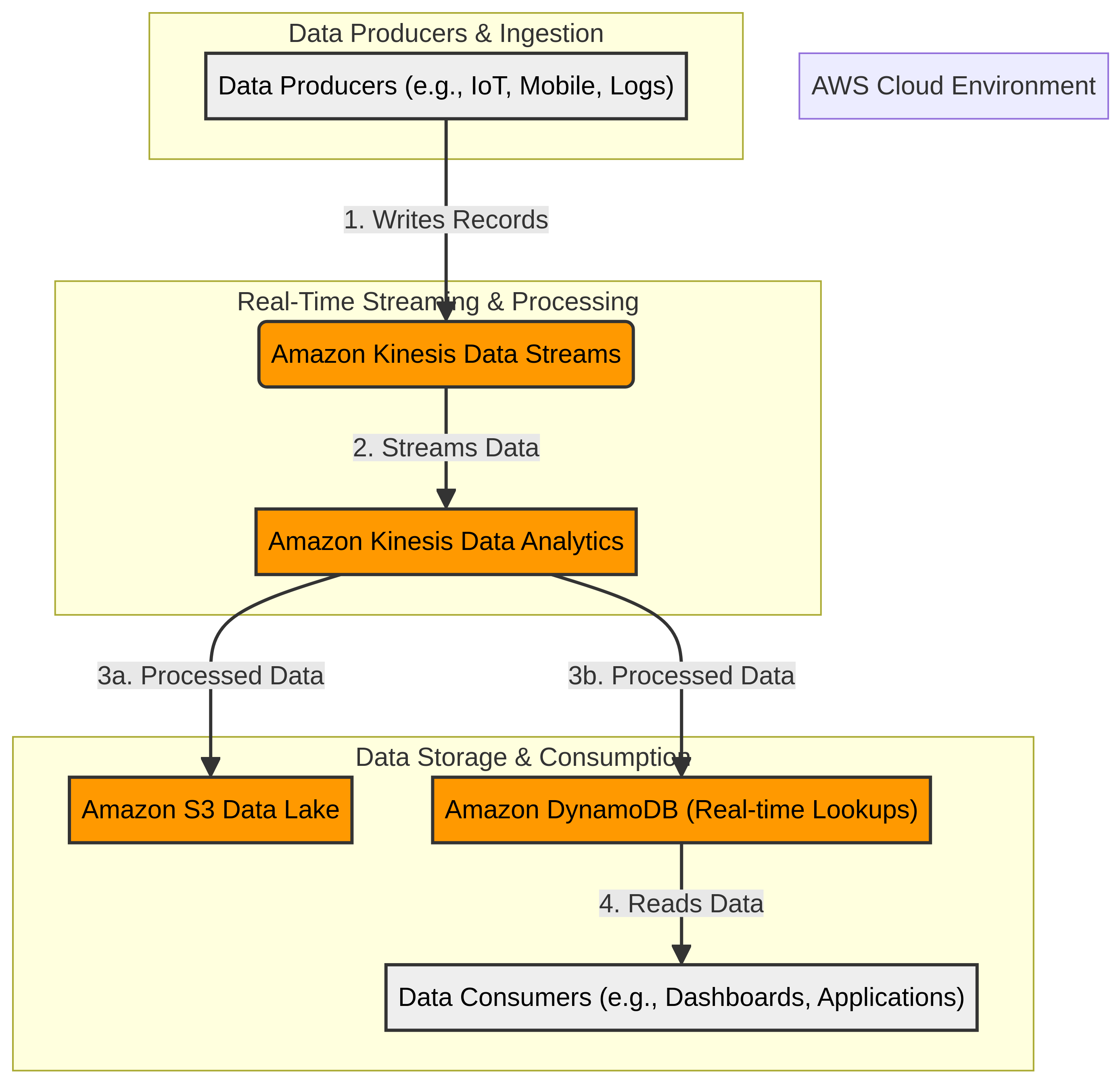
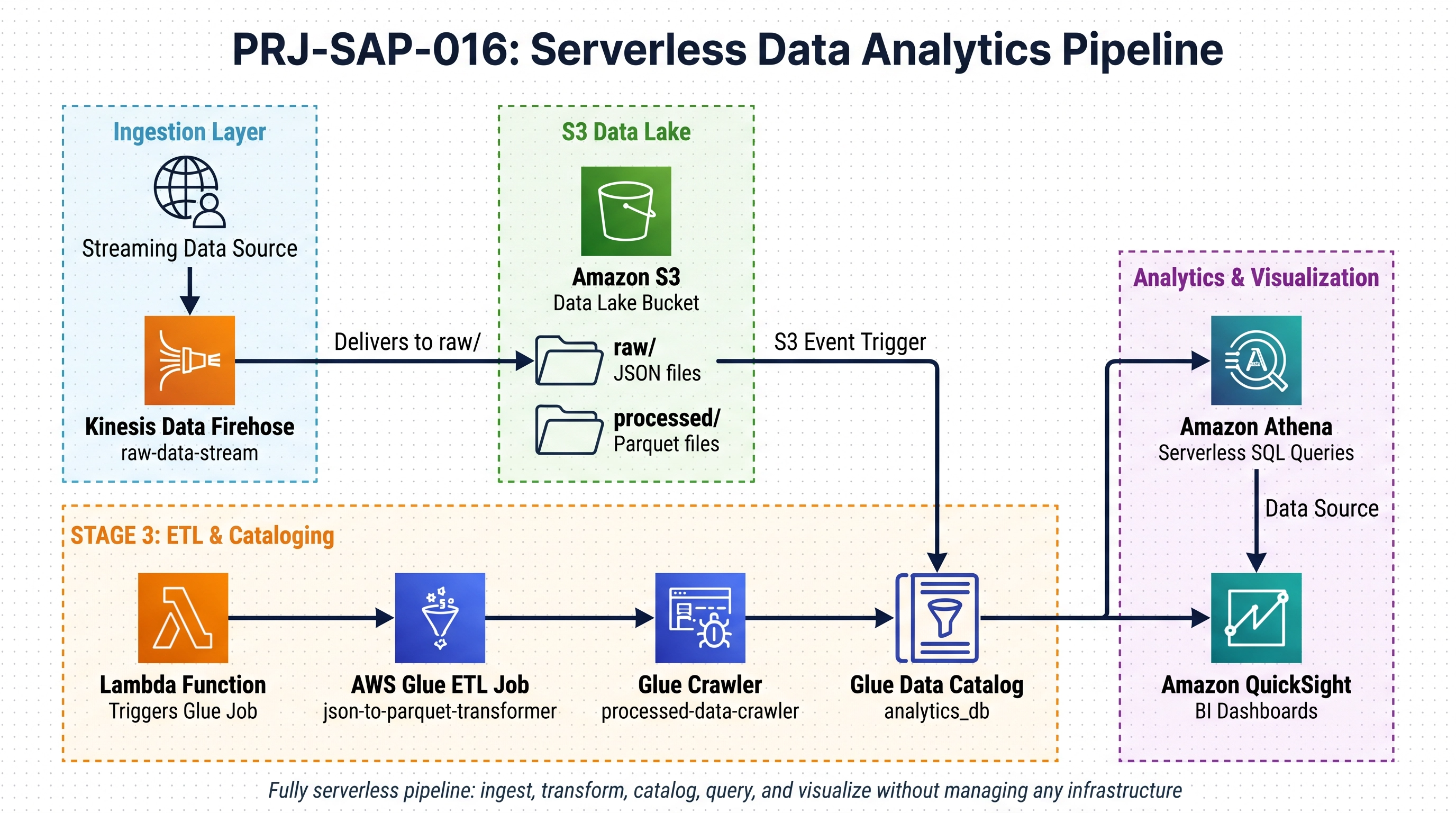
Architecture Diagram

PRJ-AWS-SAP-016 Architecture

Technology Stack

Kinesis
Glue
Redshift
QuickSight
Lake Formation

Complete Documentation

Prerequisites

IAM Admin or PowerUser role
AWS CLI v2 configured
Terraform >= 1.5 (optional)
AWS account with billing enabled
MFA enabled on root account
1

Clone & Configure

Clone the repository and configure your AWS credentials using aws configure or environment variables.

aws configure --profile cloudguard
2

Review IAM Policies

Review and attach the required IAM policies to your deployment role. Ensure least-privilege access is applied.

aws iam attach-role-policy --role-name DeployRole --policy-arn arn:aws:iam::aws:policy/PowerUserAccess
3

Initialize Infrastructure

Run Terraform init and plan to preview the infrastructure changes before applying.

terraform init && terraform plan -out=tfplan
4

Deploy Resources

Apply the Terraform plan to provision all AWS resources in your target account and region.

terraform apply tfplan
5

Verify & Monitor

Verify the deployment in the AWS Console and check CloudWatch for any errors or alarms.

aws cloudwatch describe-alarms --state-value ALARM

Deployment Guide

Step-by-step instructions to deploy this mission

Download Guide

Architecture Diagram

Visual representation of the system architecture

Download Architecture

Source Code

Complete source code and configuration files

View on GitHub

Video Tutorial

Watch the complete walkthrough video

Watch Now