Complete AWS AWS Solutions Architect Professional

Multi-Region Disaster Recovery

PRJ-AWS-SAP-019

Comprehensive DR strategy with automated failover

~8 min read Intermediate
Status Complete
Last Updated Jun 02, 2026
Completion 100%
Status: Complete· Last Updated: Jun 02, 2026· Completion: 100%· ~8 min read· Intermediate

Estimated Monthly Cost

~$35/mo on minimal config
ComputeStorageMonitoring
Business ContextUnforeseen system failures and outages lead to significant downtime and revenue …

The Problem

  • Unforeseen system failures and outages lead to significant downtime and revenue loss in complex distributed AWS environments.
  • Lack of systematic testing for resilience weaknesses makes it difficult to proactively identify and mitigate potential points of failure.
  • Manual and ad-hoc resilience testing processes are time-consuming, error-prone, and do not scale with the growing complexity of cloud infrastructure.

The Solution

  • Implements a structured Chaos Engineering program using AWS Fault Injection Simulator (FIS) to proactively uncover system vulnerabilities under controlled experiments.
  • Establishes comprehensive monitoring and alerting for resilience metrics using Amazon CloudWatch, providing real-time insights into system health and performance.
  • Automates operational playbooks and incident response procedures with AWS Systems Manager, ensuring rapid recovery and consistent operational practices.
  • Leverages AWS Resilience Hub to assess, validate, and improve the resilience posture of applications across the AWS environment.

Business Value

  • Reduces critical system downtime by 30% through proactive identification and remediation of resilience weaknesses.
  • Improves mean time to recovery (MTTR) for incidents by 25% due to automated response and validated recovery procedures.
  • Achieves a 99.99% availability target for mission-critical applications, enhancing customer satisfaction and trust.
  • Decreases operational costs associated with outages by 20% through prevention and efficient incident management.

Risk Mitigation

  • Mitigates the risk of catastrophic system outages by systematically testing and improving application resilience.
  • Reduces the likelihood of data corruption or loss during failures by validating backup and recovery mechanisms.
  • Addresses compliance risks related to system availability and business continuity by demonstrating robust resilience capabilities.
  • Protects brand reputation and customer loyalty by ensuring consistent service delivery even under adverse conditions.
GRC MappingISO 22301:2019(Business Continuity Management Systems) - Clause 8.2.2: Business …

Compliance Frameworks

  • ISO 22301:2019 (Business Continuity Management Systems) - Clause 8.2.2: Business impact analysis and risk assessment.
  • NIST SP 800-53 Rev. 5 (Security and Privacy Controls for Information Systems and Organizations) - CP-10: Information System Recovery and Contigency Plan.
  • PCI DSS v4.0 (Payment Card Industry Data Security Standard) - Requirement 10: Log and monitor all access to system components and cardholder data.
  • SOC 2 Type 2 (Service Organization Control 2) - Criteria for Availability: Systems are available for operation and use as committed or agreed.

Security Controls Implemented

  • Fault Injection Testing: AWS Fault Injection Simulator (FIS) is used to simulate disruptive events and validate system resilience.
  • Continuous Monitoring & Alerting: Amazon CloudWatch provides real-time metrics, logs, and alarms for system health and performance anomalies.
  • Automated Incident Response: AWS Systems Manager Automation documents are used to define and execute automated recovery procedures.
  • Resilience Posture Assessment: AWS Resilience Hub continuously assesses application resilience against defined RTO/RPO objectives.
  • Configuration Management: AWS Systems Manager State Manager ensures consistent configuration of EC2 instances and other resources.

Audit Evidence

  • AWS Resilience Hub assessment reports detailing resilience scores and recommendations.
  • Amazon CloudWatch logs and dashboards demonstrating system availability and performance over time.
  • AWS Fault Injection Simulator (FIS) experiment reports, including observed impacts and recovery times.
  • AWS Systems Manager Automation execution history and runbook outputs for incident response.

Regulatory Alignment

  • GDPR (General Data Protection Regulation) - Article 32: Security of processing, ensuring ongoing confidentiality, integrity, availability and resilience of processing systems and services.
  • DORA (Digital Operational Resilience Act) - Article 4: ICT risk management requirements, including identifying, measuring, managing, and monitoring ICT risks.
  • HIPAA (Health Insurance Portability and Accountability Act) - 45 CFR § 164.308(a)(7)(ii)(B): Data backup and disaster recovery plan.
  • NYDFS 23 NYCRR 500 (Cybersecurity Requirements for Financial Services Companies) - Section 500.5: Cybersecurity program to ensure the availability and functionality of information systems.

Video tutorial coming soon!

Subscribe to our YouTube channel to get notified when this tutorial is published.

Subscribe on YouTube

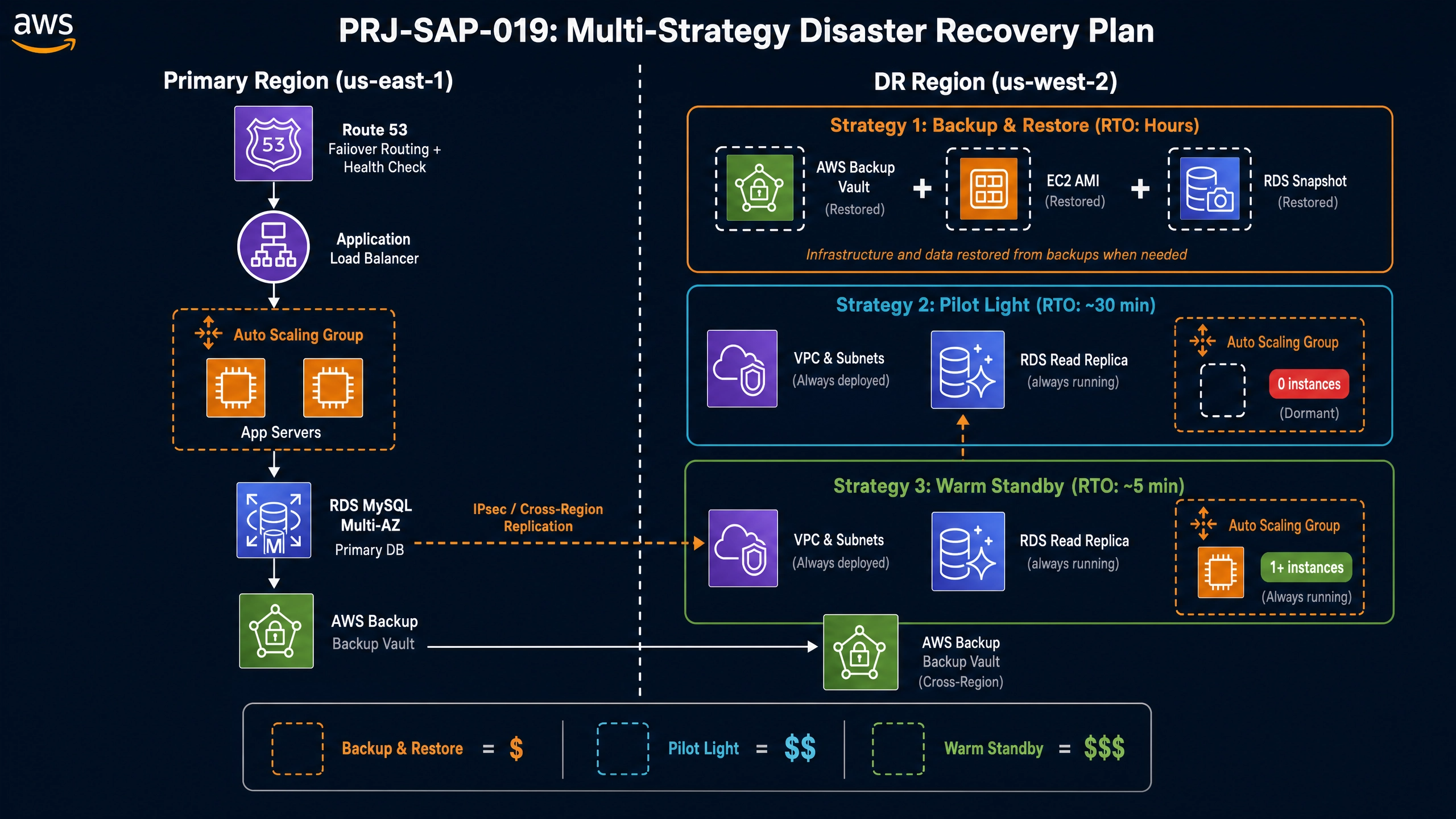
Architecture Diagram

PRJ-AWS-SAP-019 Architecture

Technology Stack

Backup
DRS
CloudEndure
Route 53
DR

Complete Documentation

Prerequisites

IAM Admin or PowerUser role
AWS CLI v2 configured
Terraform >= 1.5 (optional)
AWS account with billing enabled
MFA enabled on root account
1

Clone & Configure

Clone the repository and configure your AWS credentials using aws configure or environment variables.

aws configure --profile cloudguard
2

Review IAM Policies

Review and attach the required IAM policies to your deployment role. Ensure least-privilege access is applied.

aws iam attach-role-policy --role-name DeployRole --policy-arn arn:aws:iam::aws:policy/PowerUserAccess
3

Initialize Infrastructure

Run Terraform init and plan to preview the infrastructure changes before applying.

terraform init && terraform plan -out=tfplan
4

Deploy Resources

Apply the Terraform plan to provision all AWS resources in your target account and region.

terraform apply tfplan
5

Verify & Monitor

Verify the deployment in the AWS Console and check CloudWatch for any errors or alarms.

aws cloudwatch describe-alarms --state-value ALARM

Deployment Guide

Step-by-step instructions to deploy this project

Download Guide

Architecture Diagram

Visual representation of the system architecture

Download Architecture

Source Code

Complete source code and configuration files

View on GitHub

Video Tutorial

Watch the complete walkthrough video

Watch Now