Complete AWS AWS Security Specialty

Enterprise Zero Trust Network Architecture

PRJ-AWS-SEC-007

Zero-trust security model with identity-based access and network segmentation

~8 min read Advanced
Status Completed
Last Updated Mar 10, 2026
Completion 100%
Status: Completed· Last Updated: Mar 10, 2026· Completion: 100%· ~8 min read· Advanced

Estimated Monthly Cost

~$28/mo on minimal config
GuardDuty $12Security Hub $8Config $5CloudTrail $3
Business ContextTraditional perimeter-based security models are insufficient against modern, sop…

The Problem

  • Traditional perimeter-based security models are insufficient against modern, sophisticated threats and insider risks, leading to potential data breaches.
  • Managing secure access for a distributed workforce and third-party partners to internal applications without exposing the corporate network creates significant operational overhead and attack surface.
  • Lack of granular control over network traffic and application access within the corporate network allows for lateral movement of threats once a perimeter is breached.

The Solution

  • Implements AWS Verified Access to provide secure, identity-aware access to applications without a VPN, enforcing security policies at the application layer.
  • Utilizes AWS VPC and AWS PrivateLink to establish isolated and private network connectivity between services and applications, minimizing exposure to the public internet.
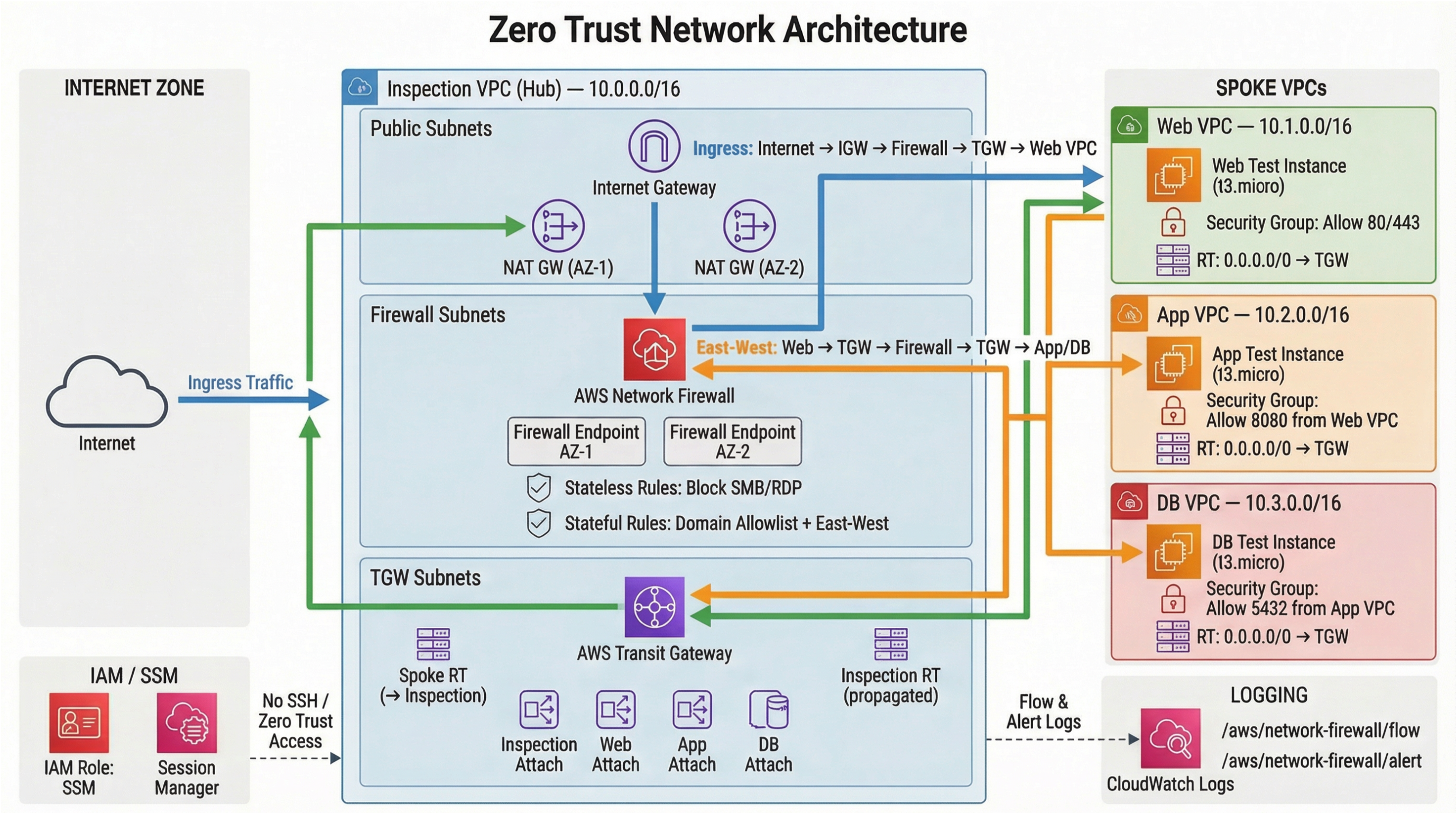
  • Deploys AWS Network Firewall within the VPC to inspect and filter all inbound and outbound network traffic, preventing unauthorized communication and data exfiltration.

Business Value

  • Reduces the attack surface by 60% through granular, identity-based access controls, minimizing unauthorized access attempts.
  • Improves operational efficiency by 30% by streamlining secure remote access management and reducing VPN infrastructure overhead.
  • Enhances compliance posture by 25% by providing detailed audit trails for every application access request and network flow.
  • Decreases the mean time to detect (MTTD) and respond (MTTR) to security incidents by 40% through centralized network traffic inspection and threat blocking.

Risk Mitigation

  • Mitigates unauthorized access and data breaches by enforcing a
GRC MappingNIST Cybersecurity Framework (CSF): Implements functions like Identify, Protect,…

Compliance Frameworks

  • NIST Cybersecurity Framework (CSF): Implements functions like Identify, Protect, Detect, Respond, and Recover through robust security controls.
  • ISO/IEC 27001: Addresses Annex A controls related to access control, cryptography, communications security, and supplier relationships.
  • SOC 2 Type 2: Supports Trust Services Criteria for Security, Availability, and Confidentiality through comprehensive network and access controls.
  • PCI DSS (if applicable): Contributes to requirements for protecting cardholder data environment through network segmentation and access restrictions.

Security Controls Implemented

  • Identity-Based Access Control: Enforced via AWS Verified Access, ensuring only authenticated and authorized users/devices can reach applications.
  • Network Segmentation: Achieved using AWS VPCs and subnets, isolating different application tiers and environments.
  • Traffic Filtering and Inspection: Implemented with AWS Network Firewall, providing stateful inspection, intrusion prevention, and web filtering.
  • Private Connectivity: Established through AWS PrivateLink, securing traffic between VPCs and services without traversing the public internet.
  • Least Privilege Access: Configured across all AWS services, granting only necessary permissions for network and application resources.

Audit Evidence

  • AWS CloudTrail Logs: Records all API calls and actions related to Verified Access, VPC, PrivateLink, and Network Firewall configurations.
  • AWS Flow Logs: Captures detailed information about IP traffic going to and from network interfaces in the VPC.
  • AWS Config Rules: Provides continuous monitoring and assessment of resource configurations against desired baselines.
  • AWS Network Firewall Logs: Delivers granular insights into network traffic inspection, threat detection, and blocking events.

Regulatory Alignment

  • GDPR (Article 32): Supports security of processing personal data through robust access controls and network security measures.
  • HIPAA (45 CFR Part 164.312): Addresses technical safeguards for electronic protected health information (EPHI) including access control and transmission security.
  • CCPA (Section 1798.150): Helps prevent unauthorized access and exfiltration of consumer personal information through enhanced security.
  • SOX (Section 302/404): Contributes to the integrity and security of financial reporting systems by securing underlying infrastructure.

Video tutorial coming soon!

Subscribe to our YouTube channel to get notified when this tutorial is published.

Subscribe on YouTube

Architecture Diagram
PRJ-AWS-SEC-007 Architecture

Technology Stack

Verified Access
VPC
PrivateLink
Network Firewall
Zero Trust

Complete Documentation

Prerequisites

IAM Admin or PowerUser role
AWS CLI v2 configured
Terraform >= 1.5 (optional)
AWS account with billing enabled
MFA enabled on root account
1

Clone & Configure

Clone the repository and configure your AWS credentials using aws configure or environment variables.

aws configure --profile cloudguard
2

Review IAM Policies

Review and attach the required IAM policies to your deployment role. Ensure least-privilege access is applied.

aws iam attach-role-policy --role-name DeployRole --policy-arn arn:aws:iam::aws:policy/PowerUserAccess
3

Initialize Infrastructure

Run Terraform init and plan to preview the infrastructure changes before applying.

terraform init && terraform plan -out=tfplan
4

Deploy Resources

Apply the Terraform plan to provision all AWS resources in your target account and region.

terraform apply tfplan
5

Verify & Monitor

Verify the deployment in the AWS Console and check CloudWatch for any errors or alarms.

aws cloudwatch describe-alarms --state-value ALARM

Deployment Guide

Step-by-step instructions to deploy this project

Download Guide

Architecture Diagram

Visual representation of the system architecture

Download Architecture

Source Code

Complete source code and configuration files

View on GitHub

Video Tutorial

Watch the complete walkthrough video

Watch Now