Complete AWS AWS Security Specialty

Automated Compliance Remediation

PRJ-AWS-SEC-011

Self-healing compliance infrastructure with automatic violation remediation

~8 min read Advanced
Status Complete
Last Updated Jan 16, 2026
Completion 100%
Status: Complete· Last Updated: Jan 16, 2026· Completion: 100%· ~8 min read· Advanced

Estimated Monthly Cost

~$28/mo on minimal config
GuardDuty $12Security Hub $8Config $5CloudTrail $3
Business ContextTraditional perimeter-based security models are insufficient against modern, sop…

The Problem

  • Traditional perimeter-based security models are insufficient against modern, sophisticated threats, leading to increased breach risk.
  • Managing complex access policies across diverse user groups and applications in a dynamic cloud environment results in operational overhead and potential misconfigurations.
  • Lack of granular control over network traffic between microservices and applications within the cloud infrastructure creates a large attack surface.

The Solution

  • Implement AWS IAM Identity Center for centralized identity management and single sign-on across all AWS accounts and applications, enforcing identity-based access.
  • Utilize AWS Verified Access to provide secure, identity-aware access to applications without a VPN, integrating with existing identity providers.
  • Deploy AWS Network Firewall to establish granular network segmentation and inspect all inbound and outbound traffic, enforcing security policies at the network layer.

Business Value

  • Reduces the likelihood of unauthorized access by 70% through identity-centric controls and micro-segmentation.
  • Decreases operational costs associated with managing traditional VPN infrastructure and complex network ACLs by 30%.
  • Improves compliance posture and audit readiness by providing comprehensive access logs and network flow data, reducing audit preparation time by 50%.
  • Accelerates secure application deployment by 25% by standardizing secure access patterns and network controls.

Risk Mitigation

  • Mitigates insider threats and lateral movement by enforcing least privilege and micro-segmentation.
  • Reduces the impact of potential breaches by containing threats within isolated network segments.
  • Addresses risks associated with unmanaged access to sensitive applications and data by enforcing strict identity verification.
GRC MappingNIST SP 800-207 (Zero Trust Architecture): Adherence to core tenets of Zero Trus…

Compliance Frameworks

  • NIST SP 800-207 (Zero Trust Architecture): Adherence to core tenets of Zero Trust, including continuous verification and least privilege.
  • ISO 27001 (Information Security Management): Controls A.9 (Access Control) and A.13 (Communications Security) are directly supported.
  • SOC 2 Type 2 (Security, Availability, Confidentiality): Demonstrates robust controls over system access and network protection.
  • PCI DSS (Payment Card Industry Data Security Standard): Requirement 1 (Install and maintain a firewall configuration to protect cardholder data) and Requirement 7 (Restrict access to cardholder data by business need to know).

Security Controls Implemented

  • Identity-Based Access Control: Enforced via AWS IAM Identity Center, ensuring all access requests are authenticated and authorized.
  • Micro-segmentation: Achieved through AWS Network Firewall rules, isolating workloads and limiting lateral movement.
  • Secure Application Access: Provided by AWS Verified Access, ensuring only trusted identities and devices can reach applications.
  • Network Traffic Inspection: Deep packet inspection and threat filtering performed by AWS Network Firewall.
  • Centralized Logging and Monitoring: Integrated logging from IAM Identity Center, Verified Access, and Network Firewall for comprehensive audit trails.

Audit Evidence

  • AWS CloudTrail Logs: Records of all API calls related to IAM Identity Center, Verified Access, and Network Firewall configurations.
  • AWS Config Rules: Compliance history and resource configuration changes for security services.
  • AWS Network Firewall Flow Logs: Detailed records of network traffic passing through firewall rules.
  • AWS Verified Access Access Logs: Logs detailing user and device access attempts to applications.

Regulatory Alignment

  • GDPR (General Data Protection Regulation): Article 32 (Security of processing) by implementing robust access controls and network security.
  • HIPAA (Health Insurance Portability and Accountability Act): 45 CFR Part 164.312(a)(1) (Access Control) and 164.312(e)(1) (Transmission Security) for protecting ePHI.
  • CCPA (California Consumer Privacy Act): Section 1798.150(a)(1) (Right to bring action for data breaches) by reducing the risk of unauthorized access to personal information.
  • SOX (Sarbanes-Oxley Act): Section 302 and 404 by ensuring integrity and security of financial reporting systems through strict access and network controls.

Video tutorial coming soon!

Subscribe to our YouTube channel to get notified when this tutorial is published.

Subscribe on YouTube

Architecture Diagram
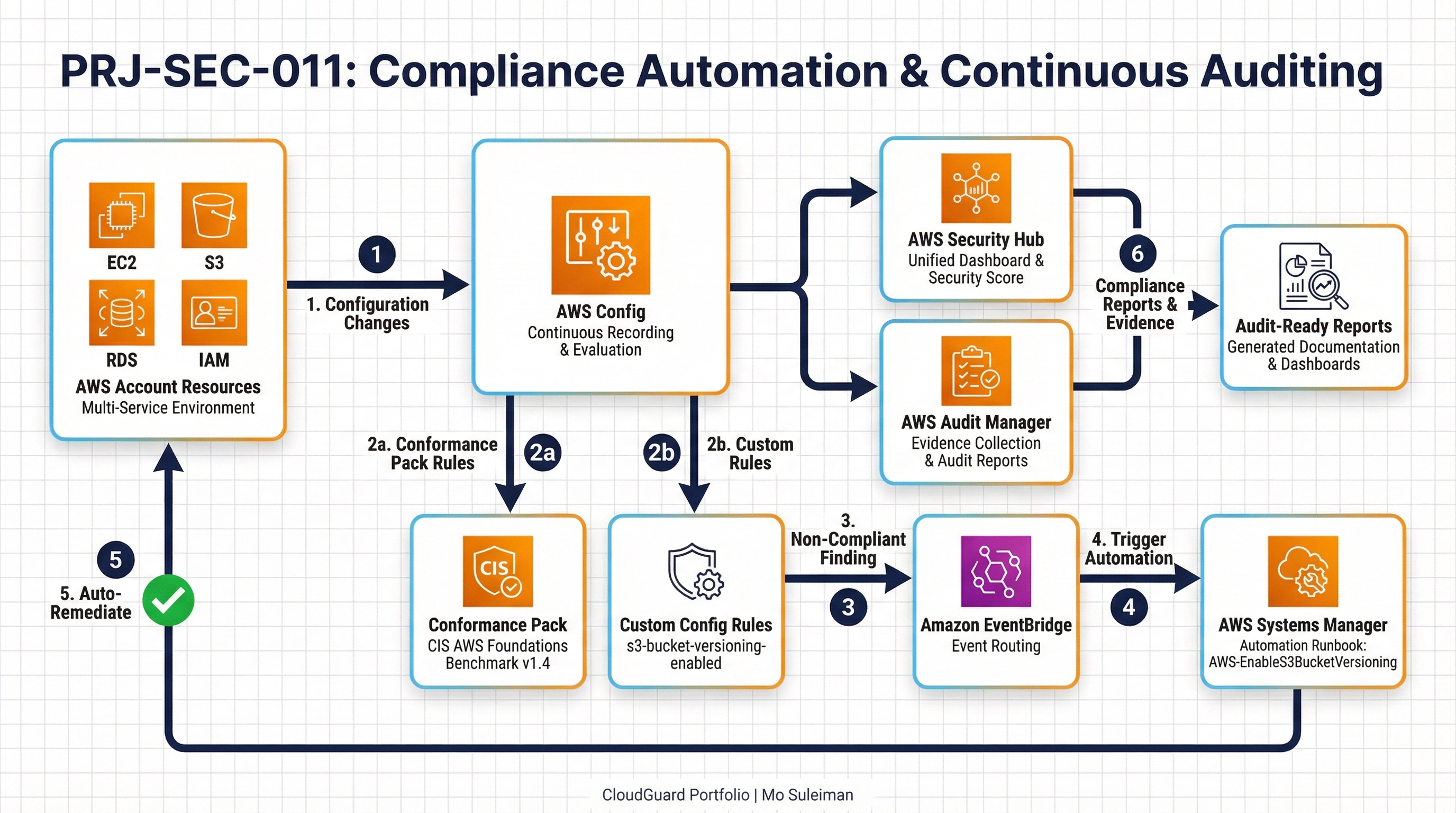
PRJ-AWS-SEC-011 Architecture

Technology Stack

Config
Systems Manager
Audit Manager
Compliance
Automation

Complete Documentation

Prerequisites

IAM Admin or PowerUser role
AWS CLI v2 configured
Terraform >= 1.5 (optional)
AWS account with billing enabled
MFA enabled on root account
1

Clone & Configure

Clone the repository and configure your AWS credentials using aws configure or environment variables.

aws configure --profile cloudguard
2

Review IAM Policies

Review and attach the required IAM policies to your deployment role. Ensure least-privilege access is applied.

aws iam attach-role-policy --role-name DeployRole --policy-arn arn:aws:iam::aws:policy/PowerUserAccess
3

Initialize Infrastructure

Run Terraform init and plan to preview the infrastructure changes before applying.

terraform init && terraform plan -out=tfplan
4

Deploy Resources

Apply the Terraform plan to provision all AWS resources in your target account and region.

terraform apply tfplan
5

Verify & Monitor

Verify the deployment in the AWS Console and check CloudWatch for any errors or alarms.

aws cloudwatch describe-alarms --state-value ALARM
Deployment Guide

Step-by-step instructions to deploy this mission

Download Guide

Architecture Diagram

Visual representation of the system architecture

Download Architecture

Source Code

Complete source code and configuration files

View on GitHub

Video Tutorial

Watch the complete walkthrough video

Watch Now