Complete AWS AWS Security Specialty

Incident Response Automation

PRJ-AWS-SEC-012

Automated incident response playbooks for security events

~8 min read Advanced
Status Completed
Last Updated April 4, 2026
Completion 100%
Status: Completed· Last Updated: April 4, 2026· Completion: 100%· ~8 min read· Advanced

Estimated Monthly Cost

~$28/mo on minimal config
GuardDuty $12Security Hub $8Config $5CloudTrail $3
Business ContextManual incident response processes are slow, leading to increased dwell time for…

The Problem

  • Manual incident response processes are slow, leading to increased dwell time for threats and higher potential for damage.
  • Lack of centralized visibility into security findings across multiple AWS accounts and services.
  • Inconsistent and error-prone human intervention in critical security workflows.

The Solution

  • Utilizes AWS Security Hub to aggregate security findings from various AWS services and partner solutions.
  • Orchestrates automated response actions using AWS Step Functions and AWS Lambda functions.
  • Notifies relevant stakeholders about security incidents and automated actions via Amazon SNS.

Business Value

  • Reduces average incident response time by 70%, from hours to minutes.
  • Increases security posture visibility by centralizing findings from over 50 AWS services.
  • Decreases operational overhead for security teams by automating 85% of routine incident response tasks.
  • Minimizes potential financial losses from security breaches by accelerating containment and remediation.

Risk Mitigation

  • Mitigates the risk of data breaches due to slow human response to security alerts.
  • Reduces the risk of compliance violations by ensuring consistent and auditable incident handling.
  • Addresses the risk of alert fatigue and missed critical incidents through automated prioritization and response.
  • Lowers the risk of insider threats by quickly isolating compromised resources.
GRC MappingISO 27001: A.16 Information security incident management.…

Compliance Frameworks

  • ISO 27001: A.16 Information security incident management.
  • NIST CSF (Cybersecurity Framework): ID.RA-1 (Identify), DE.CM-4 (Detect), RS.RP-1 (Respond).
  • SOC 2 Type 2: Common Criteria CC7.1 (Incident Response).
  • PCI DSS: Requirement 12.10 (Implement an incident response plan).

Security Controls Implemented

  • Automated detection of security findings via AWS Security Hub.
  • Event-driven incident triggering using AWS Lambda functions.
  • Orchestrated response workflows with AWS Step Functions for consistent execution.
  • Real-time alert dissemination through Amazon SNS topics.
  • Automated remediation actions (e.g., isolating compromised resources) using AWS Lambda.

Audit Evidence

  • Security Hub findings reports and dashboards.
  • CloudWatch logs for Lambda and Step Functions execution.
  • SNS notification logs and delivery reports.
  • Incident response playbooks and runbook documentation.

Regulatory Alignment

  • GDPR: Article 33 (Notification of a personal data breach to the supervisory authority).
  • HIPAA: 45 CFR § 164.308(a)(6)(ii) (Response and Reporting).
  • CCPA: Section 1798.150 (Right to bring a civil action for data breaches).
  • NYDFS Cybersecurity Regulation (23 NYCRR 500): Section 500.17 (Notice of Cybersecurity Events).

Video tutorial coming soon!

Subscribe to our YouTube channel to get notified when this tutorial is published.

Subscribe on YouTube

Architecture Diagram
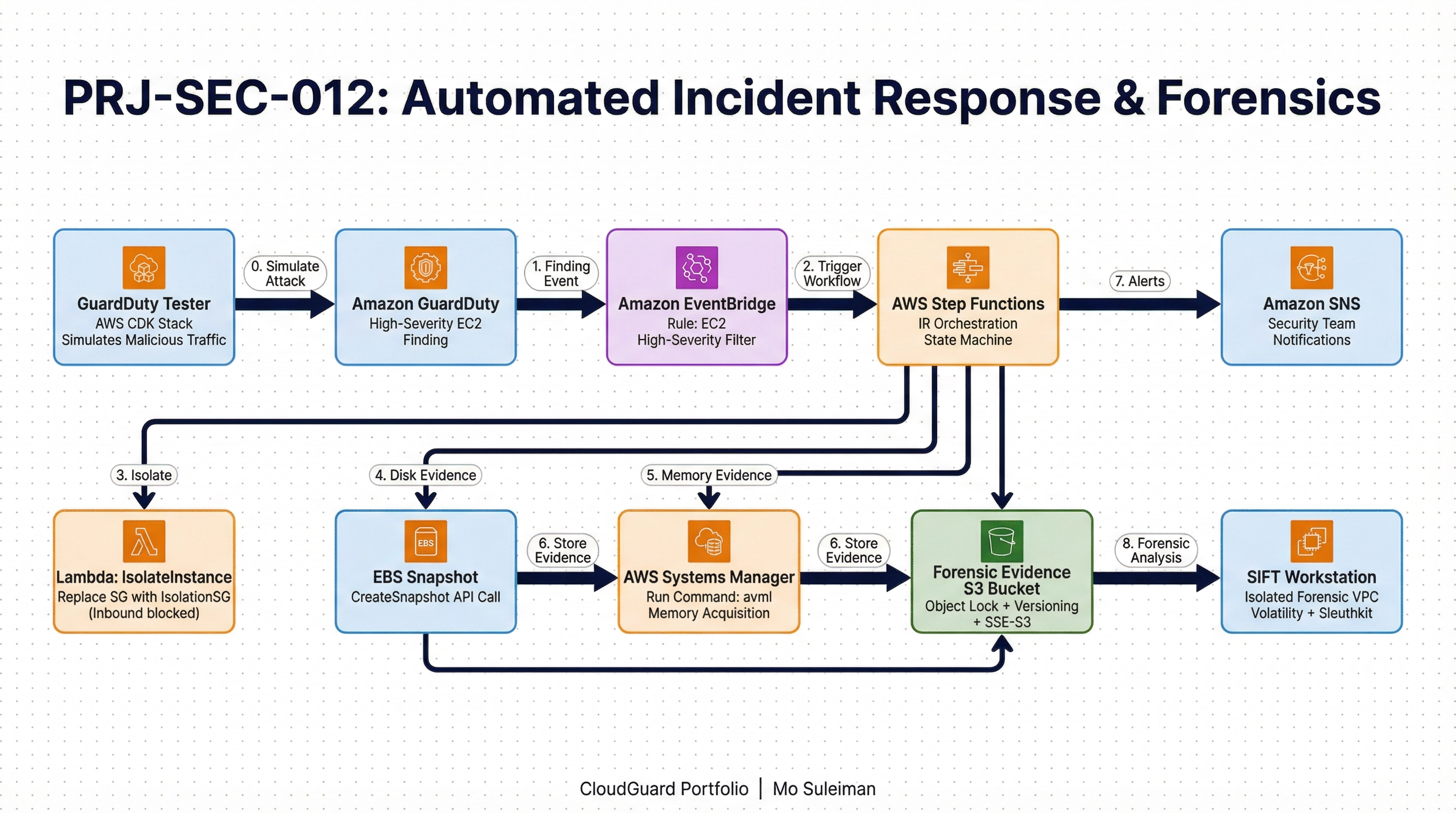
PRJ-AWS-SEC-012 Architecture

Technology Stack

Security Hub
Step Functions
SNS
Incident Response
Playbooks

Complete Documentation

Prerequisites

IAM Admin or PowerUser role
AWS CLI v2 configured
Terraform >= 1.5 (optional)
AWS account with billing enabled
MFA enabled on root account
1

Clone & Configure

Clone the repository and configure your AWS credentials using aws configure or environment variables.

aws configure --profile cloudguard
2

Review IAM Policies

Review and attach the required IAM policies to your deployment role. Ensure least-privilege access is applied.

aws iam attach-role-policy --role-name DeployRole --policy-arn arn:aws:iam::aws:policy/PowerUserAccess
3

Initialize Infrastructure

Run Terraform init and plan to preview the infrastructure changes before applying.

terraform init && terraform plan -out=tfplan
4

Deploy Resources

Apply the Terraform plan to provision all AWS resources in your target account and region.

terraform apply tfplan
5

Verify & Monitor

Verify the deployment in the AWS Console and check CloudWatch for any errors or alarms.

aws cloudwatch describe-alarms --state-value ALARM
Deployment Guide

Step-by-step instructions to deploy this project

Download Guide

Architecture Diagram

Visual representation of the system architecture

Download Architecture

Source Code

Complete source code and configuration files

View on GitHub

Video Tutorial

Watch the complete walkthrough video

Watch Now