Coming Soon AZURE Azure AI Engineer

Computer Vision Pipeline

PRJ-AZURE-AI-052

Automated image classification and object detection

~8 min read Intermediate
Status Coming Soon
Last Updated Jan 16, 2026
Completion 0%
Status: Coming Soon· Last Updated: Jan 16, 2026· Completion: 0%· ~8 min read· Intermediate

Implementation Guide

Comprehensive step-by-step deployment guide

Download Implementation Guide

Estimated Monthly Cost

~$38/mo on minimal config
ComputeStorageMonitor
Business ContextManual, time-consuming visual inspection processes leading to high operational c…

The Problem

  • Manual, time-consuming visual inspection processes leading to high operational costs and human error in quality control.
  • Lack of scalable and real-time object detection capabilities for large volumes of visual data, hindering rapid decision-making.
  • Inconsistent classification accuracy across diverse image datasets due to reliance on traditional, non-AI methods.

The Solution

  • Implements Azure Custom Vision for tailored image classification models, enabling precise identification of domain-specific objects.
  • Leverages Azure Cognitive Services (specifically Computer Vision API) to perform advanced image analysis, including object detection and attribute extraction.
  • Orchestrates automated workflows using Azure Logic Apps to trigger image processing upon upload and route classification results to downstream systems.

Business Value

  • Reduces manual inspection time by 70%, reallocating human resources to higher-value tasks.
  • Increases object detection accuracy to 95% for critical assets, minimizing false positives and negatives.
  • Accelerates visual data processing throughput by 5x, supporting real-time operational insights.
  • Decreases operational costs associated with quality control and visual data analysis by 30% annually.

Risk Mitigation

  • Mitigates risks of human error and inconsistency in visual data analysis through automated, AI-driven processes.
  • Reduces compliance risks associated with data privacy by implementing secure Azure Cognitive Services endpoints.
  • Ensures business continuity by providing a scalable and resilient computer vision pipeline on Azure.
GRC MappingNIST AI Risk Management Framework (AI RMF) v1.0: Addresses trustworthy AI system…

Compliance Frameworks

  • NIST AI Risk Management Framework (AI RMF) v1.0: Addresses trustworthy AI system design and deployment.
  • ISO/IEC 42001:2023 (AI Management System): Provides guidance for managing AI systems responsibly.
  • SOC 2 Type 2: Ensures security, availability, processing integrity, confidentiality, and privacy of data processed by the pipeline.

Security Controls Implemented

  • Access Control: Azure Active Directory integration for Custom Vision and Cognitive Services access.
  • Data Encryption: Data at rest encrypted using Azure Storage encryption for images and models.
  • Logging and Monitoring: Azure Monitor and Azure Log Analytics for tracking Logic Apps executions and API calls.
  • Secure Configuration: Azure Policy to enforce secure configurations for all deployed Azure resources.
  • Vulnerability Management: Regular scanning of Azure Container Registry images used by Custom Vision for vulnerabilities.

Audit Evidence

  • Azure Activity Logs: Records of all management operations and service health events.
  • Azure Diagnostic Logs: Detailed logs from Custom Vision, Cognitive Services, and Logic Apps.
  • Azure Policy Compliance Reports: Demonstrates adherence to security and configuration policies.
  • Security Center Alerts: Records of detected threats and security recommendations.

Regulatory Alignment

  • GDPR (General Data Protection Regulation) Article 5: Principles relating to processing of personal data (e.g., data minimization in image processing).
  • HIPAA (Health Insurance Portability and Accountability Act) Security Rule § 164.312: Technical safeguards for ePHI (e.g., access control for medical images).
  • California Consumer Privacy Act (CCPA) Section 1798.100: Consumer right to know about personal information collected (e.g., transparency in image data usage).

Video tutorial coming soon!

Subscribe to our YouTube channel to get notified when this tutorial is published.

Subscribe on YouTube

Architecture Diagram
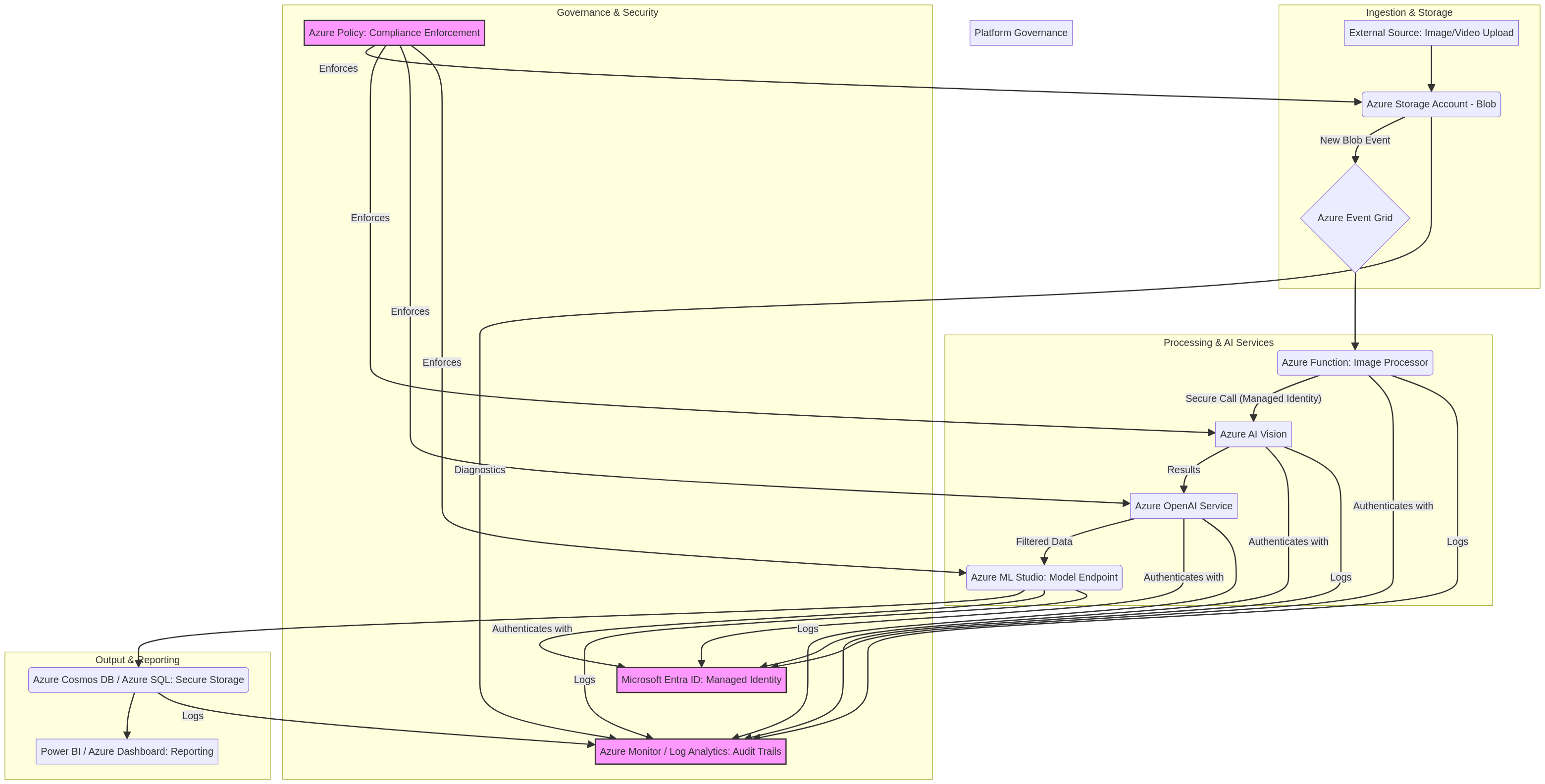
PRJ-AZURE-AI-052 Architecture

Technology Stack

Custom Vision
Cognitive Services
Logic Apps
Computer Vision

Complete Documentation

Prerequisites

Contributor or Owner role
Azure CLI 2.x configured
Terraform >= 1.5 (optional)
Active Azure subscription
Service Principal with RBAC
1

Clone & Authenticate

Clone the repository and authenticate with Azure CLI using your service principal or interactive login.

az login && az account set --subscription 
2

Review RBAC Assignments

Review the required role assignments and ensure your identity has the correct permissions in the target resource group.

az role assignment list --assignee 
3

Initialize Infrastructure

Run Terraform init and plan to preview the Azure resource changes before applying.

terraform init && terraform plan -out=tfplan
4

Deploy Resources

Apply the Terraform plan to provision all Azure resources in your target subscription.

terraform apply tfplan
5

Verify & Monitor

Verify the deployment in the Azure Portal and check Azure Monitor for any alerts or issues.

az monitor activity-log list --resource-group 

Deployment Guide

Step-by-step instructions to deploy this project

Download Guide

Architecture Diagram

Visual representation of the system architecture

Download Architecture

Source Code

Complete source code and configuration files

View on GitHub

Video Tutorial

Watch the complete walkthrough video

Watch Now