Coming Soon AZURE Azure Data Engineer

Streaming Analytics with Stream Analytics

PRJ-AZURE-DATA-074

Real-time IoT data processing

~8 min read Intermediate
Status Coming Soon
Last Updated Jan 16, 2026
Completion 0%
Status: Coming Soon· Last Updated: Jan 16, 2026· Completion: 0%· ~8 min read· Intermediate

Implementation Guide

Comprehensive step-by-step deployment guide

Download Implementation Guide

Estimated Monthly Cost

~$42/mo on minimal config
Synapse $18Data Factory $10Storage $8Monitor $6
Business ContextOrganizations struggle with ingesting and processing high-volume, high-velocity …

The Problem

  • Organizations struggle with ingesting and processing high-volume, high-velocity IoT telemetry data from diverse devices, leading to data silos and delayed insights.
  • Lack of real-time visibility into operational performance and equipment health prevents proactive maintenance and optimization, resulting in increased downtime and operational costs.
  • Complex and disparate data sources make it challenging to correlate time-series data, identify anomalies, and predict future trends effectively.

The Solution

  • Implements Azure IoT Hub for secure, bi-directional communication with millions of IoT devices, enabling reliable ingestion of telemetry data.
  • Utilizes Azure Event Hubs to process high-throughput data streams from IoT devices, ensuring scalable and low-latency data capture.
  • Deploys Azure Time Series Insights (TSI) for real-time analytics, visualization, and exploration of time-series data, providing operational intelligence.

Business Value

  • Reduces equipment downtime by 15% through predictive maintenance insights derived from real-time IoT data analysis.
  • Improves operational efficiency by 20% by providing real-time visibility into asset performance and anomaly detection.
  • Accelerates time-to-insight for IoT data from hours to minutes, enabling faster decision-making and response to critical events.
  • Achieves a 99.9% data ingestion reliability for IoT telemetry, ensuring comprehensive data availability for analysis.

Risk Mitigation

  • Addresses data loss risks during ingestion by leveraging Azure Event Hubs' durable buffer and partitioned consumer groups.
  • Mitigates security vulnerabilities for IoT devices and data streams through Azure IoT Hub's built-in security features, including per-device authentication and access control.
  • Reduces the risk of stale or inaccurate insights by providing real-time data processing and visualization capabilities with Azure Time Series Insights.
  • Ensures data scalability and availability for growing IoT deployments by utilizing Azure's elastic cloud infrastructure.
GRC MappingISO 27001:2022(Information Security Management): Controls related to access cont…

Compliance Frameworks

  • ISO 27001:2022 (Information Security Management): Controls related to access control, cryptography, and operational security for IoT data.
  • NIST Cybersecurity Framework (CSF): Focus on Identify, Protect, Detect, Respond, and Recover functions for IoT telemetry systems.
  • GDPR (General Data Protection Regulation): Principles of data minimization, purpose limitation, and data subject rights for any personal data within IoT telemetry.
  • IEC 62443 (Security for industrial automation and control systems): Relevant for securing industrial IoT (IIoT) deployments and data integrity.

Security Controls Implemented

  • Access Control: Role-Based Access Control (RBAC) implemented in Azure IoT Hub and Time Series Insights to restrict data access.
  • Data Encryption in Transit: TLS 1.2 encryption enforced for all data streams between IoT devices and Azure IoT Hub, and within Azure services.
  • Data Encryption at Rest: Data stored in Azure Time Series Insights is encrypted at rest using Microsoft-managed keys.
  • Anomaly Detection: Azure Time Series Insights' built-in anomaly detection capabilities monitor telemetry for unusual patterns.
  • Logging and Monitoring: Comprehensive logging of IoT Hub and Event Hubs activities integrated with Azure Monitor for security event analysis.

Audit Evidence

  • Azure Activity Logs for IoT Hub and Event Hubs operations, demonstrating administrative actions and configuration changes.
  • Azure Security Center recommendations and compliance scores for IoT solutions, showing adherence to security best practices.
  • Time Series Insights query logs and access patterns, providing evidence of data access and usage.
  • Network security group (NSG) flow logs for IoT solution components, detailing network traffic and access attempts.

Regulatory Alignment

  • GDPR Article 5: Principles relating to processing of personal data, ensuring lawful, fair, and transparent handling of IoT data.
  • GDPR Article 32: Security of processing, requiring appropriate technical and organizational measures to ensure a level of security appropriate to the risk.
  • HIPAA Security Rule (45 CFR Part 164, Subpart C): If health-related IoT data is processed, ensuring confidentiality, integrity, and availability of electronic protected health information.
  • California Consumer Privacy Act (CCPA) Section 1798.100: Consumer rights regarding personal information collected via IoT devices, including right to know and delete.

Video tutorial coming soon!

Subscribe to our YouTube channel to get notified when this tutorial is published.

Subscribe on YouTube

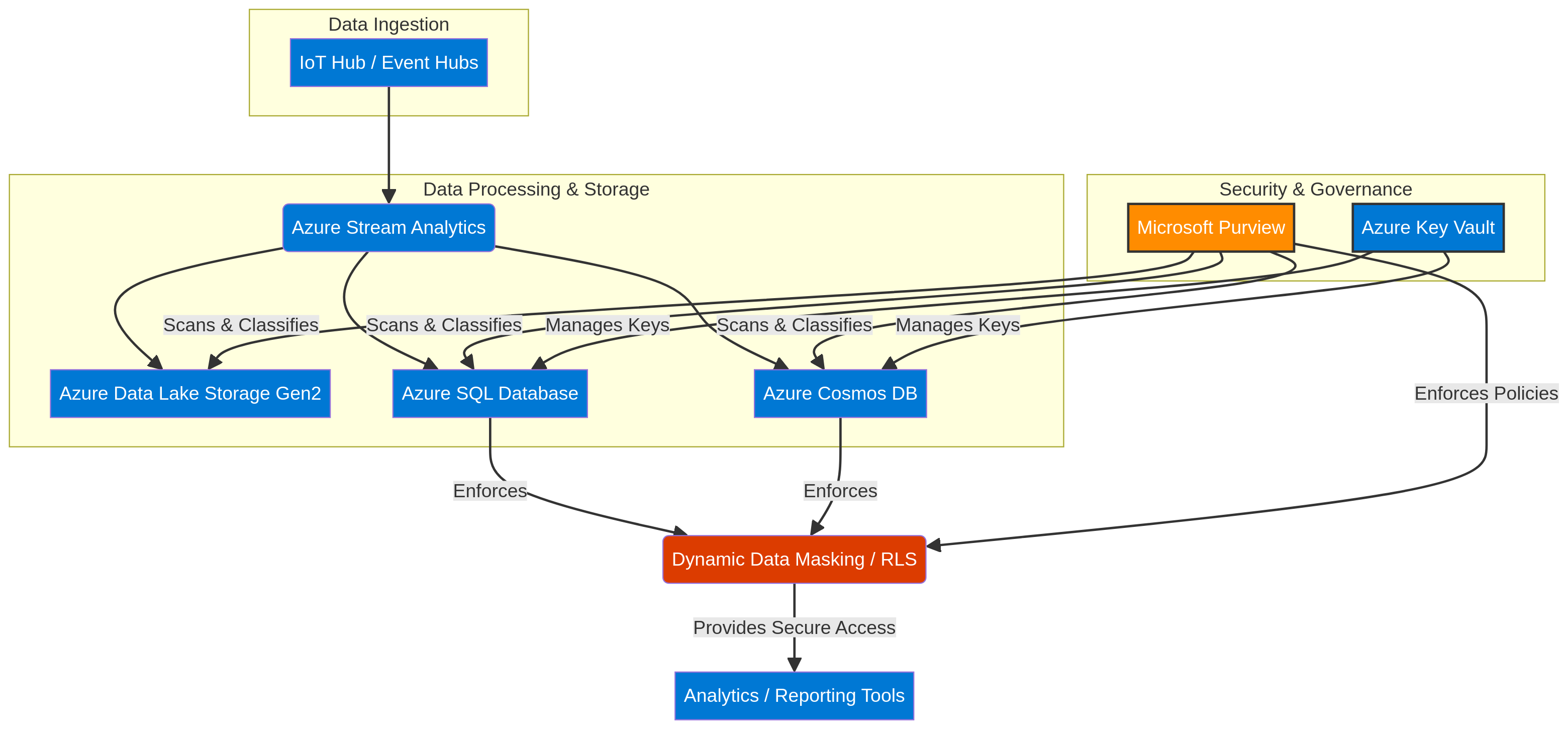
Architecture Diagram

PRJ-AZURE-DATA-074 Architecture

Technology Stack

Stream Analytics
IoT Hub
Cosmos DB
Streaming

Complete Documentation

Prerequisites

Contributor or Owner role
Azure CLI 2.x configured
Terraform >= 1.5 (optional)
Active Azure subscription
Service Principal with RBAC
1

Clone & Authenticate

Clone the repository and authenticate with Azure CLI using your service principal or interactive login.

az login && az account set --subscription 
2

Review RBAC Assignments

Review the required role assignments and ensure your identity has the correct permissions in the target resource group.

az role assignment list --assignee 
3

Initialize Infrastructure

Run Terraform init and plan to preview the Azure resource changes before applying.

terraform init && terraform plan -out=tfplan
4

Deploy Resources

Apply the Terraform plan to provision all Azure resources in your target subscription.

terraform apply tfplan
5

Verify & Monitor

Verify the deployment in the Azure Portal and check Azure Monitor for any alerts or issues.

az monitor activity-log list --resource-group 

Deployment Guide

Step-by-step instructions to deploy this project

Download Guide

Architecture Diagram

Visual representation of the system architecture

Download Architecture

Source Code

Complete source code and configuration files

View on GitHub

Video Tutorial

Watch the complete walkthrough video

Watch Now