Coming Soon AZURE Azure Security Engineer

DDoS Protection and WAF

PRJ-AZURE-SEC-061

Multi-layered application protection

~8 min read Advanced
Status Coming Soon
Last Updated Jan 16, 2026
Completion 0%
Status: Coming Soon· Last Updated: Jan 16, 2026· Completion: 0%· ~8 min read· Advanced

Implementation Guide

Comprehensive step-by-step deployment guide

Download Implementation Guide

Estimated Monthly Cost

~$38/mo on minimal config
ComputeStorageMonitor
Business ContextUnmitigated Distributed Denial of Service (DDoS) attacks leading to critical app…

The Problem

  • Unmitigated Distributed Denial of Service (DDoS) attacks leading to critical application downtime and significant financial losses.
  • Persistent web application vulnerabilities (e.g., SQL injection, cross-site scripting) exploited by attackers, resulting in data breaches and reputational damage.
  • Lack of a unified, scalable security solution for global web applications, leading to complex management overhead and inconsistent protection across environments.

The Solution

  • Implements Azure DDoS Protection Standard to provide comprehensive defense against volumetric, protocol, and resource-layer DDoS attacks.
  • Deploys Azure Application Gateway Web Application Firewall (WAF) to protect web applications from common exploits and vulnerabilities, including OWASP Top 10 threats.
  • Utilizes Azure Front Door with integrated WAF policies for global threat protection, accelerated content delivery, and intelligent traffic routing to enhance application resilience and performance.

Business Value

  • Achieves 99.99% uptime SLA for critical web applications by effectively mitigating DDoS attacks and preventing service disruptions.
  • Reduces the incidence of successful web application exploits by over 95% through proactive WAF protection and real-time threat intelligence.
  • Improves global web application response times by an average of 30% due to Azure Front Door's optimized routing and caching capabilities.
  • Lowers security operational costs by 25% through centralized management and automated threat detection across Azure security services.

Risk Mitigation

  • Mitigates Distributed Denial of Service (DDoS) attacks that target application availability and network resources.
  • Addresses web application vulnerabilities such as SQL injection, cross-site scripting (XSS), and other OWASP Top 10 risks.
  • Reduces the risk of data breaches and unauthorized access to sensitive information via compromised web applications.
  • Minimizes reputational damage and financial penalties associated with security incidents and non-compliance.
GRC MappingISO 27001: Annex A.12.4.1 (Logging and monitoring) and A.14.2.5 (Secure system e…

Compliance Frameworks

  • ISO 27001: Annex A.12.4.1 (Logging and monitoring) and A.14.2.5 (Secure system engineering principles) for robust security controls.
  • NIST SP 800-53: Control SC-5 (Denial of Service Protection) and SC-7 (Boundary Protection) for comprehensive system and information integrity.
  • SOC 2 Type 2: Addresses the Security and Availability principles by demonstrating effective controls over system protection and operational performance.
  • PCI DSS v4.0: Requirement 6.4.1 (Protecting web applications from attacks) and 11.4.1 (External vulnerability scans) for payment card data security.

Security Controls Implemented

  • Azure DDoS Protection Standard: Provides always-on traffic monitoring and automatic mitigation of common network-layer attacks.
  • Azure Application Gateway WAF: Filters malicious web traffic based on OWASP Core Rule Set and custom rules, preventing application-layer attacks.
  • Azure Front Door WAF Policies: Enforces global security policies at the edge, protecting applications from threats before they reach the backend.
  • Azure Security Center (Defender for Cloud): Provides continuous security posture management and threat protection recommendations for WAF and DDoS configurations.
  • Azure Monitor & Azure Sentinel: Collects and analyzes security logs from DDoS Protection, Application Gateway, and Front Door for threat detection and incident response.

Audit Evidence

  • Azure DDoS Protection Logs: Records of detected and mitigated DDoS attacks, including attack type, duration, and traffic volume.
  • Azure Application Gateway WAF Logs: Detailed logs of blocked web requests, identified attack patterns, and WAF rule evaluations.
  • Azure Front Door Access and WAF Logs: Logs detailing traffic patterns, WAF policy hits, and security events at the edge.
  • Azure Policy Compliance Reports: Reports demonstrating adherence to security configurations for DDoS Protection, Application Gateway, and Front Door.

Regulatory Alignment

  • GDPR (Article 32): Requires appropriate technical and organizational measures to ensure a level of security appropriate to the risk, including protection against accidental or unlawful destruction, loss, alteration, unauthorized disclosure of, or access to personal data.
  • HIPAA (45 CFR Part 164.308(a)(1)(ii)(B)): Requires implementation of security measures to guard against unauthorized access to electronic protected health information (ePHI) and protect its integrity.
  • CCPA (California Civil Code § 1798.150): Addresses the right to bring a civil action in the event of a data breach resulting from a business's violation of the duty to implement and maintain reasonable security procedures and practices.
  • NIST Cybersecurity Framework (CSF) (PR.PT-1): Protect information and systems from unauthorized access, use, disclosure, disruption, modification, or destruction.

Video tutorial coming soon!

Subscribe to our YouTube channel to get notified when this tutorial is published.

Subscribe on YouTube

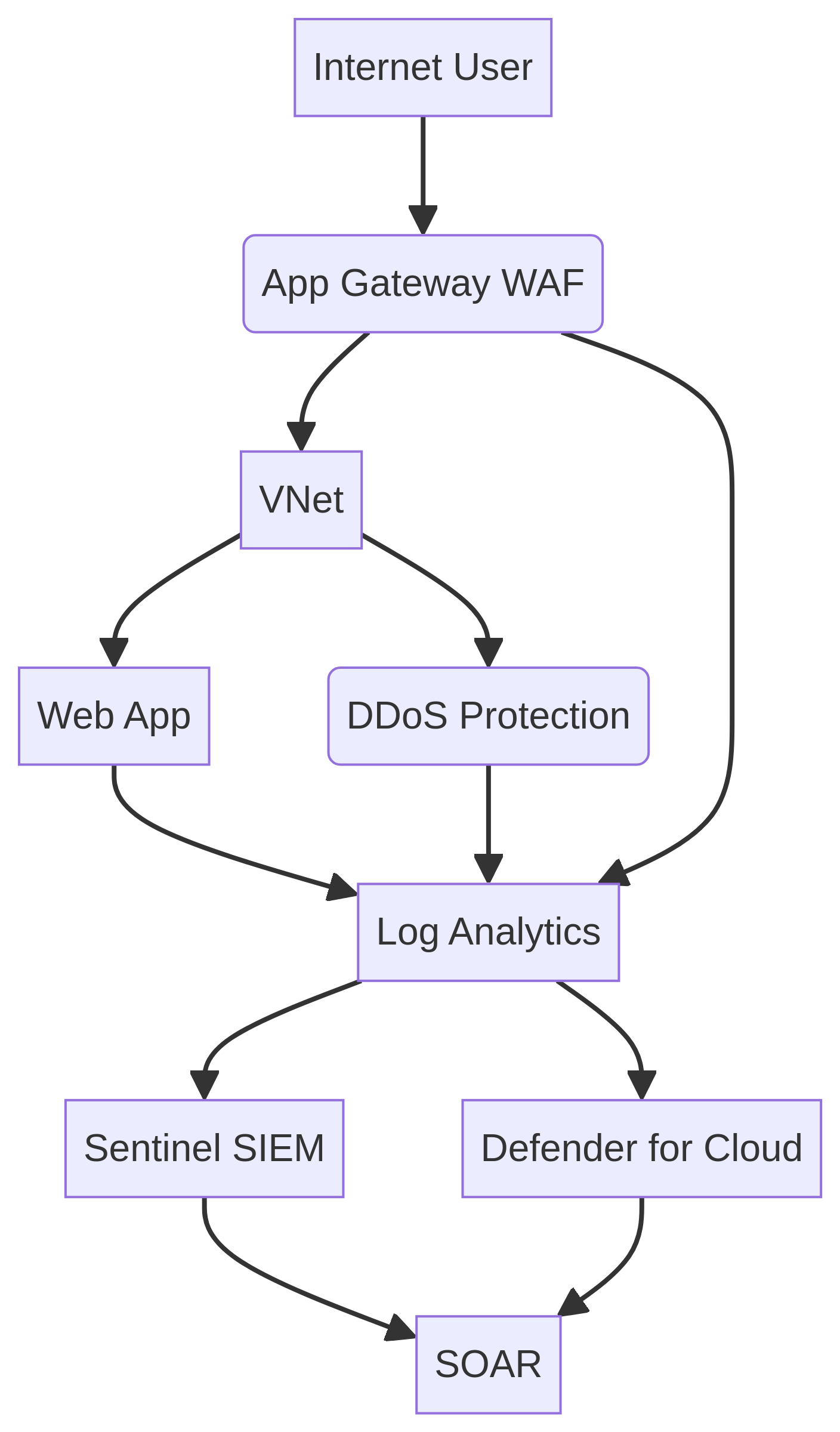
Architecture Diagram

PRJ-AZURE-SEC-061 Architecture

Technology Stack

DDoS Protection
Application Gateway WAF
Front Door
Security

Complete Documentation

Prerequisites

Contributor or Owner role
Azure CLI 2.x configured
Terraform >= 1.5 (optional)
Active Azure subscription
Service Principal with RBAC
1

Clone & Authenticate

Clone the repository and authenticate with Azure CLI using your service principal or interactive login.

az login && az account set --subscription 
2

Review RBAC Assignments

Review the required role assignments and ensure your identity has the correct permissions in the target resource group.

az role assignment list --assignee 
3

Initialize Infrastructure

Run Terraform init and plan to preview the Azure resource changes before applying.

terraform init && terraform plan -out=tfplan
4

Deploy Resources

Apply the Terraform plan to provision all Azure resources in your target subscription.

terraform apply tfplan
5

Verify & Monitor

Verify the deployment in the Azure Portal and check Azure Monitor for any alerts or issues.

az monitor activity-log list --resource-group 

Deployment Guide

Step-by-step instructions to deploy this project

Download Guide

Architecture Diagram

Visual representation of the system architecture

Download Architecture

Source Code

Complete source code and configuration files

View on GitHub

Video Tutorial

Watch the complete walkthrough video

Watch Now