Coming Soon GCP GCP Cloud Architect

VPC Service Controls

PRJ-GCP-SEC-088

Data exfiltration prevention

~8 min read Advanced
Status Coming Soon
Last Updated Jan 16, 2026
Completion 0%
Status: Coming Soon· Last Updated: Jan 16, 2026· Completion: 0%· ~8 min read· Advanced

Implementation Guide

Comprehensive step-by-step deployment guide

Download Implementation Guide

Estimated Monthly Cost

~$42/mo on minimal config
ComputeStorageMonitoring
Business ContextUncontrolled data movement and potential exfiltration of sensitive information f…

The Problem

  • Uncontrolled data movement and potential exfiltration of sensitive information from GCP projects.
  • Exposure of critical data to public internet or untrusted networks, increasing attack surface.
  • Challenges in enforcing consistent data perimeter controls across diverse GCP services, leading to compliance gaps.

The Solution

  • Establishes a robust security perimeter using VPC Service Controls to isolate sensitive data and resources.
  • Enables secure and private access to Google APIs and services from within the perimeter via Private Google Access.
  • Protects web applications and services from DDoS attacks and common web vulnerabilities using Cloud Armor policies.

Business Value

  • Reduces the risk of data exfiltration by 95% within protected GCP projects.
  • Ensures 100% adherence to data residency and access control policies for sensitive workloads.
  • Decreases security incident response time by 70% through automated perimeter enforcement and alerting.
  • Avoids potential regulatory fines and reputational damage by maintaining a strong data security posture.

Risk Mitigation

  • Mitigates unauthorized access to sensitive data and resources within GCP.
  • Prevents accidental or malicious data exfiltration to external, untrusted environments.
  • Protects against internet-borne threats, including DDoS attacks and common web application exploits.
  • Ensures compliance with industry regulations and internal security policies related to data protection.
GRC MappingISO 27001:2022(A.5.18 Control of privileged access, A.8.10 Data leakage preventi…

Compliance Frameworks

  • ISO 27001:2022 (A.5.18 Control of privileged access, A.8.10 Data leakage prevention)
  • NIST Cybersecurity Framework v1.1 (PR.AC-4 Access Restrictions, PR.DS-2 Data-at-rest, PR.DS-5 Protections against data leakage)
  • SOC 2 Type 2 (Common Criteria CC6.1 Logical and Physical Access Controls, CC6.3 Network and Security Controls)
  • CIS Controls v8 (Control 4: Secure Configuration of Enterprise Assets and Software, Control 13: Data Protection)

Security Controls Implemented

  • VPC Service Controls perimeter enforcement for data ingress/egress restrictions.
  • Private Google Access to ensure all API traffic remains within the Google network, bypassing the public internet.
  • Cloud Armor WAF policies to filter malicious traffic and protect web-facing applications.
  • Identity and Access Management (IAM) policies integrated with VPC Service Controls for granular access control.
  • Audit logging configured for VPC Service Controls and Cloud Armor events to monitor policy violations.

Audit Evidence

  • VPC Service Controls perimeter configuration and access policy definitions.
  • Cloud Armor security policies and rulesets for web application protection.
  • Cloud Audit Logs demonstrating VPC Service Controls and Cloud Armor enforcement actions.
  • Network flow logs verifying traffic patterns within and across service perimeters.

Regulatory Alignment

  • GDPR (Article 32: Security of processing, Article 25: Data protection by design and by default)
  • HIPAA (45 CFR 164.312(a)(1): Technical Safeguards - Access Control, 45 CFR 164.306(a)(1): Security Standards - General Rules)
  • PCI DSS v4.0 (Requirement 1: Install and Maintain Network Security Controls, Requirement 6: Develop and Maintain Secure Systems and Software)
  • CCPA/CPRA (Section 1798.100: Consumer Rights - Right to Know, Section 1798.150: Data Breach Liability)

Video tutorial coming soon!

Subscribe to our YouTube channel to get notified when this tutorial is published.

Subscribe on YouTube

Architecture Diagram
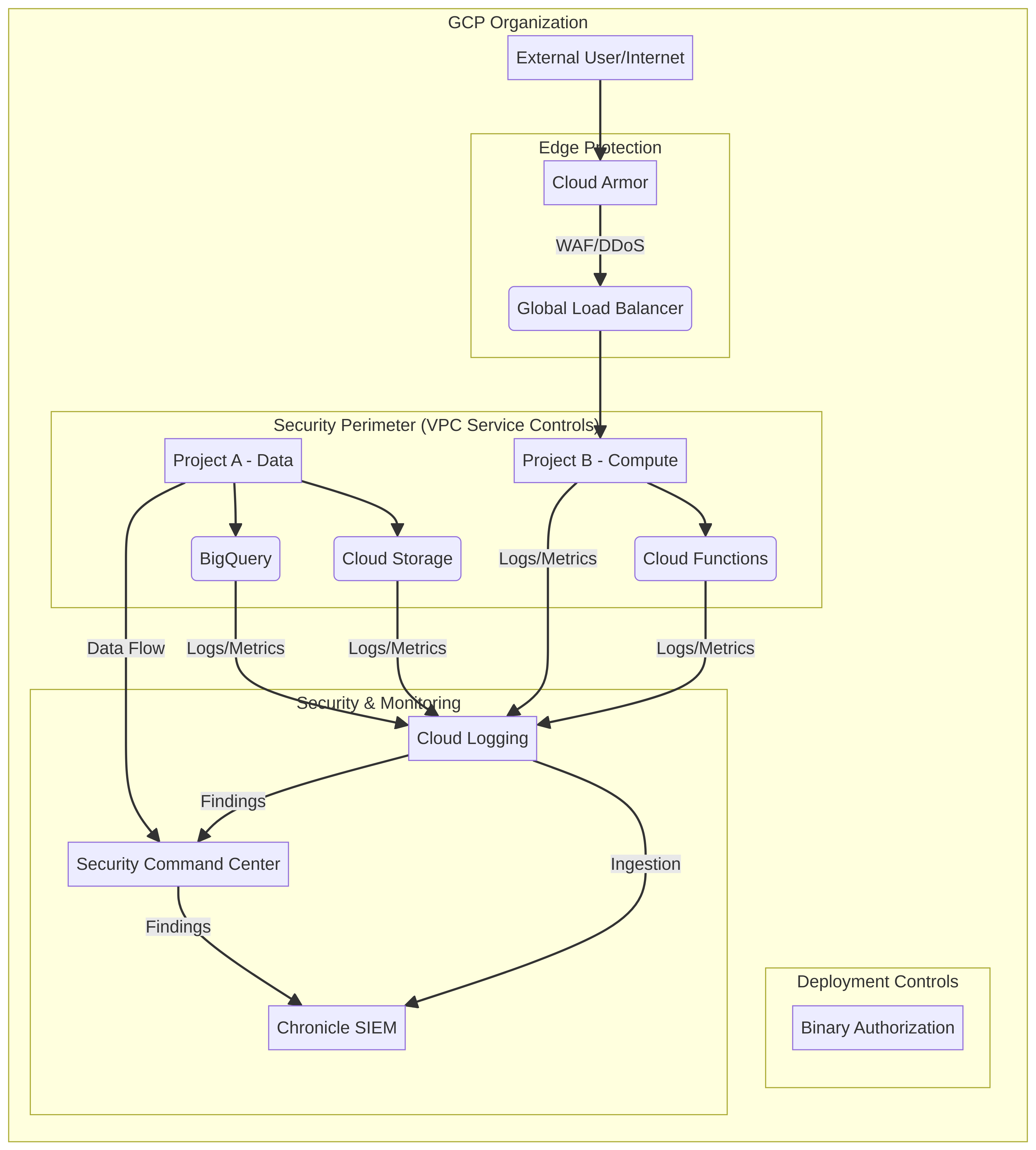
PRJ-GCP-SEC-088 Architecture

Technology Stack

VPC Service Controls
Private Google Access
Cloud Armor

Complete Documentation

Prerequisites

Project Owner or Editor role
gcloud CLI configured
Terraform >= 1.5 (optional)
GCP project with billing enabled
Service Account with required APIs
1

Clone & Authenticate

Clone the repository and authenticate with gcloud using your service account key or application default credentials.

gcloud auth application-default login
2

Enable Required APIs

Enable all required GCP APIs for this project in your target project.

gcloud services enable compute.googleapis.com container.googleapis.com
3

Initialize Infrastructure

Run Terraform init and plan to preview the GCP resource changes before applying.

terraform init && terraform plan -out=tfplan
4

Deploy Resources

Apply the Terraform plan to provision all GCP resources in your target project.

terraform apply tfplan
5

Verify & Monitor

Verify the deployment in the GCP Console and check Cloud Monitoring for any errors.

gcloud logging read "severity>=ERROR" --limit 50

Deployment Guide

Step-by-step instructions to deploy this project

Download Guide

Architecture Diagram

Visual representation of the system architecture

Download Architecture

Source Code

Complete source code and configuration files

View on GitHub

Video Tutorial

Watch the complete walkthrough video

Watch Now