Coming Soon GCP GCP Cloud Architect

Security Command Center

PRJ-GCP-SEC-089

Centralized security management

~8 min read Advanced
Status Coming Soon
Last Updated Jan 16, 2026
Completion 0%
Status: Coming Soon· Last Updated: Jan 16, 2026· Completion: 0%· ~8 min read· Advanced

Implementation Guide

Comprehensive step-by-step deployment guide

Download Implementation Guide

Estimated Monthly Cost

~$42/mo on minimal config
ComputeStorageMonitoring
Business ContextLack of a unified view for security posture across diverse GCP services, leading…

The Problem

  • Lack of a unified view for security posture across diverse GCP services, leading to blind spots and delayed incident response.
  • Manual and fragmented detection of threats and vulnerabilities, increasing operational overhead and potential for human error.
  • Challenges in identifying and protecting sensitive data (PII, regulated data) spread across various GCP resources, risking compliance breaches.

The Solution

  • Implements GCP Security Command Center to provide a centralized dashboard for security insights, asset inventory, and vulnerability management.
  • Leverages Event Threat Detection within Security Command Center to automatically identify sophisticated threats and anomalous activities in real-time.
  • Deploys Cloud DLP to discover, classify, and protect sensitive data across GCP, ensuring compliance and preventing data exfiltration.

Business Value

  • Reduces security incident response time by 40% through centralized alerts and automated threat detection.
  • Improves compliance audit readiness by 30% with comprehensive security posture reporting and data protection controls.
  • Decreases potential data breach costs by proactively identifying and remediating sensitive data exposures.
  • Achieves a 25% reduction in manual security review efforts, allowing security teams to focus on strategic initiatives.

Risk Mitigation

  • Mitigates the risk of undetected security vulnerabilities and misconfigurations across GCP environments.
  • Reduces the likelihood of data breaches and compliance penalties by protecting sensitive information.
  • Addresses the risk of insider threats and external attacks through continuous monitoring and threat detection.
  • Minimizes operational risks associated with manual security management and fragmented security tools.
GRC MappingISO 27001: Information Security Management System (ISMS) standard, specifically …

Compliance Frameworks

  • ISO 27001: Information Security Management System (ISMS) standard, specifically Annex A controls for security operations and incident management.
  • NIST CSF (Cybersecurity Framework): Focuses on the Identify, Protect, Detect, Respond, and Recover functions for improving critical infrastructure cybersecurity.
  • SOC 2 Type 2: Addresses security, availability, processing integrity, confidentiality, and privacy principles relevant to service organizations.
  • PCI DSS (Payment Card Industry Data Security Standard): Relevant for projects handling payment card data, ensuring secure processing and storage.

Security Controls Implemented

  • Asset Inventory and Configuration Management: Utilizes Security Command Center's Asset Discovery to maintain an up-to-date inventory of GCP resources and their configurations.
  • Continuous Monitoring and Threat Detection: Implements Event Threat Detection to monitor logs and detect suspicious activities, alerting security teams in real-time.
  • Data Loss Prevention (DLP): Configures Cloud DLP to scan and redact sensitive data in storage buckets, databases, and streaming data, preventing unauthorized exposure.
  • Vulnerability Management: Leverages Security Command Center's built-in vulnerability scanning (e.g., Security Health Analytics) to identify and prioritize security weaknesses.
  • Incident Response and Remediation: Integrates Security Command Center findings with incident management workflows to streamline response and automated remediation actions.

Audit Evidence

  • Security Command Center findings reports and dashboards demonstrating security posture over time.
  • Cloud Audit Logs detailing security-relevant events, access patterns, and administrative activities.
  • Cloud DLP scan reports and remediation actions for sensitive data discovery and protection.
  • Configuration snapshots and policy compliance reports generated by Security Command Center.

Regulatory Alignment

  • GDPR (General Data Protection Regulation): Article 32 (Security of processing) and Article 35 (Data protection impact assessment).
  • HIPAA (Health Insurance Portability and Accountability Act): Security Rule (45 CFR Part 164, Subpart C) for protecting electronic protected health information.
  • CCPA (California Consumer Privacy Act): Section 1798.150 (Right to bring civil action) related to data breaches and reasonable security procedures.
  • NIST SP 800-53 (Security and Privacy Controls for Information Systems and Organizations): Control Family CM (Configuration Management) and AU (Audit and Accountability).

Video tutorial coming soon!

Subscribe to our YouTube channel to get notified when this tutorial is published.

Subscribe on YouTube

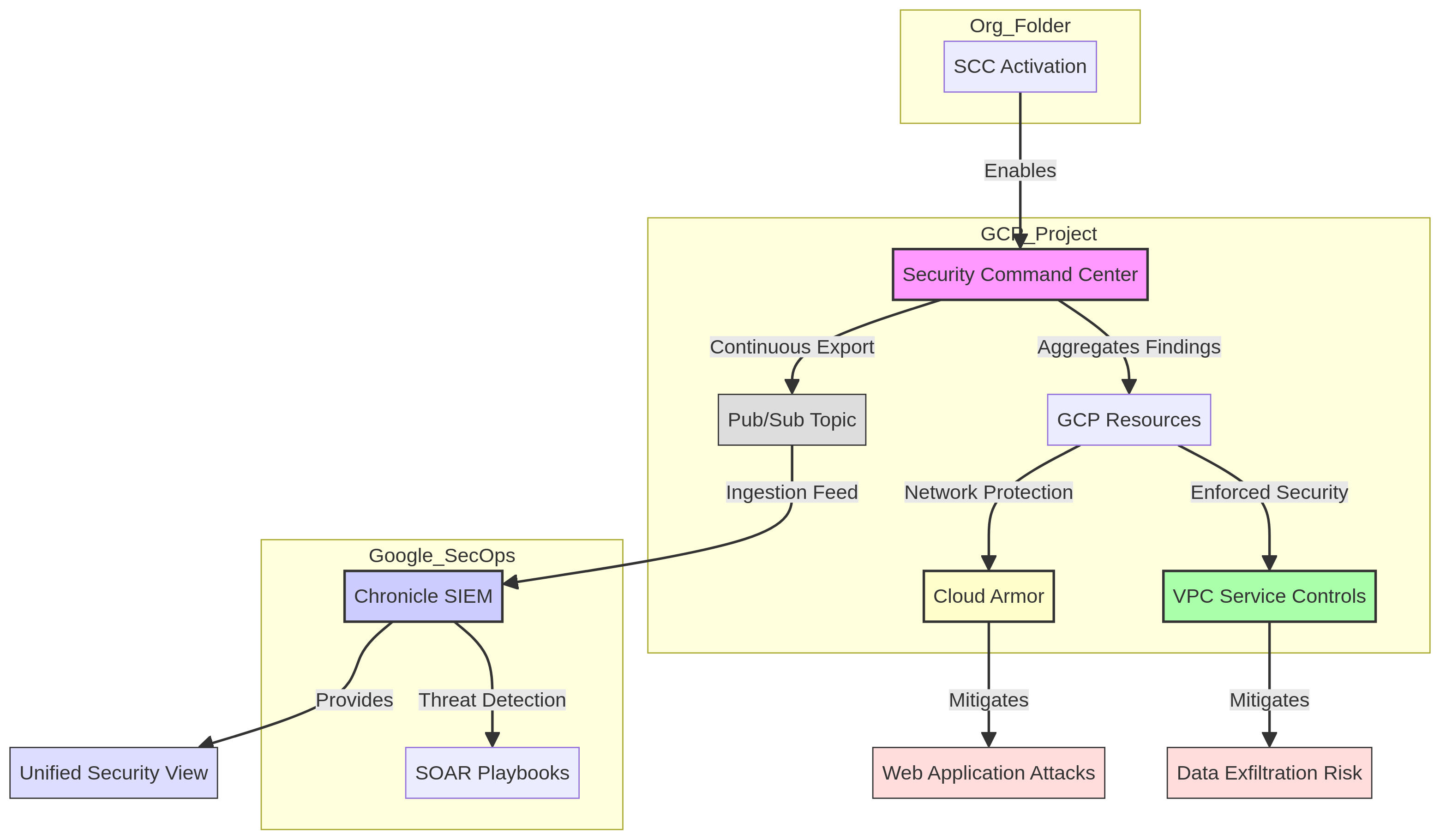
Architecture Diagram

PRJ-GCP-SEC-089 Architecture

Technology Stack

Security Command Center
Event Threat Detection
Cloud DLP

Complete Documentation

Prerequisites

Project Owner or Editor role
gcloud CLI configured
Terraform >= 1.5 (optional)
GCP project with billing enabled
Service Account with required APIs
1

Clone & Authenticate

Clone the repository and authenticate with gcloud using your service account key or application default credentials.

gcloud auth application-default login
2

Enable Required APIs

Enable all required GCP APIs for this project in your target project.

gcloud services enable compute.googleapis.com container.googleapis.com
3

Initialize Infrastructure

Run Terraform init and plan to preview the GCP resource changes before applying.

terraform init && terraform plan -out=tfplan
4

Deploy Resources

Apply the Terraform plan to provision all GCP resources in your target project.

terraform apply tfplan
5

Verify & Monitor

Verify the deployment in the GCP Console and check Cloud Monitoring for any errors.

gcloud logging read "severity>=ERROR" --limit 50

Deployment Guide

Step-by-step instructions to deploy this project

Download Guide

Architecture Diagram

Visual representation of the system architecture

Download Architecture

Source Code

Complete source code and configuration files

View on GitHub

Video Tutorial

Watch the complete walkthrough video

Watch Now