Coming Soon OCI OCI Architect

Autonomous Database with Data Guard

PRJ-OCI-DB-091

Self-managing database with HA/DR

~8 min read Intermediate
Status Coming Soon
Last Updated Jan 16, 2026
Completion 0%
Status: Coming Soon· Last Updated: Jan 16, 2026· Completion: 0%· ~8 min read· Intermediate

Implementation Guide

Comprehensive step-by-step deployment guide

Download Implementation Guide

Estimated Monthly Cost

~$20/mo on minimal config
Autonomous DB $12Object Storage $4Monitoring $4
Business ContextManual database administration leads to high operational costs and potential hum…

The Problem

  • Manual database administration leads to high operational costs and potential human errors, impacting reliability and efficiency.
  • Lack of robust high availability and disaster recovery solutions results in significant downtime during outages, leading to business disruption and revenue loss.
  • Complex and time-consuming patching and maintenance cycles for traditional databases often cause service interruptions and security vulnerabilities.

The Solution

  • Implementation of Oracle Autonomous Database for self-driving, self-securing, and self-repairing capabilities, reducing administrative overhead.
  • Deployment of Oracle Data Guard to provide comprehensive high availability, data protection, and disaster recovery for critical database workloads.
  • Leveraging APEX within Autonomous Database to enable rapid development and deployment of secure, scalable enterprise applications with minimal coding.

Business Value

  • Achieves 99.995% availability SLA for critical applications, minimizing revenue loss from downtime.
  • Reduces database operational costs by 30% through automation of patching, tuning, and backups.
  • Accelerates application development cycles by 50% using APEX, enabling faster time-to-market for new features.
  • Ensures RPO of 0 and RTO of less than 60 seconds for disaster recovery scenarios, protecting business continuity.

Risk Mitigation

  • Mitigates data loss and corruption risks through automated backups and real-time data replication with Data Guard.
  • Addresses security vulnerabilities with continuous patching and advanced security features inherent in Autonomous Database.
  • Reduces the risk of human error in database management by automating routine tasks and complex operations.
  • Ensures business continuity by providing seamless failover capabilities in the event of a primary database failure.
GRC MappingISO 27001:2022(Information Security Management): Controls related to data protec…

Compliance Frameworks

  • ISO 27001:2022 (Information Security Management): Controls related to data protection, access control, and incident management (e.g., A.5.14, A.8.1).
  • SOC 2 Type 2 (Security, Availability, Processing Integrity): Demonstrates effective controls over the security and availability of the database service.
  • GDPR (General Data Protection Regulation): Addresses data privacy and protection requirements, especially for personal data stored in the database (e.g., Article 5, Article 32).
  • NIST SP 800-53 Rev. 5 (Security and Privacy Controls): Incorporates controls for system and information integrity, and contingency planning (e.g., SI-1, CP-2).

Security Controls Implemented

  • Data Encryption at Rest and in Transit: Oracle Autonomous Database automatically encrypts all data using TDE (Transparent Data Encryption) and enforces TLS for network communication.
  • Automated Patching and Updates: Autonomous Database applies security patches and updates automatically without downtime, ensuring systems are always up-to-date against known vulnerabilities.
  • Access Control and Authentication: Implemented strong authentication mechanisms and role-based access control (RBAC) within Autonomous Database to restrict data access based on least privilege.
  • Audit Logging and Monitoring: Comprehensive audit trails are enabled in Autonomous Database, capturing all database activities for security monitoring and forensic analysis.
  • Disaster Recovery and Business Continuity: Oracle Data Guard provides physical standby databases for high availability and disaster recovery, ensuring data integrity and rapid recovery.

Audit Evidence

  • Autonomous Database Audit Trails and Logs (e.g., `UNIFIED_AUDIT_TRAIL` views).
  • Data Guard Broker Configuration Reports and Switchover/Failover Logs.
  • OCI Identity and Access Management (IAM) Policies and User Activity Logs.
  • Disaster Recovery Test Reports and Recovery Time Objective (RTO) / Recovery Point Objective (RPO) verification.

Regulatory Alignment

  • GDPR (EU): Article 32 (Security of processing) and Article 25 (Data protection by design and by default) through encryption, access controls, and HA/DR.
  • CCPA (California): Section 1798.150 (Right to cure) and Section 1798.100 (Right to know) by ensuring data integrity and auditable access.
  • HIPAA (US): 45 CFR Part 164.312 (Technical Safeguards) for protecting Electronic Protected Health Information (ePHI) through access control, audit controls, and integrity.
  • PCI DSS (Global): Requirement 3 (Protect stored cardholder data) and Requirement 8 (Identify and authenticate access to system components) via encryption and strong authentication.

Video tutorial coming soon!

Subscribe to our YouTube channel to get notified when this tutorial is published.

Subscribe on YouTube

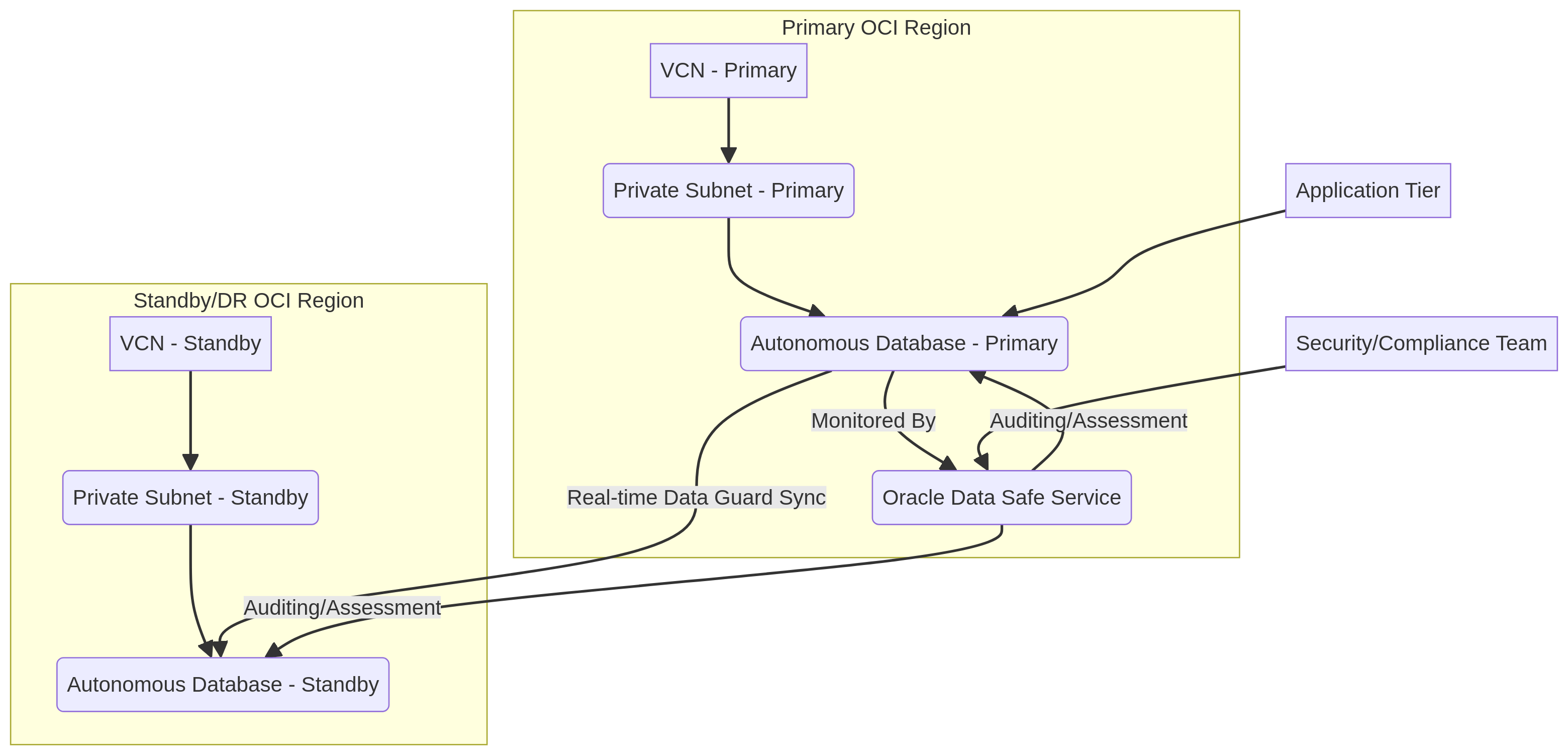
Architecture Diagram

PRJ-OCI-DB-091 Architecture

Technology Stack

Autonomous Database
Data Guard
APEX
HA/DR

Complete Documentation

Prerequisites

OCI Administrator policy
OCI CLI configured
Terraform >= 1.5 (optional)
OCI tenancy with credits
API key pair generated
1

Clone & Configure

Clone the repository and configure OCI CLI with your tenancy OCID, user OCID, and API key.

oci setup config
2

Review Policies

Review and create the required OCI IAM policies for the deployment compartment.

oci iam policy list --compartment-id 
3

Initialize Infrastructure

Run Terraform init and plan to preview the OCI resource changes before applying.

terraform init && terraform plan -out=tfplan
4

Deploy Resources

Apply the Terraform plan to provision all OCI resources in your target compartment.

terraform apply tfplan
5

Verify & Monitor

Verify the deployment in the OCI Console and check the Monitoring service for any alarms.

oci monitoring alarm list --compartment-id 

Deployment Guide

Step-by-step instructions to deploy this project

Download Guide

Architecture Diagram

Visual representation of the system architecture

Download Architecture

Source Code

Complete source code and configuration files

View on GitHub

Video Tutorial

Watch the complete walkthrough video

Watch Now