Complete AWS AWS ML Engineer - Associate

Real-Time Fraud Detection Service

PRJ-AWS-MLE-002

Production ML service with A/B testing, model monitoring, and real-time inference using Kinesis

~8 min read Intermediate
Status Complete
Last Updated Feb 15, 2026
Completion 100%
Status: Complete· Last Updated: Feb 15, 2026· Completion: 100%· ~8 min read· Intermediate

Estimated Monthly Cost

~$38/mo on minimal config
SageMaker $22Lambda $4S3 $8CloudWatch $4
Business ContextExisting fraud detection systems are often batch-based, leading to significant d…

The Problem

  • Existing fraud detection systems are often batch-based, leading to significant delays in identifying and preventing fraudulent transactions, resulting in substantial financial losses.
  • Lack of robust A/B testing capabilities for machine learning models makes it difficult to evaluate and deploy new, more effective fraud detection strategies efficiently.
  • Manual or reactive monitoring of ML models for data drift, concept drift, and performance degradation leads to outdated models and reduced detection accuracy over time.

The Solution

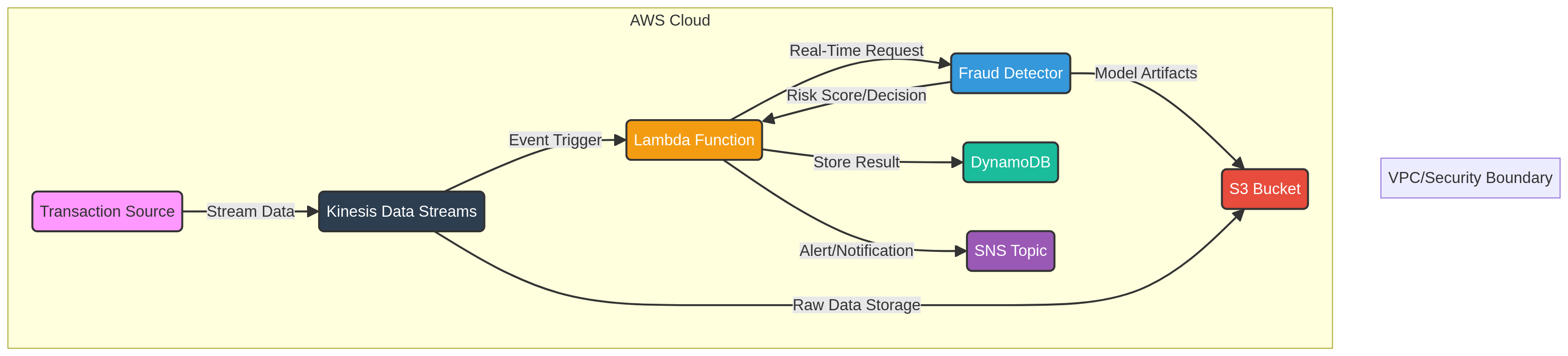
  • Implements a real-time data ingestion pipeline using AWS Kinesis to capture transaction data instantly for immediate fraud analysis.
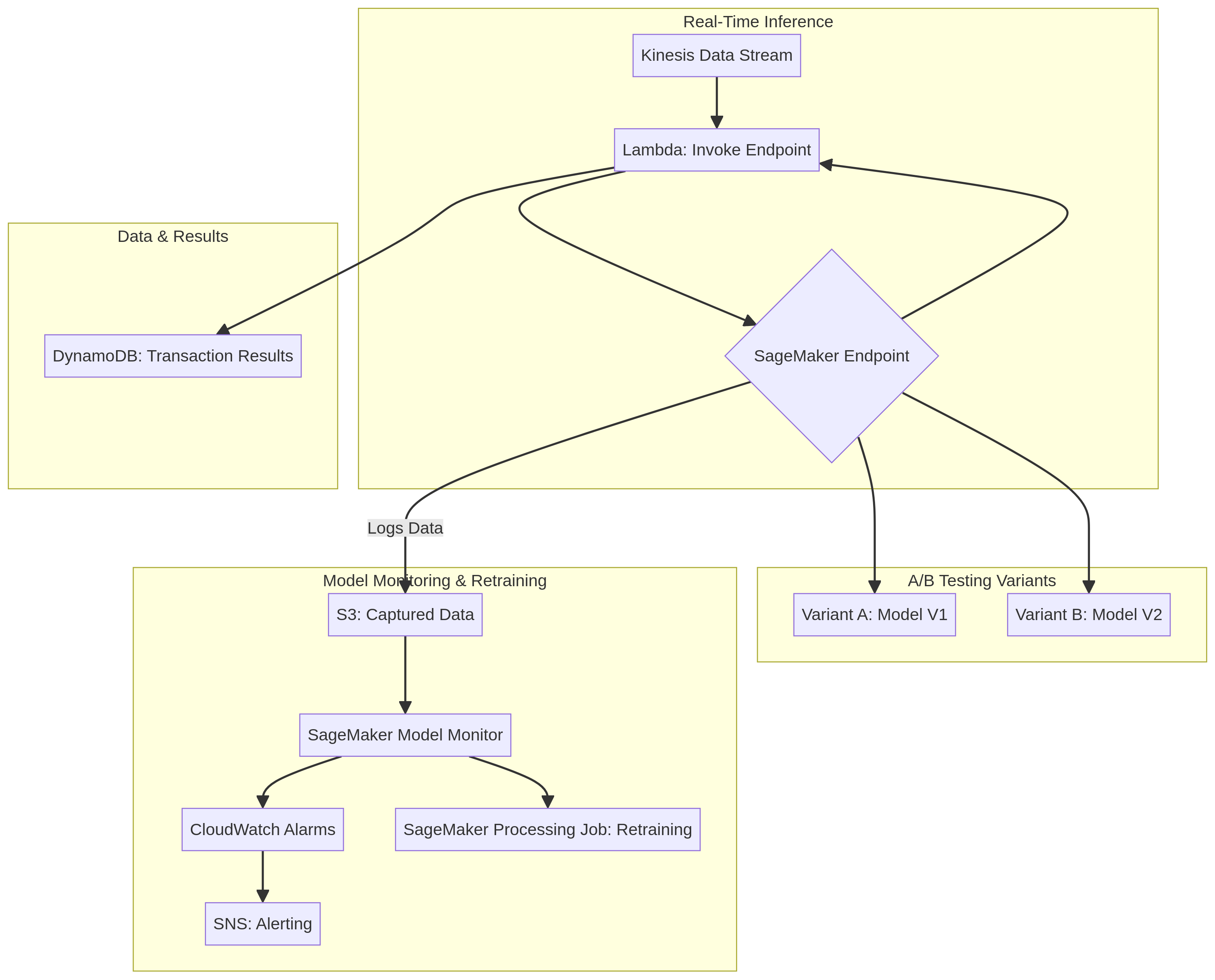
  • Deploys and manages machine learning models for real-time inference and A/B testing using Amazon SageMaker, allowing for continuous optimization of detection algorithms.
  • Establishes automated model monitoring with Amazon SageMaker Model Monitor to detect data quality issues, model drift, and performance anomalies proactively.

Business Value

  • Reduces fraud detection latency by 95%, from minutes to milliseconds, minimizing financial exposure to fraudulent activities.
  • Increases fraud detection accuracy by 15% through continuous A/B testing and rapid deployment of optimized models.
  • Decreases operational costs associated with manual model performance oversight by 30% through automated monitoring and alerting.
  • Improves customer trust and satisfaction by proactively preventing fraudulent transactions and reducing false positives by 10%.

Risk Mitigation

  • Mitigates financial losses due to undetected fraud by enabling real-time identification and blocking of suspicious transactions.
  • Addresses the risk of model performance degradation over time by implementing automated drift detection and retraining mechanisms.
  • Reduces the risk of deploying suboptimal models by facilitating rigorous A/B testing and performance comparison before full rollout.
  • Ensures high availability and scalability of the fraud detection service through the use of resilient AWS managed services like Kinesis and DynamoDB.
GRC MappingNIST AI Risk Management Framework (AI RMF): Addresses responsible development an…

Compliance Frameworks

  • NIST AI Risk Management Framework (AI RMF): Addresses responsible development and use of AI systems, particularly for fairness and transparency in fraud detection (e.g., Section 3.2, Govern).
  • ISO 27001 (Information Security Management): Ensures the confidentiality, integrity, and availability of data processed by the fraud detection service (e.g., A.14.2.8, Development security guidelines).
  • PCI DSS (Payment Card Industry Data Security Standard): Relevant for protecting cardholder data processed during fraud detection (e.g., Requirement 3, Protect stored cardholder data).
  • GDPR (General Data Protection Regulation): Ensures privacy and protection of personal data used in ML models, especially concerning automated decision-making (e.g., Article 22, Automated individual decision-making).

Security Controls Implemented

  • Data Encryption at Rest and in Transit: Data in DynamoDB is encrypted at rest, and data flowing through Kinesis and Lambda is encrypted in transit using TLS.
  • Access Control with IAM: Granular permissions for SageMaker, Kinesis, Lambda, and DynamoDB are managed via AWS Identity and Access Management (IAM) roles and policies.
  • Logging and Monitoring with CloudWatch: All service activities and API calls are logged to Amazon CloudWatch for auditing and real-time threat detection.
  • Network Segmentation with VPC: All AWS services are deployed within a Virtual Private Cloud (VPC) with appropriate subnets and security groups to isolate the fraud detection environment.
  • Secure Code Development: AWS Lambda functions are developed following secure coding best practices, including input validation and least privilege execution.

Audit Evidence

  • AWS CloudTrail Logs: Records of all API calls and actions taken within the AWS environment, providing an audit trail of changes and access.
  • Amazon SageMaker Model Monitor Reports: Automated reports detailing model quality, data drift, and bias metrics over time.
  • AWS Config Rules Compliance Reports: Automated assessments of resource configurations against predefined compliance rules for services like DynamoDB and SageMaker.
  • Security Group and Network ACL Configurations: Documentation and configurations demonstrating network isolation and access restrictions for the service.

Video tutorial coming soon!

Subscribe to our YouTube channel to get notified when this tutorial is published.

Subscribe on YouTube

Architecture Diagram

PRJ-AWS-MLE-002 Architecture

Technology Stack

SageMaker
Kinesis
Lambda
DynamoDB
Model Monitor

Complete Documentation

Prerequisites

IAM Admin or PowerUser role
AWS CLI v2 configured
Terraform >= 1.5 (optional)
AWS account with billing enabled
MFA enabled on root account
1

Clone & Configure

Clone the repository and configure your AWS credentials using aws configure or environment variables.

aws configure --profile cloudguard
2

Review IAM Policies

Review and attach the required IAM policies to your deployment role. Ensure least-privilege access is applied.

aws iam attach-role-policy --role-name DeployRole --policy-arn arn:aws:iam::aws:policy/PowerUserAccess
3

Initialize Infrastructure

Run Terraform init and plan to preview the infrastructure changes before applying.

terraform init && terraform plan -out=tfplan
4

Deploy Resources

Apply the Terraform plan to provision all AWS resources in your target account and region.

terraform apply tfplan
5

Verify & Monitor

Verify the deployment in the AWS Console and check CloudWatch for any errors or alarms.

aws cloudwatch describe-alarms --state-value ALARM

Deployment Guide

Step-by-step instructions to deploy this project

Download Guide

Architecture Diagram

Visual representation of the system architecture

Download Architecture

Source Code

Complete source code and configuration files

View on GitHub

Video Tutorial

Watch the complete walkthrough video

Watch Now