Coming Soon AZURE Azure Data Engineer

Real-Time Analytics with Synapse

PRJ-AZURE-DATA-072

Unified analytics platform with real-time capabilities

~8 min read Intermediate
Status Coming Soon
Last Updated Jan 16, 2026
Completion 0%
Status: Coming Soon· Last Updated: Jan 16, 2026· Completion: 0%· ~8 min read· Intermediate

Implementation Guide

Comprehensive step-by-step deployment guide

Download Implementation Guide

Estimated Monthly Cost

~$42/mo on minimal config
Synapse $18Data Factory $10Storage $8Monitor $6
Business ContextApplications requiring low-latency data access across geographically dispersed u…

The Problem

  • Applications requiring low-latency data access across geographically dispersed users.
  • Maintaining data consistency and availability in a distributed environment without complex custom solutions.
  • Scaling NoSQL databases globally to handle high throughput and diverse data models.

The Solution

  • Implementation of Azure Cosmos DB with its global distribution capabilities to replicate data across multiple Azure regions.
  • Leveraging Azure Cosmos DB Change Feed to enable real-time data processing and integration with other services.
  • Utilizing Azure Functions for serverless event-driven processing of data changes and business logic execution.

Business Value

  • Achieves a 99.999% availability SLA for mission-critical applications, minimizing downtime.
  • Reduces global data access latency by up to 10x for users worldwide, enhancing user experience.
  • Decreases operational overhead for database management by 30% through Cosmos DB's fully managed service.
  • Enables rapid development of new features by providing a flexible NoSQL data model and global scalability.

Risk Mitigation

  • Addresses data loss and corruption risks through automatic, transparent multi-region replication and failover.
  • Mitigates performance bottlenecks for geographically distributed users by serving data from the closest region.
  • Reduces vendor lock-in risk by supporting multiple APIs (e.g., SQL, MongoDB, Cassandra).
GRC MappingISO 27001:2013 (A.12.1.1 - Operating procedures and responsibilities)…

Compliance Frameworks

  • ISO 27001:2013 (A.12.1.1 - Operating procedures and responsibilities)
  • GDPR (Article 32 - Security of processing)
  • NIST SP 800-53 Rev. 5 (SC-7 - Boundary Protection)

Security Controls Implemented

  • Data encryption at rest and in transit using Azure Cosmos DB's built-in capabilities.
  • Role-Based Access Control (RBAC) for Azure Cosmos DB to manage data access permissions.
  • Network isolation for Cosmos DB endpoints using Azure Private Link.
  • Automated backups and point-in-time restore for data recovery in Azure Cosmos DB.
  • Monitoring and alerting for unusual access patterns and performance anomalies via Azure Monitor.

Audit Evidence

  • Azure Activity Logs for Cosmos DB configuration changes and access attempts.
  • Azure Policy compliance reports for data residency and security configurations.
  • Azure Security Center recommendations and compliance scores for Cosmos DB.
  • Network security group flow logs demonstrating network isolation.

Regulatory Alignment

  • GDPR (Article 5 - Principles relating to processing of personal data)
  • CCPA (Section 1798.100 - Consumer's right to know)
  • HIPAA (45 CFR Part 164, Subpart C - Security Standards)

Video tutorial coming soon!

Subscribe to our YouTube channel to get notified when this tutorial is published.

Subscribe on YouTube

Architecture Diagram
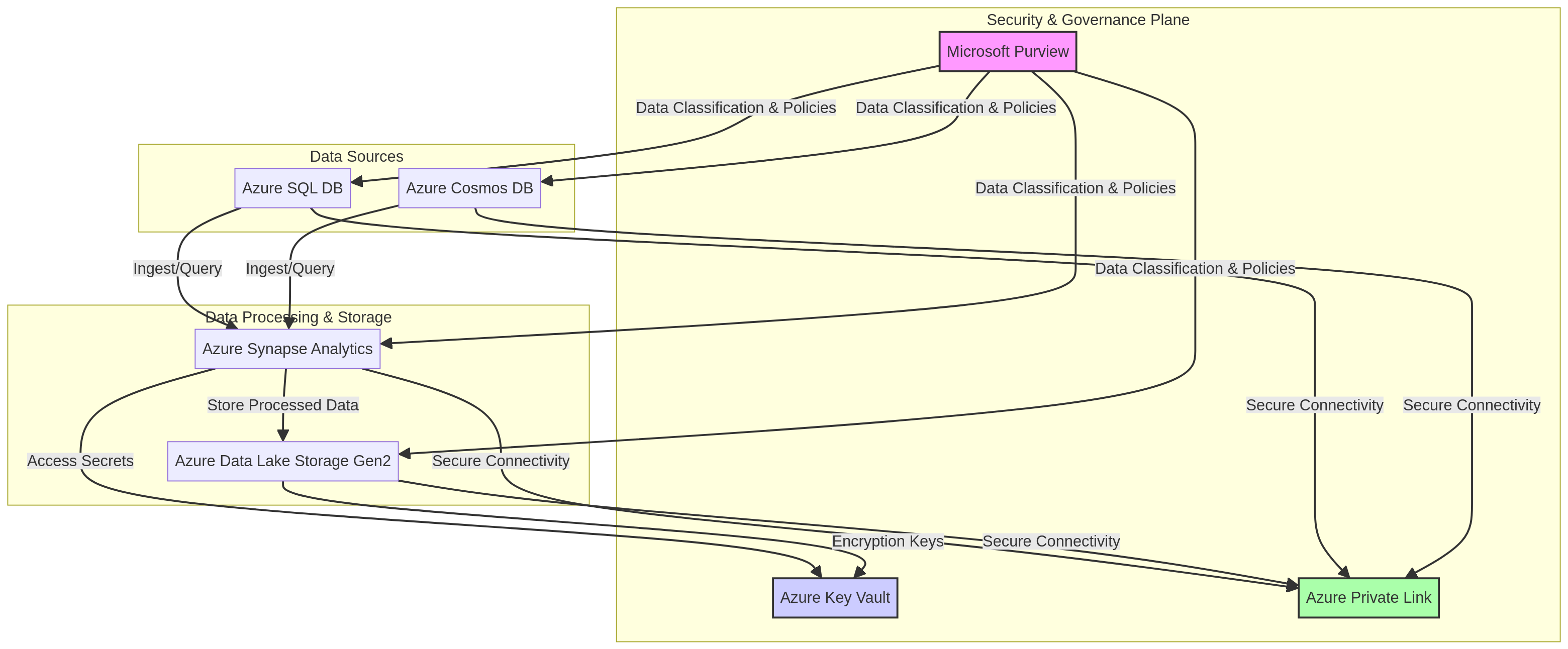
PRJ-AZURE-DATA-072 Architecture

Technology Stack

Synapse Analytics
Event Hubs
Power BI
Real-Time

Complete Documentation

Prerequisites

Contributor or Owner role
Azure CLI 2.x configured
Terraform >= 1.5 (optional)
Active Azure subscription
Service Principal with RBAC
1

Clone & Authenticate

Clone the repository and authenticate with Azure CLI using your service principal or interactive login.

az login && az account set --subscription 
2

Review RBAC Assignments

Review the required role assignments and ensure your identity has the correct permissions in the target resource group.

az role assignment list --assignee 
3

Initialize Infrastructure

Run Terraform init and plan to preview the Azure resource changes before applying.

terraform init && terraform plan -out=tfplan
4

Deploy Resources

Apply the Terraform plan to provision all Azure resources in your target subscription.

terraform apply tfplan
5

Verify & Monitor

Verify the deployment in the Azure Portal and check Azure Monitor for any alerts or issues.

az monitor activity-log list --resource-group 

Deployment Guide

Step-by-step instructions to deploy this project

Download Guide

Architecture Diagram

Visual representation of the system architecture

Download Architecture

Source Code

Complete source code and configuration files

View on GitHub

Video Tutorial

Watch the complete walkthrough video

Watch Now