Coming Soon AZURE Azure Solutions Architect

High-Availability VM Architecture

PRJ-AZURE-INFRA-065

Resilient compute infrastructure with 99.99% SLA

~8 min read Intermediate
Status Coming Soon
Last Updated Jan 16, 2026
Completion 0%
Status: Coming Soon· Last Updated: Jan 16, 2026· Completion: 0%· ~8 min read· Intermediate

Implementation Guide

Comprehensive step-by-step deployment guide

Download Implementation Guide

Estimated Monthly Cost

~$38/mo on minimal config
VMs $20VNet $0Monitor $8Storage $10
Business ContextUnplanned downtime of critical applications due to single points of failure in t…

The Problem

  • Unplanned downtime of critical applications due to single points of failure in traditional VM deployments, leading to significant operational disruption and revenue loss.
  • Inability to meet stringent service level agreements (SLAs) for application availability, impacting customer trust and regulatory compliance.
  • Manual and time-consuming recovery processes after infrastructure failures, increasing Mean Time To Recovery (MTTR) and operational overhead.

The Solution

  • Deployment of Azure Virtual Machines across multiple Azure Availability Zones to ensure fault isolation and resilience against datacenter-level failures.
  • Implementation of Azure Load Balancer to distribute incoming application traffic across healthy VMs, enhancing application responsiveness and fault tolerance.
  • Utilization of Azure VM Scale Sets for automatic scaling and self-healing capabilities, dynamically adjusting compute capacity based on demand and replacing unhealthy instances.

Business Value

  • Achieves a 99.99% uptime SLA for critical applications, minimizing business interruption and ensuring continuous service delivery.
  • Reduces potential revenue loss from downtime by an estimated 25-30% annually through enhanced infrastructure resilience.
  • Decreases operational costs by automating VM scaling and recovery processes, leading to a 15% reduction in manual intervention.
  • Improves customer satisfaction and trust by providing highly available and consistently performing services.

Risk Mitigation

  • Mitigates the risk of application unavailability due to infrastructure failures by distributing VMs across physically separate Availability Zones.
  • Addresses performance bottlenecks and service degradation during peak loads through automated scaling with VM Scale Sets.
  • Reduces the risk of data path disruption and single points of failure by intelligently routing traffic with Azure Load Balancer.
  • Ensures business continuity and disaster recovery capabilities for critical compute resources.
GRC MappingISO 27001:2022 (A.5.14 Redundancy, A.8.6 Capacity Management)…

Compliance Frameworks

  • ISO 27001:2022 (A.5.14 Redundancy, A.8.6 Capacity Management)
  • NIST SP 800-53 Rev. 5 (CP-2 Contingency Plan, SC-5 Denial of Service Protection)
  • CSA CCM v4 (BCM-01 Business Continuity Planning, IVS-01 Infrastructure Vulnerability Scanning)

Security Controls Implemented

  • Fault Tolerance (Availability Zones): Critical VMs are deployed across distinct Azure Availability Zones, providing physical and logical isolation to prevent single points of failure.
  • Load Balancing (Azure Load Balancer): Traffic is distributed across multiple healthy VM instances, preventing overload and ensuring continuous service delivery even if individual instances fail.
  • Automated Scaling (VM Scale Sets): Automatically adjusts the number of VM instances based on predefined metrics, ensuring optimal performance and availability while preventing resource exhaustion.
  • Health Monitoring & Self-Healing (VM Scale Sets): Integrated health probes detect unhealthy VM instances, which are automatically replaced or repaired to maintain the desired service level.
  • Network Segmentation (Azure Virtual Network): VMs are deployed within a secure Azure Virtual Network, allowing for granular control over network traffic and isolation from public internet.

Audit Evidence

  • Azure Resource Manager (ARM) templates and deployment scripts for infrastructure as code (IaC) configuration.
  • Azure Monitor logs and metrics demonstrating VM uptime, load balancer health probes, and VM Scale Set scaling events.
  • Network security group (NSG) flow logs and Azure Firewall logs detailing traffic patterns and access controls.
  • Architecture diagrams and design documents illustrating the multi-zone deployment and high-availability configuration.

Regulatory Alignment

  • GDPR (Article 32 - Security of processing): Ensures resilience of processing systems and services, and the ability to restore availability in a timely manner in the event of a physical or technical incident.
  • HIPAA (45 CFR § 164.308(a)(7)(ii)(B) - Data Backup and Disaster Recovery): Supports the ability to recover data in the event of system failure, crucial for protected health information (PHI).
  • PCI DSS v4.0 (Requirement 2.2 - Configure all system components securely): Implements secure configurations for all Azure services, including VMs, load balancers, and scale sets, to protect cardholder data.

Video tutorial coming soon!

Subscribe to our YouTube channel to get notified when this tutorial is published.

Subscribe on YouTube

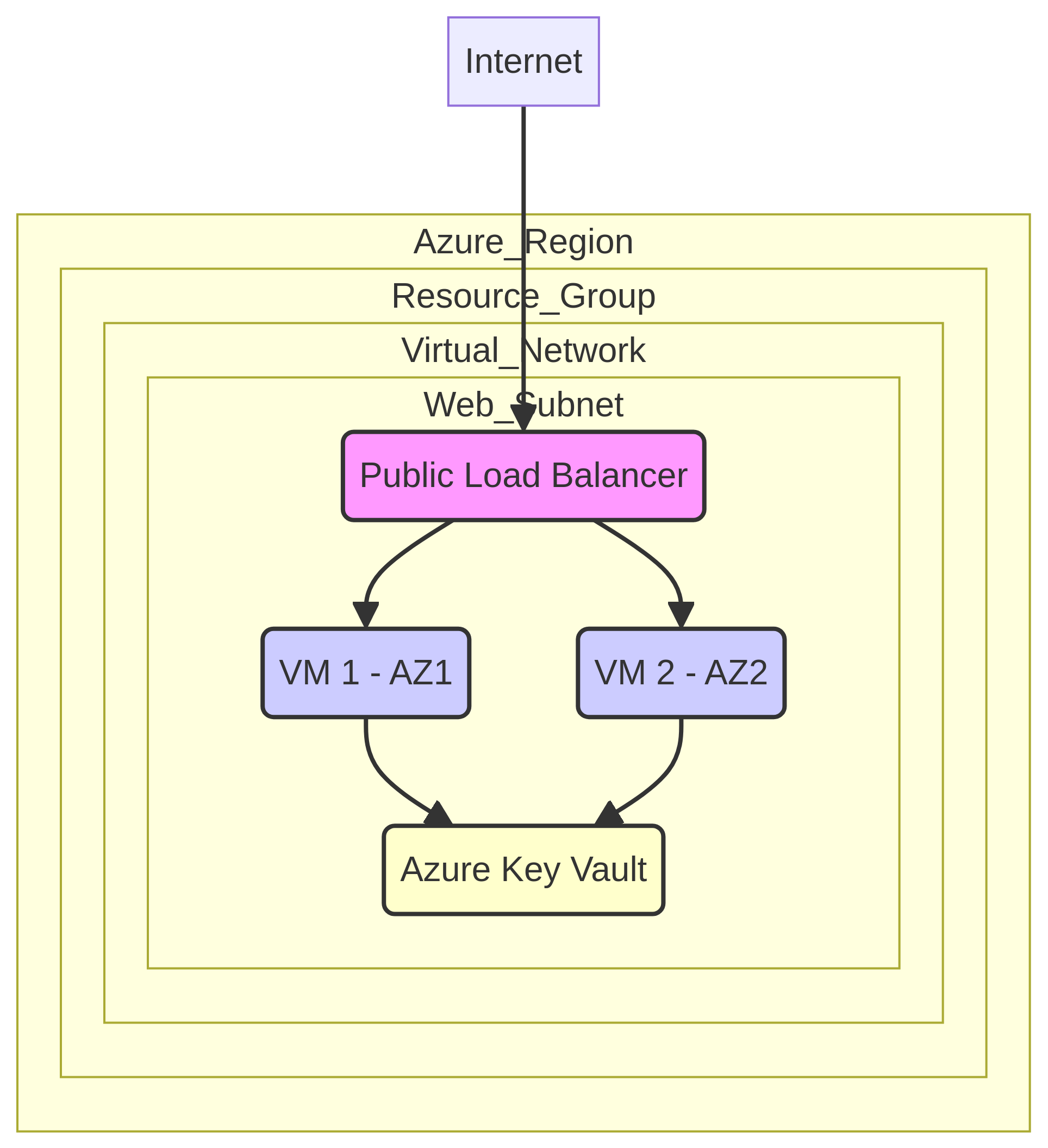
Architecture Diagram

PRJ-AZURE-INFRA-065 Architecture

Technology Stack

Availability Zones
Load Balancer
VM Scale Sets
HA

Complete Documentation

Prerequisites

Contributor or Owner role
Azure CLI 2.x configured
Terraform >= 1.5 (optional)
Active Azure subscription
Service Principal with RBAC
1

Clone & Authenticate

Clone the repository and authenticate with Azure CLI using your service principal or interactive login.

az login && az account set --subscription 
2

Review RBAC Assignments

Review the required role assignments and ensure your identity has the correct permissions in the target resource group.

az role assignment list --assignee 
3

Initialize Infrastructure

Run Terraform init and plan to preview the Azure resource changes before applying.

terraform init && terraform plan -out=tfplan
4

Deploy Resources

Apply the Terraform plan to provision all Azure resources in your target subscription.

terraform apply tfplan
5

Verify & Monitor

Verify the deployment in the Azure Portal and check Azure Monitor for any alerts or issues.

az monitor activity-log list --resource-group 

Deployment Guide

Step-by-step instructions to deploy this project

Download Guide

Architecture Diagram

Visual representation of the system architecture

Download Architecture

Source Code

Complete source code and configuration files

View on GitHub

Video Tutorial

Watch the complete walkthrough video

Watch Now