Coming Soon GCP GCP Data Engineer

BigQuery Data Warehouse

PRJ-GCP-DATA-077

Petabyte-scale analytics platform

~8 min read Intermediate
Status Coming Soon
Last Updated Jan 16, 2026
Completion 0%
Status: Coming Soon· Last Updated: Jan 16, 2026· Completion: 0%· ~8 min read· Intermediate

Implementation Guide

Comprehensive step-by-step deployment guide

Download Implementation Guide

Estimated Monthly Cost

~$42/mo on minimal config
ComputeStorageMonitoring
Business ContextExisting data infrastructure struggles to process and analyze petabyte-scale dat…

The Problem

  • Existing data infrastructure struggles to process and analyze petabyte-scale datasets efficiently, leading to delayed insights.
  • Lack of a centralized data warehousing and business intelligence platform results in data silos and inconsistent reporting across departments.
  • Manual and error-prone data pipeline orchestration increases operational overhead and hinders the timely delivery of critical business information.

The Solution

  • Implements a scalable, serverless data warehouse using Google BigQuery for efficient storage and analysis of petabyte-scale data.
  • Develops interactive dashboards and reports with Google Data Studio to provide a unified view of business intelligence insights.
  • Automates and orchestrates complex data ingestion and transformation pipelines using Google Cloud Composer for reliability and efficiency.

Business Value

  • Reduces data processing time for petabyte-scale analytical queries by 70%, enabling near real-time business insights.
  • Improves the accuracy and consistency of data-driven decision-making by 25% through a unified reporting platform.
  • Decreases operational costs associated with data infrastructure management by 30% due to BigQuery's serverless and cost-effective architecture.
  • Accelerates the development and deployment of new data products and analytical models by 40% through automated and robust data pipelines.

Risk Mitigation

  • Mitigates risks of data loss and corruption through BigQuery's built-in redundancy, automatic backups, and disaster recovery capabilities.
  • Addresses data security and unauthorized access risks by leveraging GCP's robust identity and access management (IAM) and data encryption features.
  • Reduces the risk of data quality issues and inconsistencies through automated data validation and transformation processes orchestrated by Cloud Composer.
  • Minimizes the risk of scalability limitations by utilizing BigQuery's elastic and on-demand compute resources, ensuring performance under peak loads.
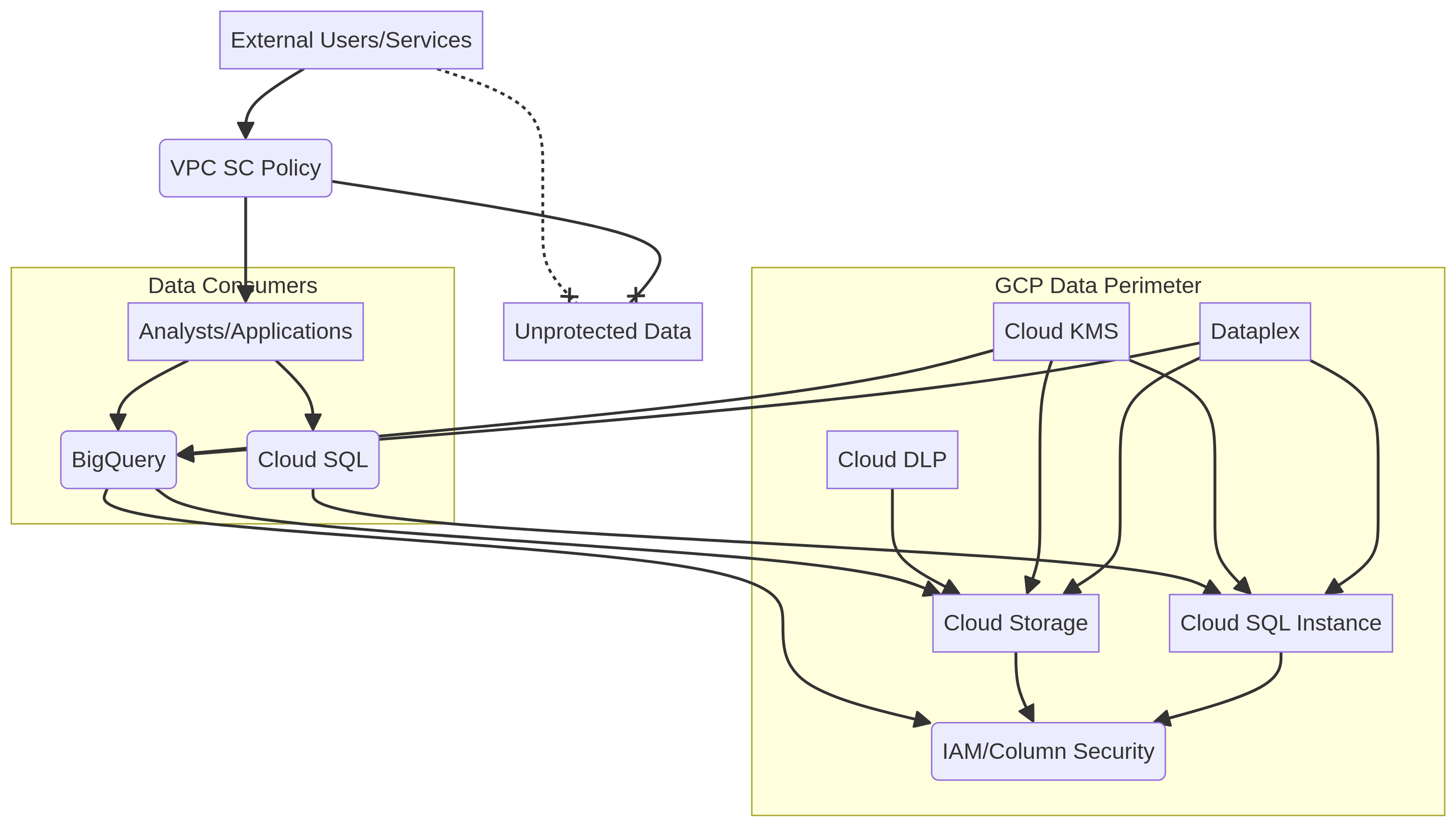
GRC MappingISO 27001: Information Security Management System, specifically control A.12.4.1…

Compliance Frameworks

  • ISO 27001: Information Security Management System, specifically control A.12.4.1 (Logging and Monitoring) for BigQuery audit logs.
  • GDPR (General Data Protection Regulation): Article 32 (Security of processing) for data protection in BigQuery and Data Studio.
  • NIST SP 800-53: Control AU-2 (Audit Review, Analysis, and Reporting) for comprehensive audit trails from Cloud Audit Logs.
  • HIPAA (Health Insurance Portability and Accountability Act): Security Rule § 164.312(b) (Audit Controls) for protecting Protected Health Information (PHI) in BigQuery.

Security Controls Implemented

  • Access Control: Granular access policies implemented via GCP IAM roles for BigQuery datasets and Data Studio reports.
  • Data Encryption: Data at rest in BigQuery is encrypted by default using Google-managed keys, with customer-managed encryption keys (CMEK) optionally enabled.
  • Audit Logging: Comprehensive audit trails generated by Cloud Audit Logs for all BigQuery and Cloud Composer activities, stored for compliance.
  • Network Security: Private IP connectivity for Cloud Composer environments to restrict public internet exposure and secure data flow.
  • Data Masking/Tokenization: Implementation of BigQuery column-level security and data masking techniques for sensitive data within the data warehouse.

Audit Evidence

  • GCP Cloud Audit Logs for BigQuery data access and administrative activities.
  • IAM policy configurations and role assignments for BigQuery datasets and Data Studio assets.
  • Cloud Composer DAG (Directed Acyclic Graph) definitions and execution logs demonstrating data pipeline integrity.
  • Data Studio report access logs and dashboard configuration snapshots.

Regulatory Alignment

  • GDPR: Article 5 (Principles relating to processing of personal data) and Article 32 (Security of processing) for data handling in BigQuery.
  • HIPAA: Security Rule § 164.306 (Security standards: General rules) and § 164.312 (Technical safeguards) for PHI protection.
  • CCPA (California Consumer Privacy Act): Section 1798.100 (Consumer rights) and 1798.150 (Data breaches) regarding consumer data protection and breach notification.
  • SOX (Sarbanes-Oxley Act): Section 302 (Corporate Responsibility for Financial Reports) and Section 404 (Management Assessment of Internal Controls) for financial data integrity and reporting.

Video tutorial coming soon!

Subscribe to our YouTube channel to get notified when this tutorial is published.

Subscribe on YouTube

Architecture Diagram

PRJ-GCP-DATA-077 Architecture

Technology Stack

BigQuery
Data Studio
Cloud Composer
Data Warehouse

Complete Documentation

Prerequisites

Project Owner or Editor role
gcloud CLI configured
Terraform >= 1.5 (optional)
GCP project with billing enabled
Service Account with required APIs
1

Clone & Authenticate

Clone the repository and authenticate with gcloud using your service account key or application default credentials.

gcloud auth application-default login
2

Enable Required APIs

Enable all required GCP APIs for this project in your target project.

gcloud services enable compute.googleapis.com container.googleapis.com
3

Initialize Infrastructure

Run Terraform init and plan to preview the GCP resource changes before applying.

terraform init && terraform plan -out=tfplan
4

Deploy Resources

Apply the Terraform plan to provision all GCP resources in your target project.

terraform apply tfplan
5

Verify & Monitor

Verify the deployment in the GCP Console and check Cloud Monitoring for any errors.

gcloud logging read "severity>=ERROR" --limit 50

Deployment Guide

Step-by-step instructions to deploy this project

Download Guide

Architecture Diagram

Visual representation of the system architecture

Download Architecture

Source Code

Complete source code and configuration files

View on GitHub

Video Tutorial

Watch the complete walkthrough video

Watch Now