Coming Soon GCP GCP Cloud Architect

Serverless Kubernetes with Cloud Run

PRJ-GCP-K8S-086

Fully managed container platform

~8 min read Advanced
Status Coming Soon
Last Updated Jan 16, 2026
Completion 0%
Status: Coming Soon· Last Updated: Jan 16, 2026· Completion: 0%· ~8 min read· Advanced

Implementation Guide

Comprehensive step-by-step deployment guide

Download Implementation Guide

Estimated Monthly Cost

~$40/mo on minimal config
GKE $22Cloud Run $8Storage $6Monitoring $4
Business ContextHigh operational overhead and complexity of managing traditional Kubernetes clus…

The Problem

  • High operational overhead and complexity of managing traditional Kubernetes clusters, including patching, scaling, and infrastructure maintenance.
  • Slow and inconsistent deployment processes for containerized applications, leading to delayed time-to-market and increased developer friction.
  • Inefficient resource utilization and cost overruns due to over-provisioning or under-utilization of compute resources for fluctuating workloads.

The Solution

  • Implements a fully managed serverless container platform using GCP Cloud Run to abstract away infrastructure management and simplify deployment.
  • Establishes an automated CI/CD pipeline leveraging Cloud Build for continuous integration and Artifact Registry for secure container image storage and versioning.
  • Deploys containerized applications with automatic scaling capabilities, allowing applications to scale from zero to thousands of requests per second based on demand.

Business Value

  • Reduces infrastructure operational costs by 30-50% through serverless execution and automatic scaling.
  • Accelerates application deployment cycles by 75%, decreasing time-to-market from weeks to days.
  • Achieves 99.99% availability for critical applications due to Cloud Run's inherent resilience and global infrastructure.
  • Improves developer productivity by 40% by eliminating manual infrastructure management and streamlining deployment workflows.

Risk Mitigation

  • Mitigates vendor lock-in risk by deploying containerized applications, maintaining portability across cloud providers.
  • Addresses security vulnerabilities in container images through automated scanning in Artifact Registry and integrated security controls.
  • Reduces the risk of human error during deployments by automating the entire CI/CD process with Cloud Build.
  • Minimizes cost overruns by ensuring resources are consumed only when actively processing requests, preventing idle resource charges.
GRC MappingISO 27001:2022(Information Security Management): Controls A.5.14 (Secure develop…

Compliance Frameworks

  • ISO 27001:2022 (Information Security Management): Controls A.5.14 (Secure development policy), A.8.2 (Information labelling).
  • NIST SP 800-53 Rev. 5 (Security and Privacy Controls): Controls CM-3 (Configuration Management), SA-15 (Development Process, Standards, and Tools).
  • SOC 2 Type 2 (Security, Availability, Processing Integrity, Confidentiality, Privacy): Addresses common criteria CC6.1 (Logical and physical access controls) and CC7.1 (System operations).
  • Cloud Security Alliance (CSA) CCM v4 (Cloud Controls Matrix): Addresses controls like AIS-01 (Application Security), CCC-01 (Change Control).

Security Controls Implemented

  • Cloud Run enforces identity-aware proxy (IAP) for fine-grained access control to deployed services.
  • Artifact Registry provides vulnerability scanning for container images, identifying and reporting known security issues.
  • Cloud Build integrates with security tools to perform static code analysis and dependency scanning during the CI/CD process.
  • GCP IAM roles and policies are applied to restrict access to Cloud Run services, Artifact Registry, and Cloud Build resources.
  • Network ingress and egress controls are configured in Cloud Run to limit communication to authorized sources and destinations.

Audit Evidence

  • Cloud Audit Logs for all administrative activities and data access events across Cloud Run, Artifact Registry, and Cloud Build.
  • Cloud Build build logs and pipeline execution reports demonstrating adherence to CI/CD policies and security gates.
  • Artifact Registry vulnerability scan reports and image provenance metadata.
  • GCP IAM policy bindings and audit reports detailing access permissions and roles for project resources.

Regulatory Alignment

  • GDPR (General Data Protection Regulation): Article 25 (Data protection by design and by default), Article 32 (Security of processing).
  • CCPA (California Consumer Privacy Act): Section 1798.100 (Consumer's right to know), Section 1798.150 (Right to bring action for data breaches).
  • HIPAA (Health Insurance Portability and Accountability Act): 45 CFR Part 164, Subpart C (Security Standards for the Protection of Electronic Protected Health Information).
  • PCI DSS (Payment Card Industry Data Security Standard): Requirement 6 (Develop and maintain secure systems and software), Requirement 8 (Identify and authenticate access to system components).

Video tutorial coming soon!

Subscribe to our YouTube channel to get notified when this tutorial is published.

Subscribe on YouTube

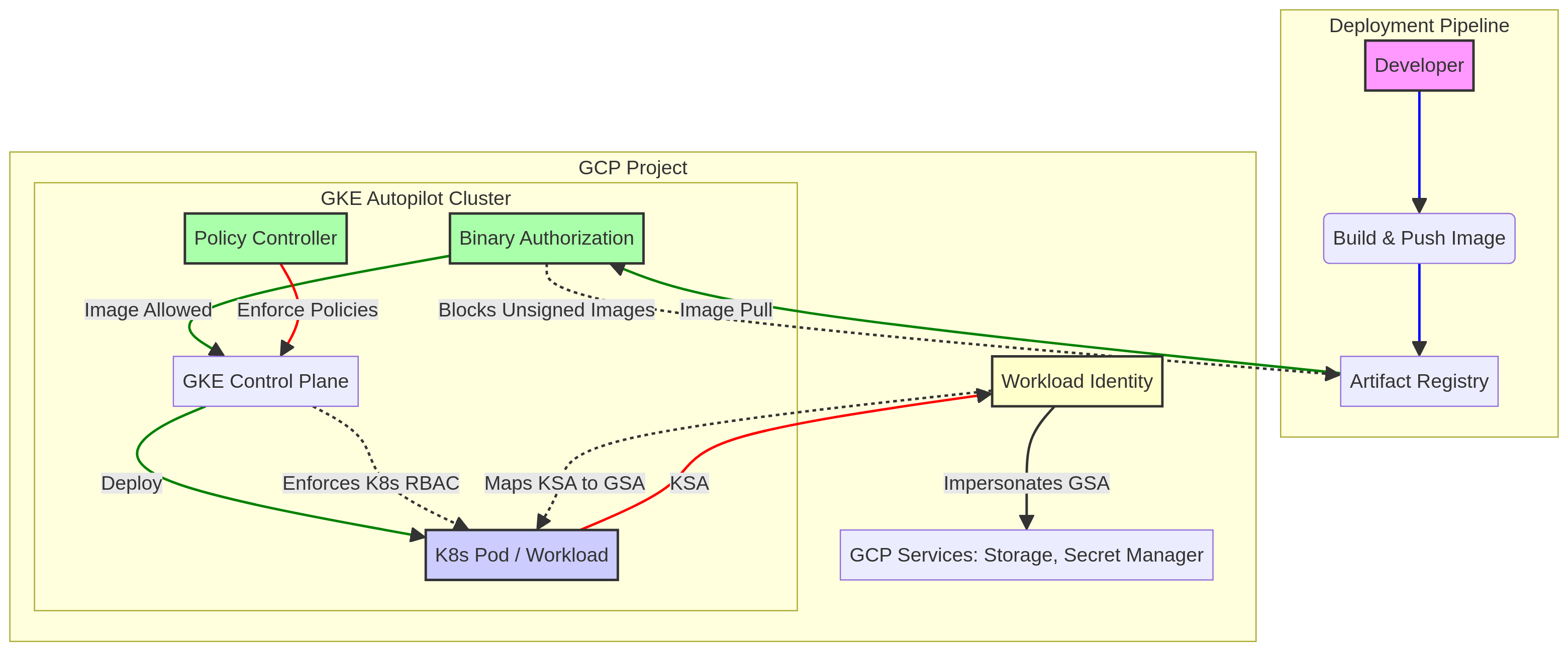
Architecture Diagram

PRJ-GCP-K8S-086 Architecture

Technology Stack

Cloud Run
Artifact Registry
Cloud Build
Serverless

Complete Documentation

Prerequisites

Project Owner or Editor role
gcloud CLI configured
Terraform >= 1.5 (optional)
GCP project with billing enabled
Service Account with required APIs
1

Clone & Authenticate

Clone the repository and authenticate with gcloud using your service account key or application default credentials.

gcloud auth application-default login
2

Enable Required APIs

Enable all required GCP APIs for this project in your target project.

gcloud services enable compute.googleapis.com container.googleapis.com
3

Initialize Infrastructure

Run Terraform init and plan to preview the GCP resource changes before applying.

terraform init && terraform plan -out=tfplan
4

Deploy Resources

Apply the Terraform plan to provision all GCP resources in your target project.

terraform apply tfplan
5

Verify & Monitor

Verify the deployment in the GCP Console and check Cloud Monitoring for any errors.

gcloud logging read "severity>=ERROR" --limit 50

Deployment Guide

Step-by-step instructions to deploy this project

Download Guide

Architecture Diagram

Visual representation of the system architecture

Download Architecture

Source Code

Complete source code and configuration files

View on GitHub

Video Tutorial

Watch the complete walkthrough video

Watch Now