Coming Soon GCP GCP Cloud Architect

GitOps with Config Sync and GKE

PRJ-GCP-K8S-087

Declarative cluster management

~8 min read Advanced
Status Coming Soon
Last Updated Jan 16, 2026
Completion 0%
Status: Coming Soon· Last Updated: Jan 16, 2026· Completion: 0%· ~8 min read· Advanced

Implementation Guide

Comprehensive step-by-step deployment guide

Download Implementation Guide

Estimated Monthly Cost

~$40/mo on minimal config
GKE $22Cloud Run $8Storage $6Monitoring $4
Business ContextManual configuration drift: Traditional Kubernetes cluster management often lead…

The Problem

  • Manual configuration drift: Traditional Kubernetes cluster management often leads to inconsistencies between desired and actual states due to manual changes, increasing operational overhead and error rates.
  • Slow and error-prone deployments: Without a centralized, version-controlled approach, deploying applications and configurations across multiple GKE clusters can be slow, inconsistent, and prone to human error.
  • Lack of auditable change history: Manual changes or ad-hoc scripts make it difficult to track, audit, and revert configuration changes, hindering compliance and troubleshooting efforts.

The Solution

  • Automated configuration synchronization: Implements Config Sync to continuously reconcile GKE cluster configurations with a single source of truth stored in Cloud Source Repositories.
  • Declarative infrastructure management: Leverages GitOps principles to manage GKE cluster and application configurations declaratively, ensuring consistency and idempotency across environments.
  • Version-controlled deployments: Utilizes Cloud Source Repositories as the central Git repository for all configurations, enabling full version history, rollbacks, and collaborative development.

Business Value

  • Reduces configuration drift incidents by 80%, ensuring consistent environments and minimizing downtime.
  • Accelerates application deployment cycles by 50%, enabling faster time-to-market for new features.
  • Improves operational efficiency by 30%, by automating manual configuration tasks and reducing troubleshooting time.
  • Enhances auditability and compliance readiness, providing a complete, immutable history of all configuration changes.

Risk Mitigation

  • Mitigates risks of unauthorized configuration changes through Git-based access controls and review processes.
  • Reduces human error in deployments by automating the application of configurations across GKE clusters.
  • Ensures rapid recovery from misconfigurations by enabling quick rollbacks to previous, known-good states in Cloud Source Repositories.
GRC MappingNIST SP 800-53 Rev. 5(Security and Privacy Controls for Information Systems and …

Compliance Frameworks

  • NIST SP 800-53 Rev. 5 (Security and Privacy Controls for Information Systems and Organizations): Specifically, CM-2 (Baseline Configuration) and CM-3 (Configuration Change Control).
  • ISO/IEC 27001 (Information Security Management): Annex A.12.1.2 (Change Management) and A.14.2.1 (Secure Development Policy).
  • CIS Kubernetes Benchmark: Focuses on hardening GKE cluster configurations and ensuring secure deployment practices.
  • SOC 2 Type 2 (Security, Availability, Processing Integrity, Confidentiality, Privacy): Relevant to change management and system monitoring principles.

Security Controls Implemented

  • Version Control with Cloud Source Repositories: All configuration changes are committed, reviewed, and approved before deployment, providing an immutable audit trail.
  • Automated Configuration Enforcement with Config Sync: Ensures GKE clusters continuously conform to defined security policies and configurations, preventing unauthorized deviations.
  • Role-Based Access Control (RBAC) in GKE: Restricts access to cluster resources and configurations based on least privilege principles.
  • Policy as Code with Config Sync: Security policies are defined as code within the Git repository, enabling automated validation and enforcement across clusters.
  • Immutable Infrastructure Principles: GKE cluster configurations are managed declaratively, reducing the attack surface from manual, ad-hoc changes.

Audit Evidence

  • Git commit history and pull request logs from Cloud Source Repositories for all configuration changes.
  • Config Sync reconciliation logs demonstrating continuous enforcement of desired state on GKE clusters.
  • GCP Cloud Audit Logs for administrative activities and access to Cloud Source Repositories and GKE.
  • Configuration files (YAML) stored in Cloud Source Repositories representing the desired state of the GKE environment.

Regulatory Alignment

  • GDPR Article 25 (Data Protection by Design and by Default): Ensures secure configuration management for systems processing personal data.
  • HIPAA Security Rule § 164.308(a)(1)(ii)(B) (Protection from Malicious Software): GitOps helps maintain system integrity and protect against unauthorized modifications.
  • PCI DSS Requirement 6.4 (Change Control Procedures): Ensures all changes to system components are managed and documented.
  • SOX Section 302 (Corporate Responsibility for Financial Reports): Supports accurate and reliable financial reporting through controlled IT environments.

Video tutorial coming soon!

Subscribe to our YouTube channel to get notified when this tutorial is published.

Subscribe on YouTube

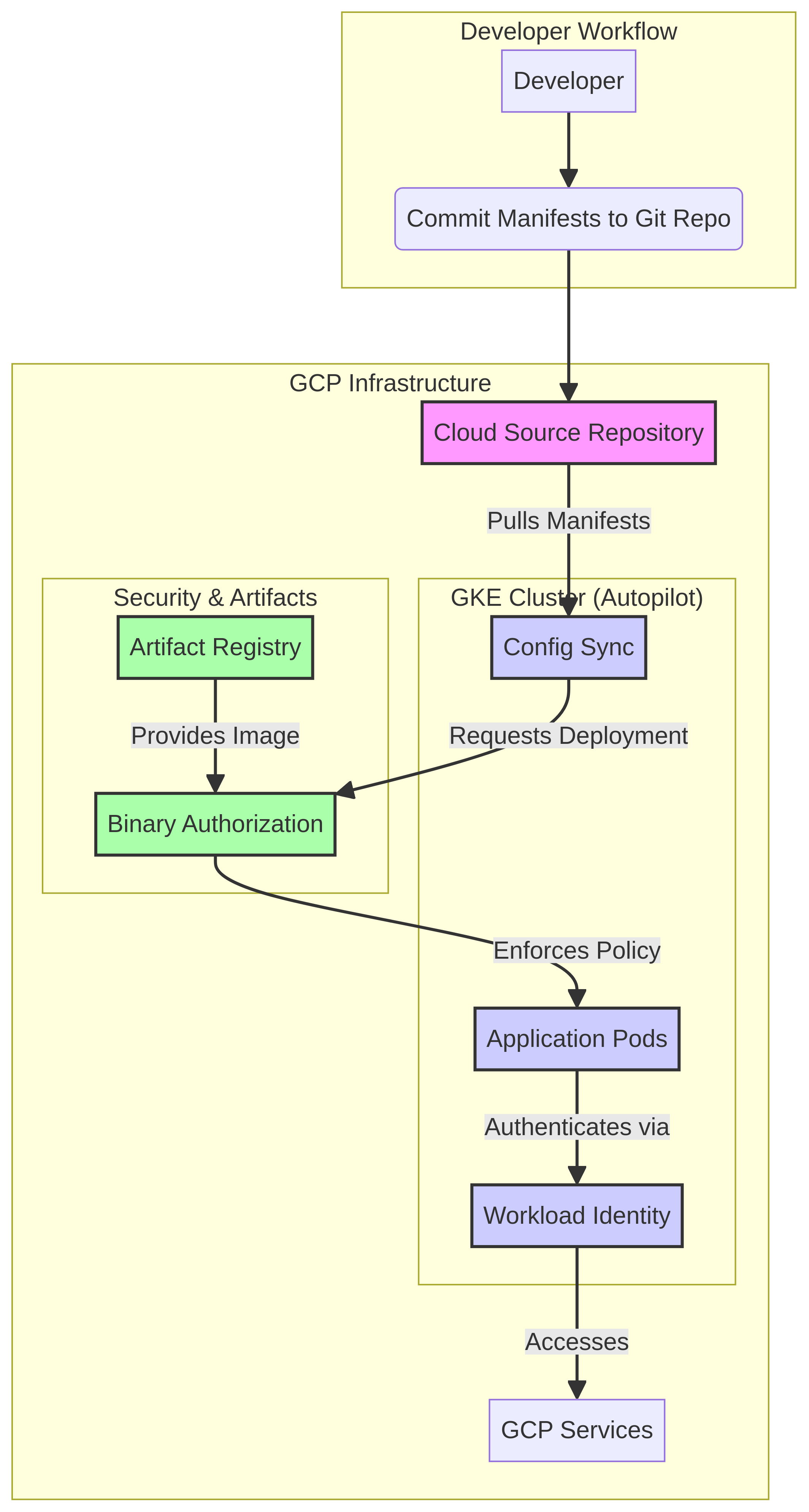
Architecture Diagram

PRJ-GCP-K8S-087 Architecture

Technology Stack

GKE
Config Sync
Cloud Source Repositories
GitOps

Complete Documentation

Prerequisites

Project Owner or Editor role
gcloud CLI configured
Terraform >= 1.5 (optional)
GCP project with billing enabled
Service Account with required APIs
1

Clone & Authenticate

Clone the repository and authenticate with gcloud using your service account key or application default credentials.

gcloud auth application-default login
2

Enable Required APIs

Enable all required GCP APIs for this project in your target project.

gcloud services enable compute.googleapis.com container.googleapis.com
3

Initialize Infrastructure

Run Terraform init and plan to preview the GCP resource changes before applying.

terraform init && terraform plan -out=tfplan
4

Deploy Resources

Apply the Terraform plan to provision all GCP resources in your target project.

terraform apply tfplan
5

Verify & Monitor

Verify the deployment in the GCP Console and check Cloud Monitoring for any errors.

gcloud logging read "severity>=ERROR" --limit 50

Deployment Guide

Step-by-step instructions to deploy this project

Download Guide

Architecture Diagram

Visual representation of the system architecture

Download Architecture

Source Code

Complete source code and configuration files

View on GitHub

Video Tutorial

Watch the complete walkthrough video

Watch Now