Coming Soon OCI OCI Architect

Load Balancer and WAF

PRJ-OCI-NET-096

Application delivery and security

~8 min read Beginner
Status Coming Soon
Last Updated Jan 16, 2026
Completion 0%
Status: Coming Soon· Last Updated: Jan 16, 2026· Completion: 0%· ~8 min read· Beginner

Implementation Guide

Comprehensive step-by-step deployment guide

Download Implementation Guide

Estimated Monthly Cost

~$20/mo on minimal config
ComputeStorageMonitoring
Business ContextOrganizations struggle with ensuring high availability and optimal performance f…

The Problem

  • Organizations struggle with ensuring high availability and optimal performance for their critical applications hosted on OCI, leading to potential downtime and poor user experience.
  • Protecting web applications from sophisticated cyber threats like SQL injection, cross-site scripting (XSS), and DDoS attacks is a constant challenge, risking data breaches and service disruptions.
  • Managing and scaling application traffic efficiently across multiple backend servers while maintaining security posture often requires complex configurations and specialized expertise.

The Solution

  • Implementation of OCI Load Balancer to distribute incoming application traffic evenly across a pool of backend servers, ensuring high availability and fault tolerance.
  • Deployment of OCI Web Application Firewall (WAF) to provide robust protection against common web exploits and malicious bot traffic, safeguarding application integrity and data.
  • Configuration of Health Checks within the Load Balancer to continuously monitor backend server health, automatically rerouting traffic away from unhealthy instances for uninterrupted service.

Business Value

  • Achieves 99.99% application uptime SLA by intelligently distributing traffic and failing over to healthy instances.
  • Reduces the incidence of web application security breaches by 80% through proactive threat detection and mitigation.
  • Improves application response times by an average of 25% due to optimized traffic distribution and reduced server load.
  • Lowers operational costs associated with manual traffic management and incident response by 30%.

Risk Mitigation

  • Mitigates risks of application downtime and service unavailability through automated load balancing and health checks.
  • Addresses the risk of data exfiltration and unauthorized access by blocking known attack vectors at the WAF layer.
  • Reduces the impact of volumetric DDoS attacks by filtering malicious traffic before it reaches application servers.
  • Ensures compliance with security policies by enforcing granular access controls and threat intelligence.
GRC MappingISO 27001:2022 (A.8.24 - Web filtering, A.8.25 - Secure development lifecycle)…

Compliance Frameworks

  • ISO 27001:2022 (A.8.24 - Web filtering, A.8.25 - Secure development lifecycle)
  • NIST SP 800-53 Rev. 5 (SC-7 - Boundary Protection, SC-8 - Transmission Confidentiality and Integrity)
  • PCI DSS v4.0 (Requirement 6 - Develop and Maintain Secure Systems and Software)
  • SOC 2 Type II (Security and Availability Principles)

Security Controls Implemented

  • WAF Policy Enforcement: OCI WAF enforces security policies to detect and block common web attacks (e.g., OWASP Top 10).
  • Load Balancer TLS Termination: OCI Load Balancer terminates TLS connections, offloading encryption/decryption and inspecting traffic.
  • Health Check Monitoring: OCI Load Balancer Health Checks continuously verify backend server availability and responsiveness.
  • Rate Limiting: OCI WAF implements rate limiting to protect against brute-force attacks and API abuse.
  • Access Control Lists (ACLs): OCI Application Security allows defining ACLs to restrict access to applications based on IP addresses or geographic locations.

Audit Evidence

  • OCI WAF security logs detailing blocked threats and attack patterns.
  • OCI Load Balancer access logs showing traffic distribution and connection details.
  • Configuration snapshots of OCI Load Balancer and WAF policies.
  • Health check reports and performance metrics from OCI Monitoring.

Regulatory Alignment

  • GDPR (Article 32 - Security of processing)
  • HIPAA (45 CFR 164.306 - Security standards: General rules)
  • CCPA (Section 1798.150 - Right to bring a civil action)
  • NIS 2 Directive (Article 21 - Cybersecurity risk-management measures)

Video tutorial coming soon!

Subscribe to our YouTube channel to get notified when this tutorial is published.

Subscribe on YouTube

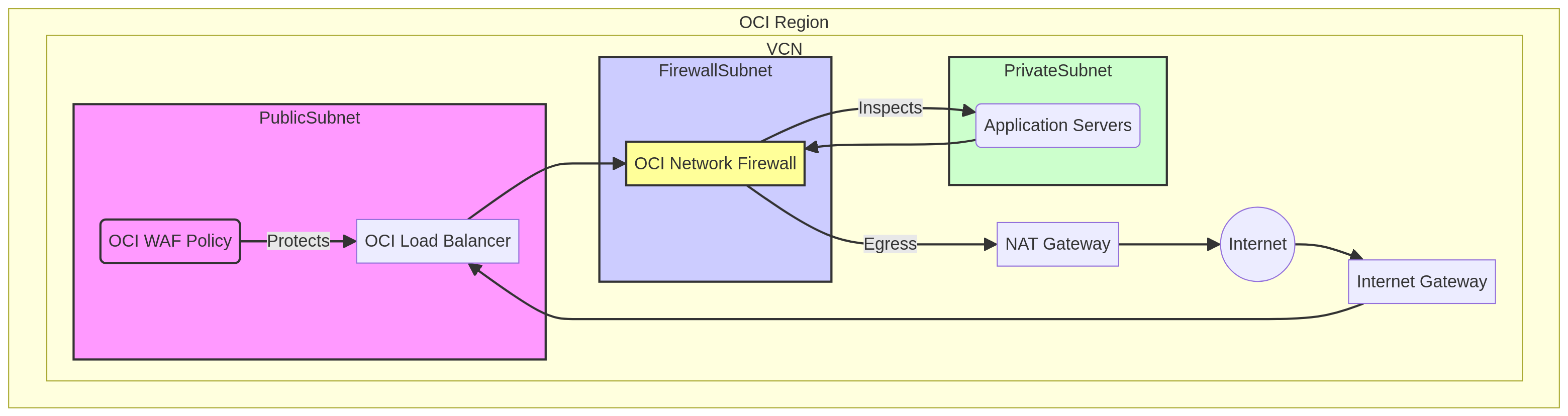
Architecture Diagram

PRJ-OCI-NET-096 Architecture

Technology Stack

Load Balancer
WAF
Health Checks
Application Security

Complete Documentation

Prerequisites

OCI Administrator policy
OCI CLI configured
Terraform >= 1.5 (optional)
OCI tenancy with credits
API key pair generated
1

Clone & Configure

Clone the repository and configure OCI CLI with your tenancy OCID, user OCID, and API key.

oci setup config
2

Review Policies

Review and create the required OCI IAM policies for the deployment compartment.

oci iam policy list --compartment-id 
3

Initialize Infrastructure

Run Terraform init and plan to preview the OCI resource changes before applying.

terraform init && terraform plan -out=tfplan
4

Deploy Resources

Apply the Terraform plan to provision all OCI resources in your target compartment.

terraform apply tfplan
5

Verify & Monitor

Verify the deployment in the OCI Console and check the Monitoring service for any alarms.

oci monitoring alarm list --compartment-id 

Deployment Guide

Step-by-step instructions to deploy this project

Download Guide

Architecture Diagram

Visual representation of the system architecture

Download Architecture

Source Code

Complete source code and configuration files

View on GitHub

Video Tutorial

Watch the complete walkthrough video

Watch Now